- DATE:
- AUTHOR:
- S&P Global
June 2026 S&P Capital IQ Pro Release Notes
S&P Capital IQ Pro Release Highlights
In this release, we added new datasets and tools on Capital IQ Pro, designed to enhance our clients' daily workflows:
Private Markets: Multi-Asset Class expansion introduces historical fund performance data, LP asset-allocation insights, and core fund investment attributes, powered by With Intelligence integration. Also discover the newly integrated Cambridge Associates Private Market Benchmarks, widely regarded as the industry standard for benchmarking private equity, venture capital, real estate, and private credit.
News & Insight: TheDeal.com content is now integrated into S&P Capital IQ Pro, delivering real-time news and analysis on private markets and dealmaking.
S&P Capital IQ Pro Plug-in: Access the new Formula Builder AI Assistant to create SPG formula syntaxes using GenAI capabilities and leverage SPGRANGEV formulas to support dynamic and static lists as well as all Visible Alpha line items across statement types.
Visible Alpha: Strengthened the integration between Visible Alpha and Capital IQ Pro with a new BioPharma indication page and Quick Chart features, expanded KPI screening, Surprise Analysis, direct Document Intelligence access for actual filings, and instant chart views for metrics.
Financials: Delivered a new football field valuation framework directly in Capital IQ Pro based on trading comps and precedent transactions to streamline valuation analysis workflows.
Private Markets & Private Company
In this release, we introduced historical fund performance data, LP investor asset-allocation insights, and core fund investment attributes across all Private Markets asset classes, including Private Equity and Venture Capital, Private Debt, and Real Assets. The private markets data is sourced from With Intelligence, a leading provider of public and private market insights that is now part of S&P Global Market Intelligence. Users can now quickly view quarterly performance trends on private funds, assess fund manager performance and gain a comprehensive multi-asset-class view of Limited Partners' commitments, allocation insights, and enhanced screening capabilities.
We are also pleased to introduce Cambridge Associates Private Market Benchmarks across the S&P Capital IQ Pro platform. Sourced from quarterly statements of 2.5K+ fund managers and 9.5K+ funds, these benchmarks are widely regarded as the industry standard for private equity, venture capital, real estate, and private credit.
Additionally, we expanded our private company data coverage for Thailand, offering additional firmographics, financials and officers & directors data for small and medium enterprises and added 6 new topic tags related to the Metals & Mining sector.
Private Markets Multi-Asset Class Expansion
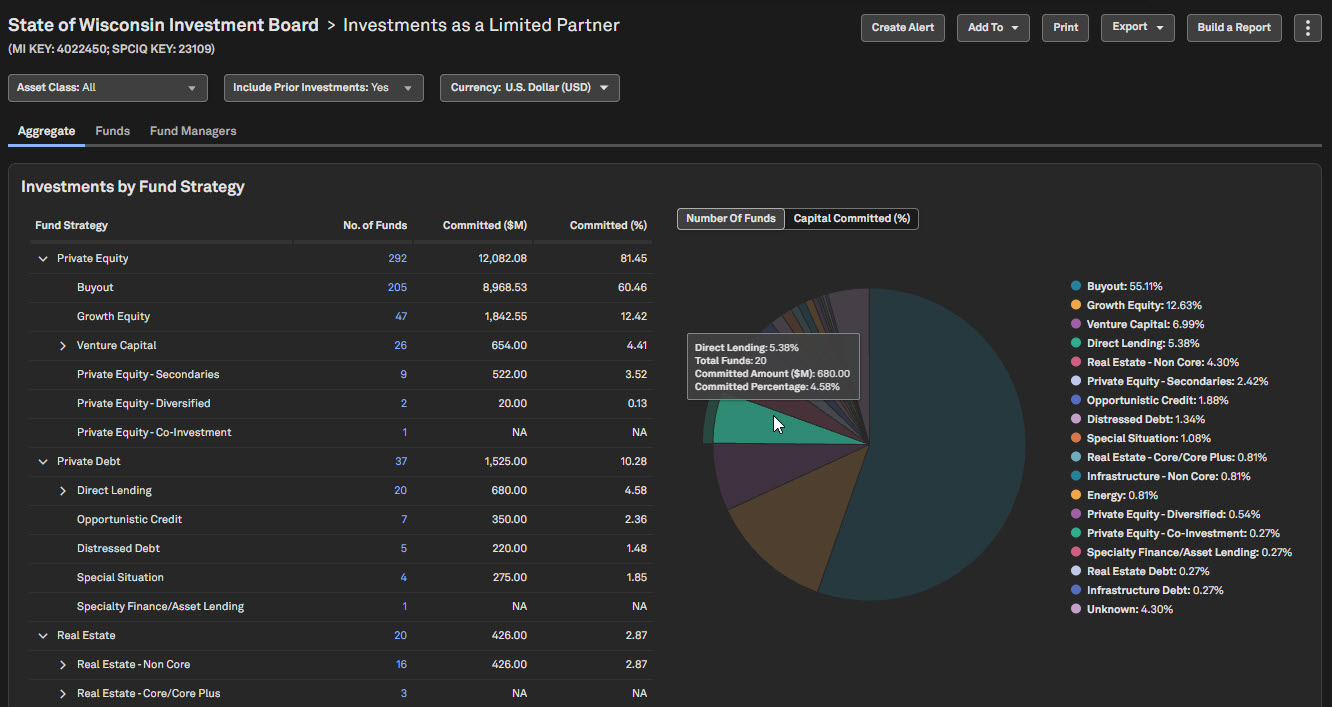
Users can now access insights for Private Debt, Real Estate, Infrastructure, and Natural Resources, in addition to the existing Private Equity and Venture Capital coverage already available in the S&P Capital IQ Pro Platform. This expanded coverage provides a more comprehensive view, enabling users to analyze multiple private-market asset classes in a single, integrated experience.
Funds/Partnerships Page: Explore a fund manager’s historical performance and review key details such as vintage year, strategy, size, and lifecycle across all asset classes.
LP Investments Page: View investor focus, analyze commitments, drill into fund performance, and effectively target and prioritize Limited Partners for fundraising.
Find it in the platform:
Search for and select a Fund Manager’s profile in the top search
In the left-hand navigation, select Investments > Funds/Partnerships
View the expanded fund roster for Private Equity/Venture Capital, Private Debt, Real Estate, Infrastructure, and Natural Resources asset classes
Navigate to a Limited Partner's profile
In the left-hand navigation, select Investments > LP Investments to see comprehensive LPs' fund commitments across various private markets asset classes
Coverage stats:
Addition of 18K+ Funds across Private Debt, Real Estate, Infrastructure, and Natural Resources
New Historical Fund Performance Page
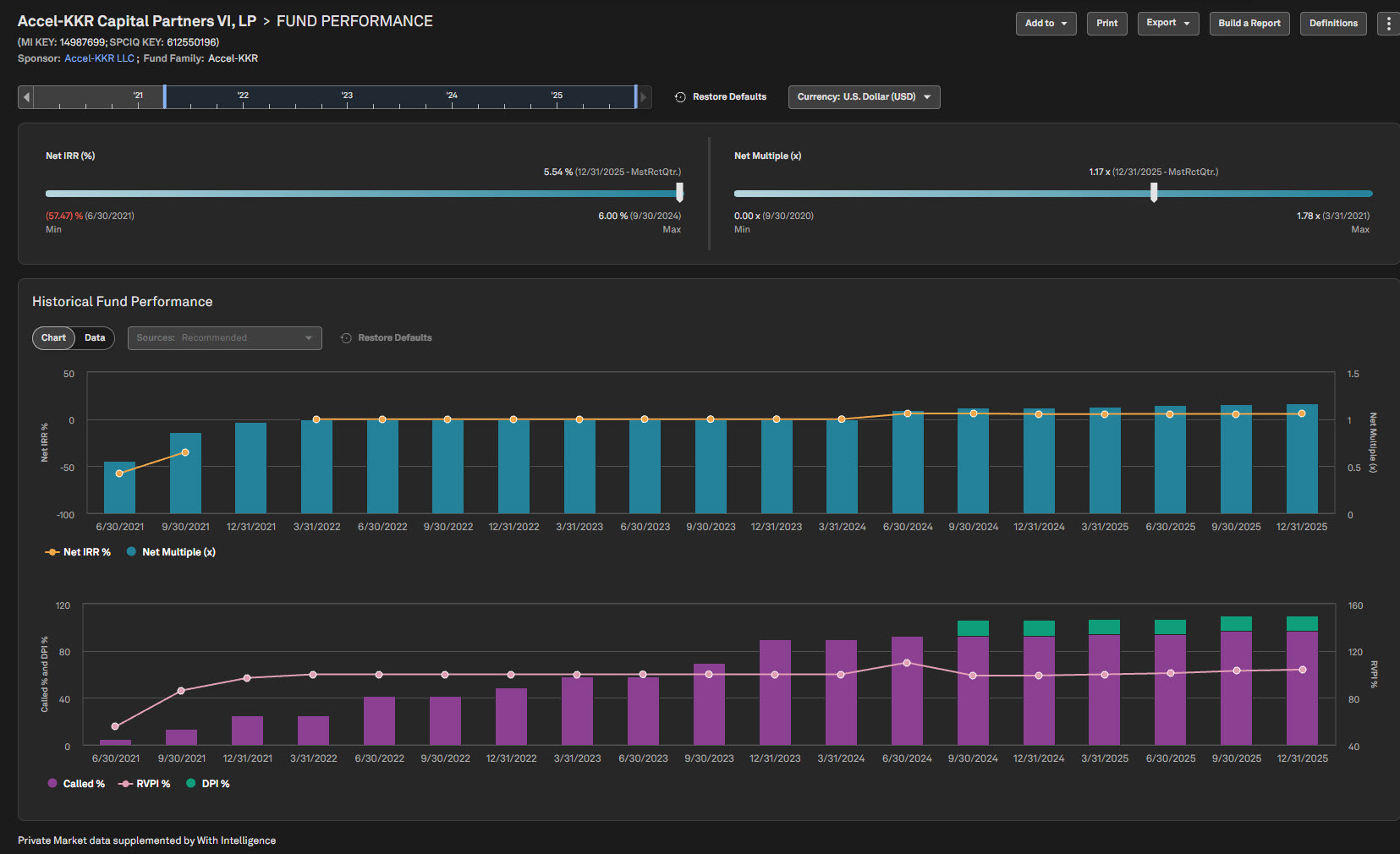
With this addition, users can evaluate private market fund performance trends, volatility, and latest reported metrics across reporting periods and sources.
Find it in the platform:
Search for and select a Fund profile in the top search
In the left-hand navigation menu, select Investments > Fund Performance to see the historical fund performance details of a private markets fund
Coverage stats:
~16K+ Private Funds across Private Equity/Venture Capital, Private Debt, Real Estate, Infrastructure, and Natural Resources asset classes
Fund Performance Criteria in Screener
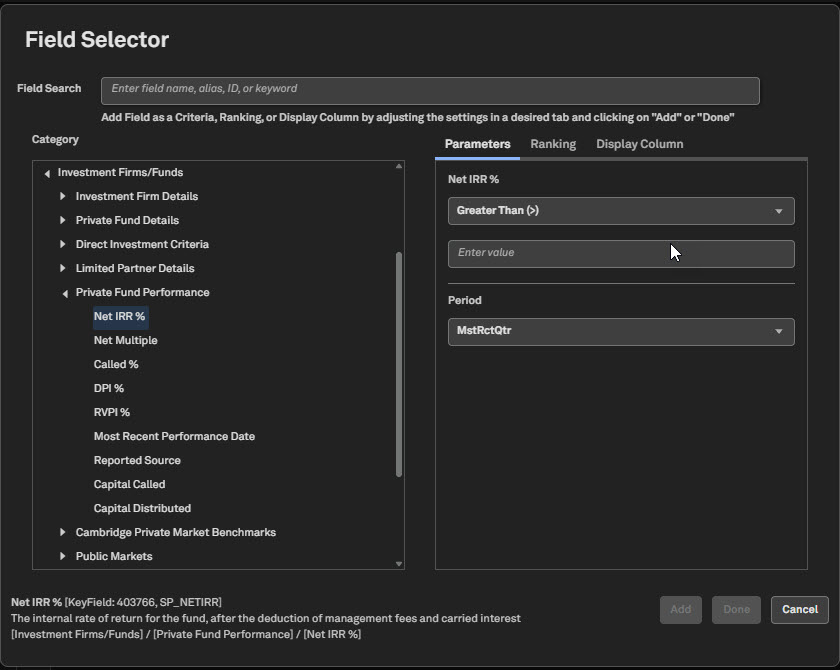
Users can now create comps to identify, prioritize, and target high-potential investors more effectively, using selected fund performance metrics in the new Private Fund Performance folder within Screener. Newly supported metrics include Net IRR %, Net Multiple, Called %, Distributed to Paid In (DPI) %, and Residual Value to Paid In (RVPI) %.
Find it in the platform:
Navigate to Screener from the top navigation or the Apps & Links menu
Select the Companies dataset, open the Field Selector from Add Criteria or Display Columns
Expand the Investment Firms/Funds > Private Fund Performance to access fund performance metrics
Coverage stats:
~16K+ Private Funds across Private Equity/Venture Capital, Private Debt, Real Estate, Infrastructure, and Natural Resources
Current and Historical Allocations for Limited Partners
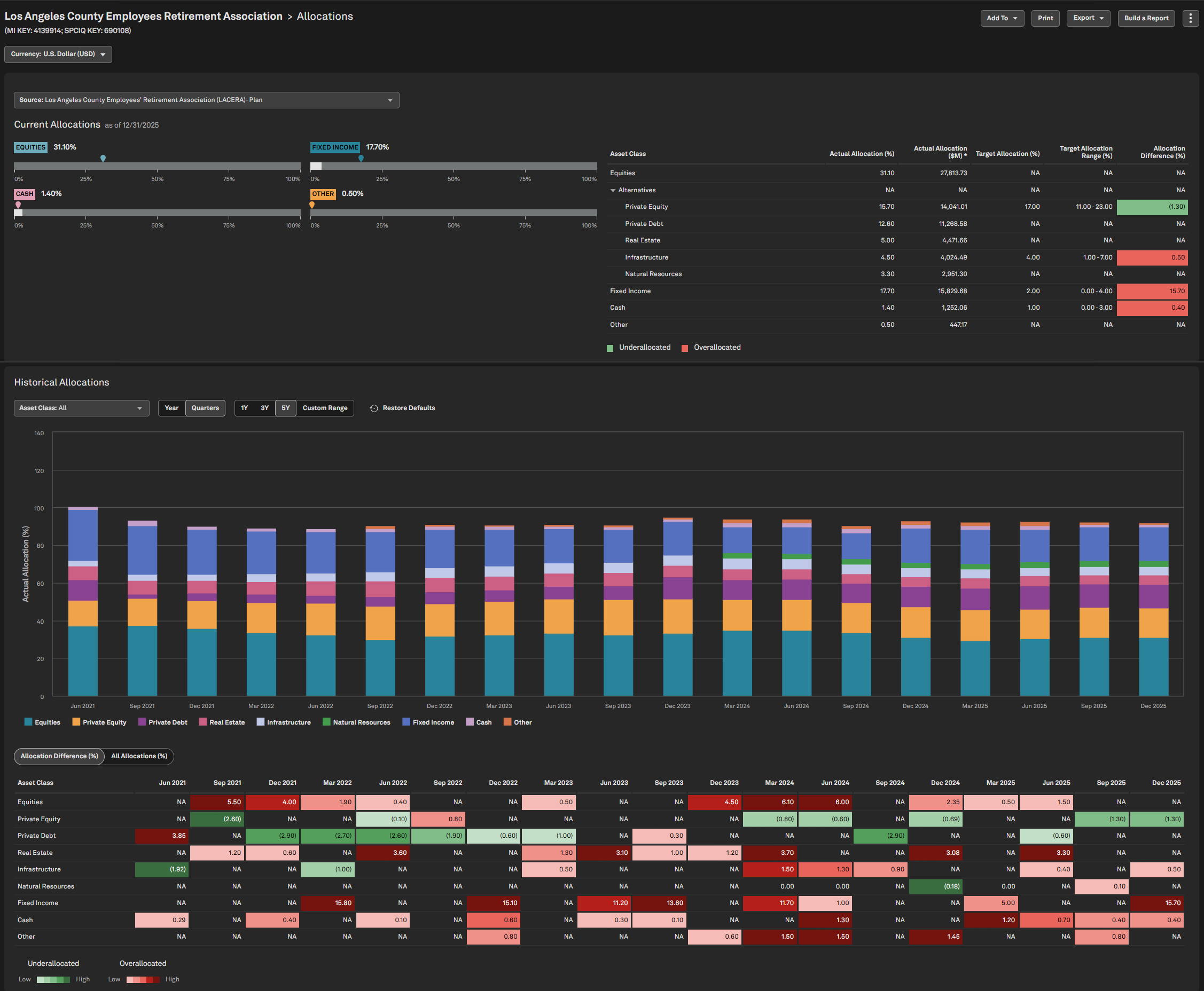
Users now have visibility into how Limited Partners allocate capital across key asset classes, including Private Equity, Private Debt, Infrastructure, Real Estate, Equities, and Fixed Income, through the Limited Partner's Corporate Profile and the new Allocations page. This feature enables users to identify relevant investors, prioritize those ready to deploy capital, and track allocation trends to support fundraising efforts.
Find it in the platform:
Search for and select a Limited Partner’s profile in the top search to navigate to its Corporate Profile
Access the Investment Allocation widget and click on More for additional details
Or in the left-hand navigation, select Investments > Allocations to view current and historical allocations across various asset classes
Coverage stats:
Current and historical allocations data for ~16K Investors across Private Equity/Venture Capital, Private Debt, Real Estate, Infrastructure, and Natural Resources asset classes
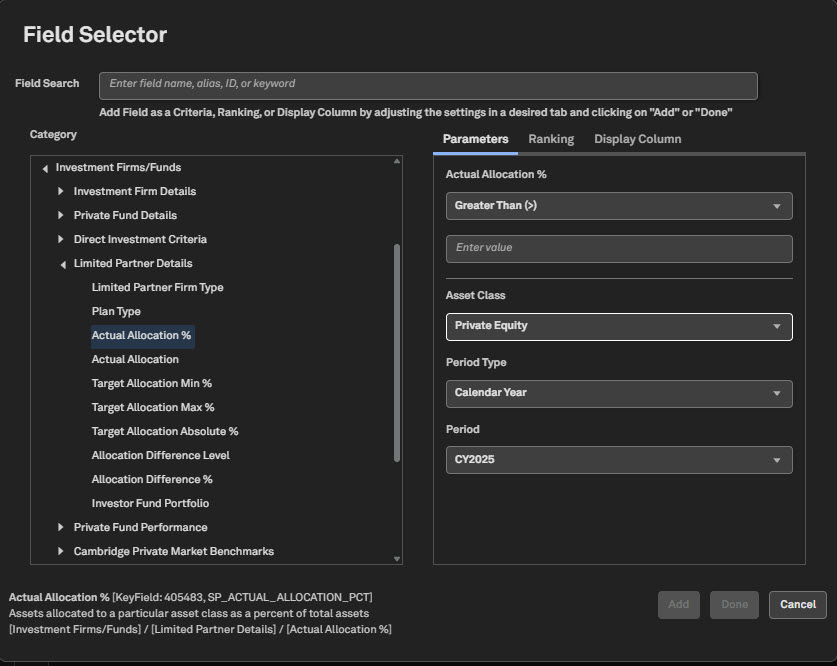
New Limited Partners criteria in Screener
Users can now seamlessly screen Limited Partners and their underlying attributes, including firm type, plan type, actual and target allocations, and allocation differences, within the Screener and S&P Capital IQ Pro Plug-in. This enables users to identify, filter, and prioritize relevant investors across private markets asset classes, streamlining their fundraising workflow.
Find it in the platform:
Navigate to Screener from the top navigation or the Apps & Links menu
Select the Companies dataset, open the Field Selector from Add Criteria or Display Columns
Expand the Investment Firms/Funds > Limited Partner Details to view the new criteria
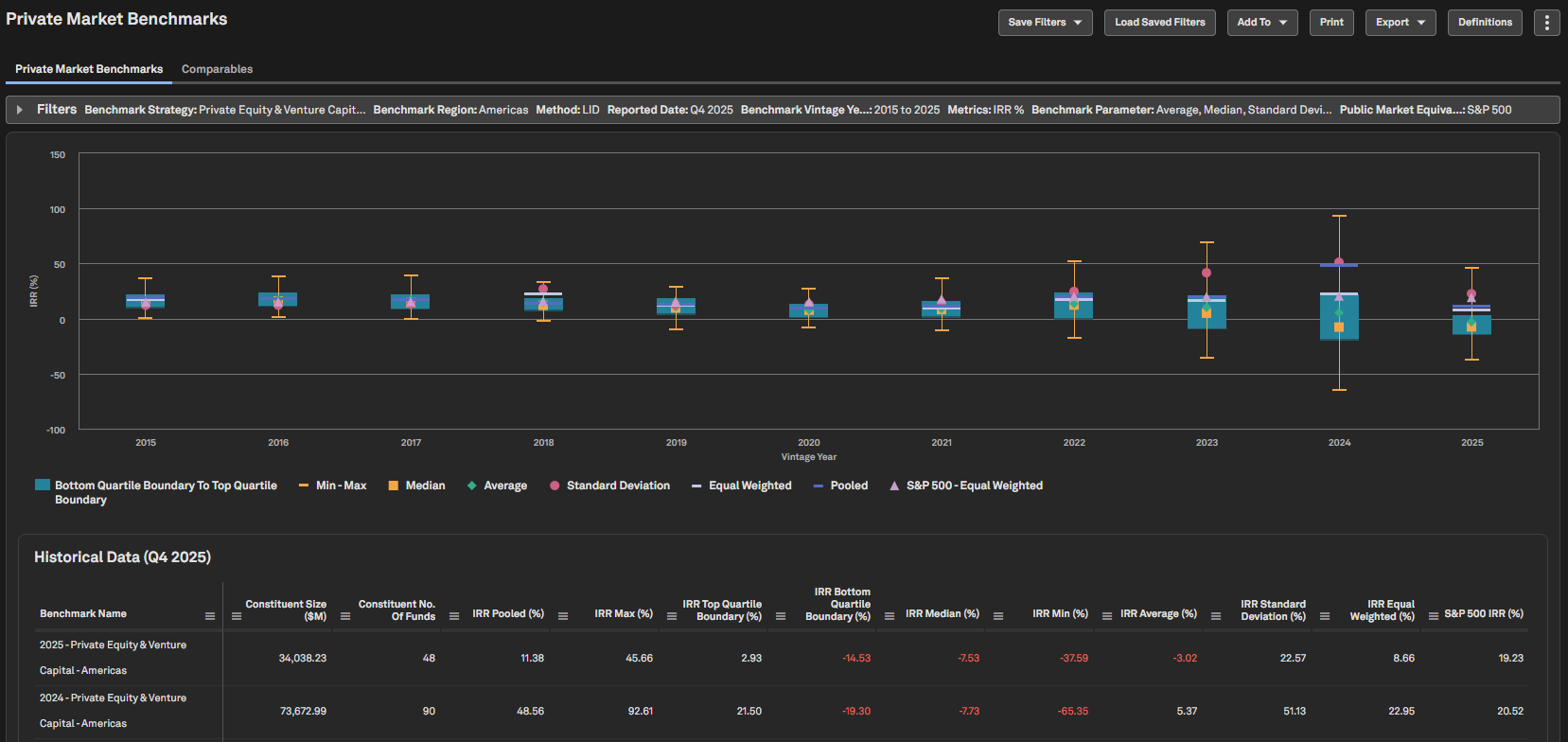
Private Market Benchmarks Page
Users can view key metrics such as IRR, DPI, and RVPI across different Cambridge Associates Private Market Benchmark strategies by region, for parameters including mean, median, and the top and bottom quartiles. These values can be compared with Industry Public Market Equivalent (PME) benchmark indices, enabling deeper analysis of private markets.
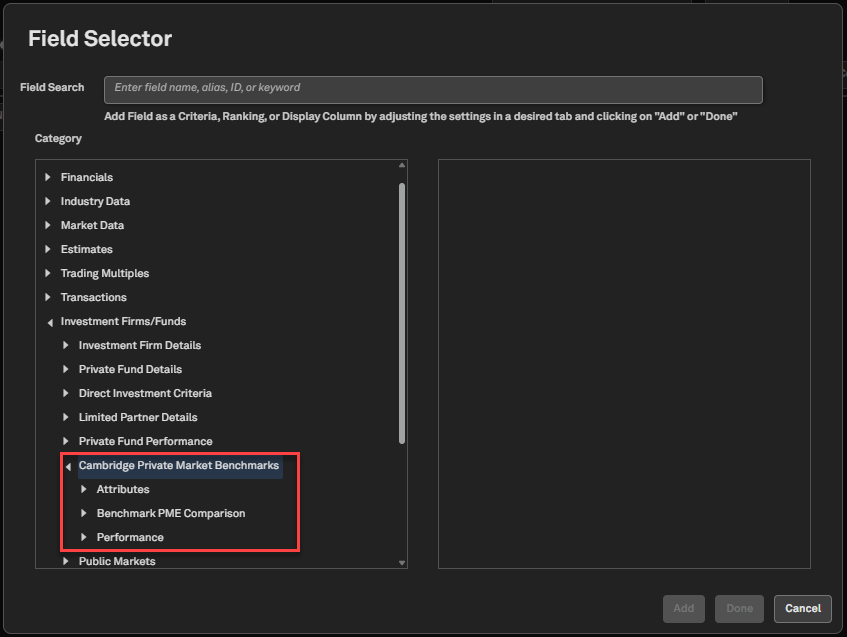
This data is also available in the Screener and S&P Capital IQ Pro Plug-in. Featuring nearly 50 data points spanning various return types, benchmarks, and over 40 years of history, it provides a robust addition that complements our existing private market fund-level data.
Find it in the platform:
S&P Capital IQ Pro Platform
Navigate to Transactions & Private Markets in the top navigation
Select Private Market Benchmarks
Screener
Navigate to Screener from the top navigation or the Apps & Links menu and select Companies Screener
Under Browse Criteria or Display Columns, select Investment Firms/Funds > Cambridge Private Market Benchmarks
S&P Capital IQ Pro Plug-In
In Excel, launch the S&P Capital IQ Pro Plug-in and open Formula Builder
In Companies workflow, select Investment Firms/Funds > Cambridge Private Market Benchmarks
Note: Access to Cambridge Associates Private Market Benchmarks data requires an additional subscription, please contact your account team for details.
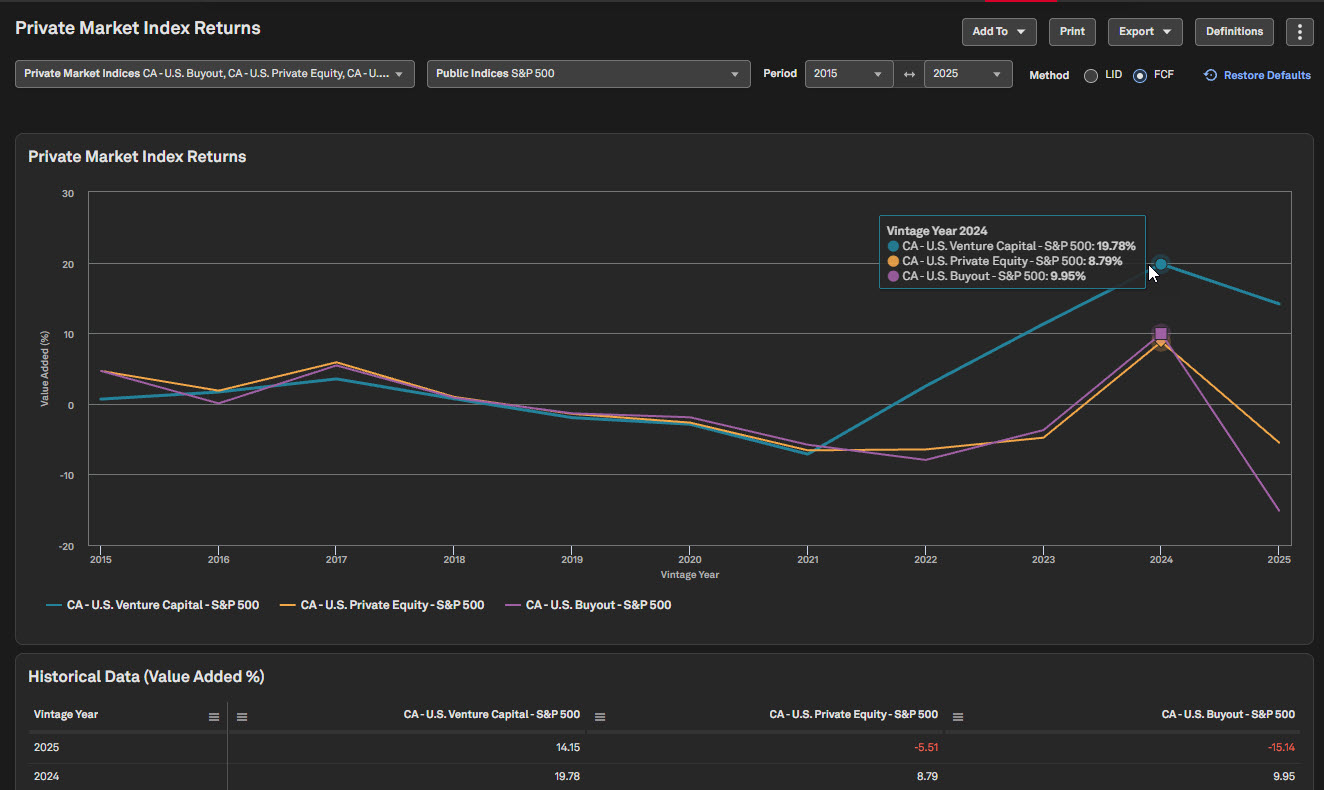
Private Market Index Returns Page
Users can compare value-added returns of multiple Cambridge Associates Private Market Indices with popular public market equivalent indices across a time series, enabling effective performance analysis between private and public markets.
Find it in the platform:
Navigate to Transactions & Private Markets in the top navigation
Select Private Market Index Returns
Note: Access to Cambridge Associates Private Market Index Returns data requires an additional subscription, please contact your account team for details.
Private Company Logos
Users can now view company logos for over 82,000 private companies displayed within the Search capability, Corporate Profile page and People Summary pages, including 750 unicorn companies and 81K US-based private companies.
Find it in the platform:
Search for a private company in the top search
View the company logo displayed alongside the company name
The logo also appears on the company card within the search results, making it easier to identify companies at a glance
Navigate to the company’s Corporate Profile, where the logo is shown alongside the company name in the header
On the company’s People Summary page, the logo is displayed in the header
Coverage stats:
82K+ private companies, including 750 unicorns and 81K US-based funded private companies
New Metals & Mining Topic Tags
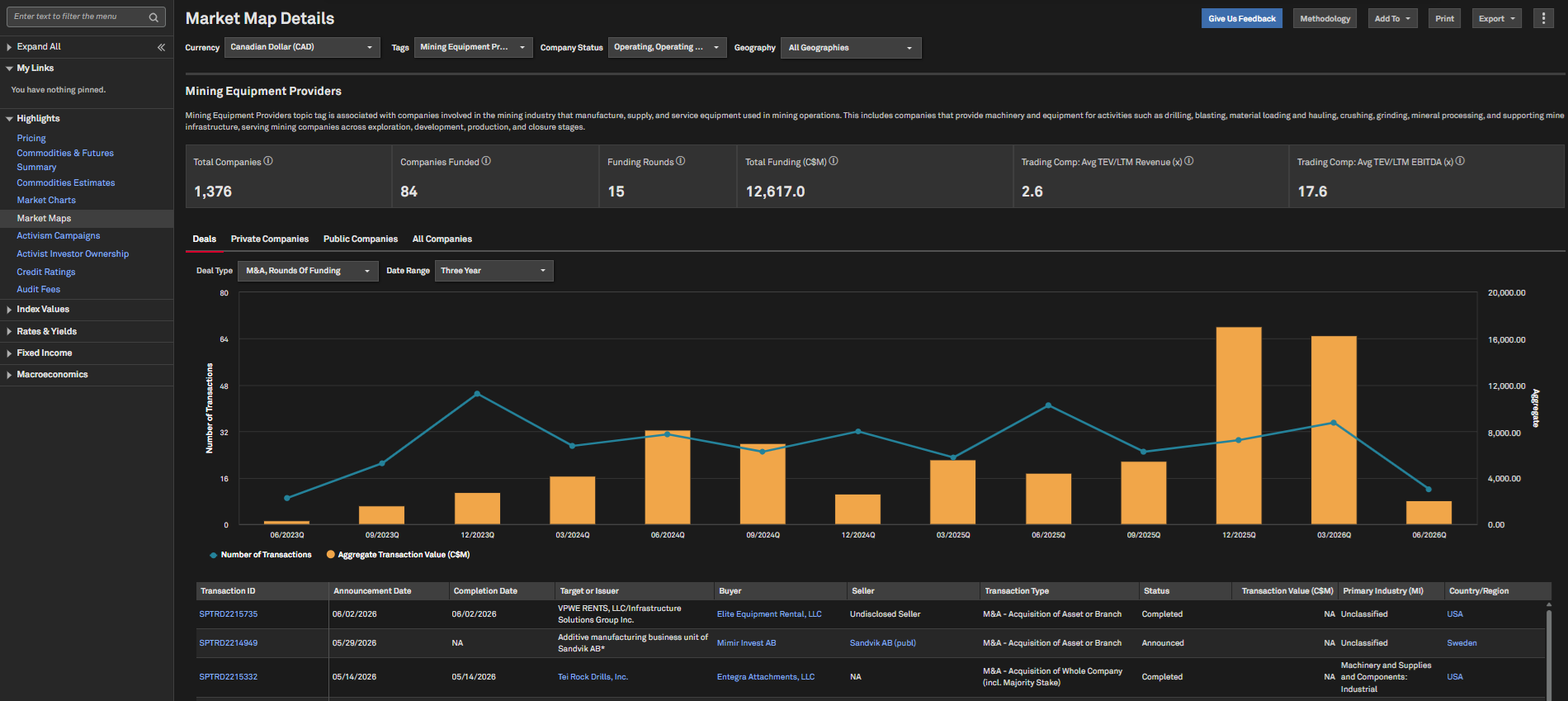
With the addition of 6 new Topic Tags - Mining Equipment Providers, Contract Mining Services, Mine Planning & Engineering Consultants, Geotechnical Engineering Services, Urban Mining, Metals Streaming and Royalty Agreements - users can more easily identify companies that operate in these niche markets.
Find it in the platform:
Navigate to the Markets tab from the top navigation menu
Select Market Maps and choose a Topic Tag to deep dive into relevant companies, deal activity, and latest news within this niche market
Coverage stats:
70K+ public and private companies associated with at least 1 of the 6 new tags
Financials and Firmographics for Thailand Private Companies
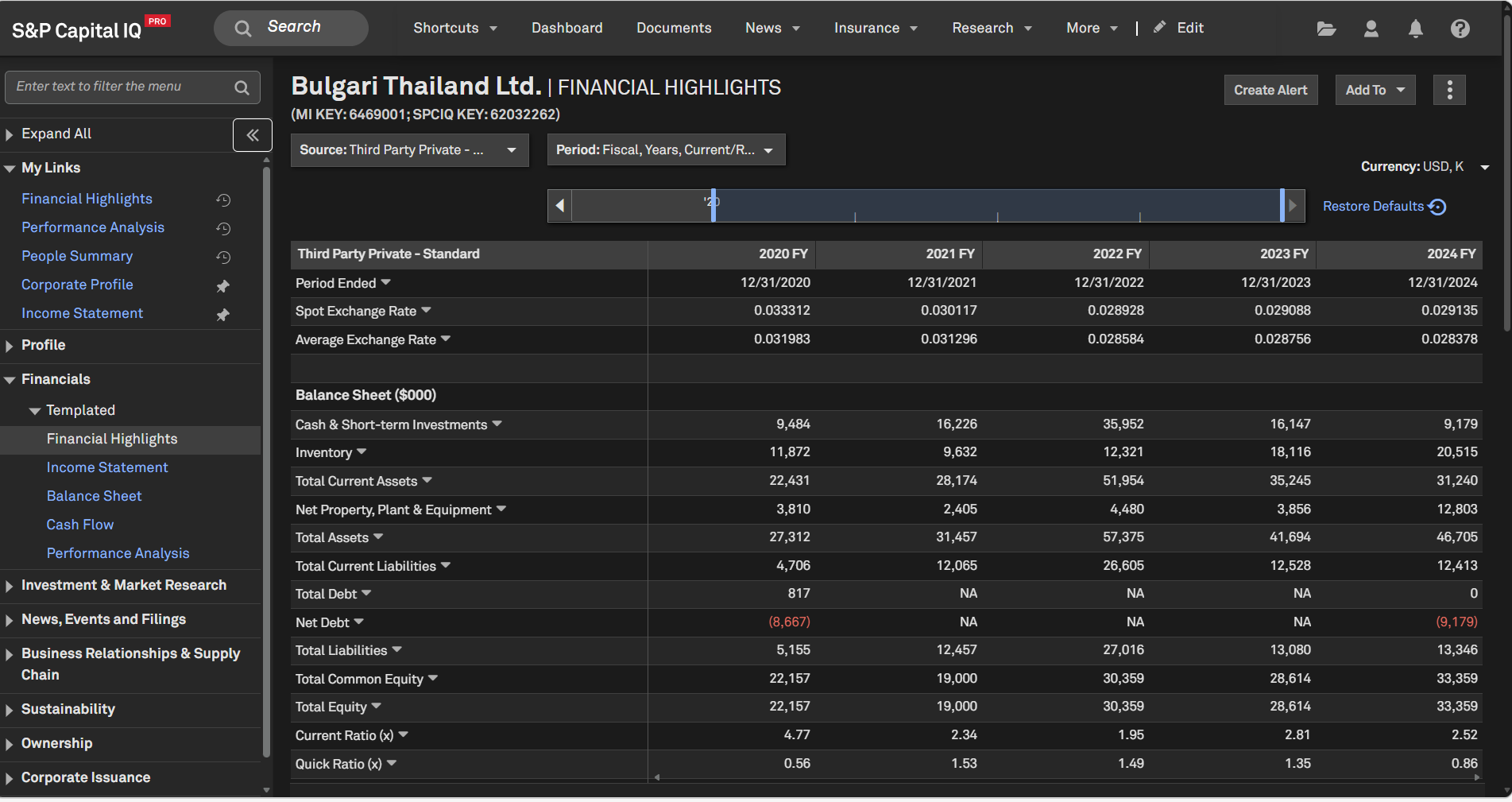
Users can access additional financials & firmographic data for small and medium enterprises in Thailand, significantly enhancing coverage for this market.
Find it in the platform:
Search and select a Thailand private company in the top search to navigate to its Corporate Profile
In the left-hand navigation, navigate to Financials > Templated
Coverage stats:
73K private companies
Directors & Officers data for Thailand Private Companies
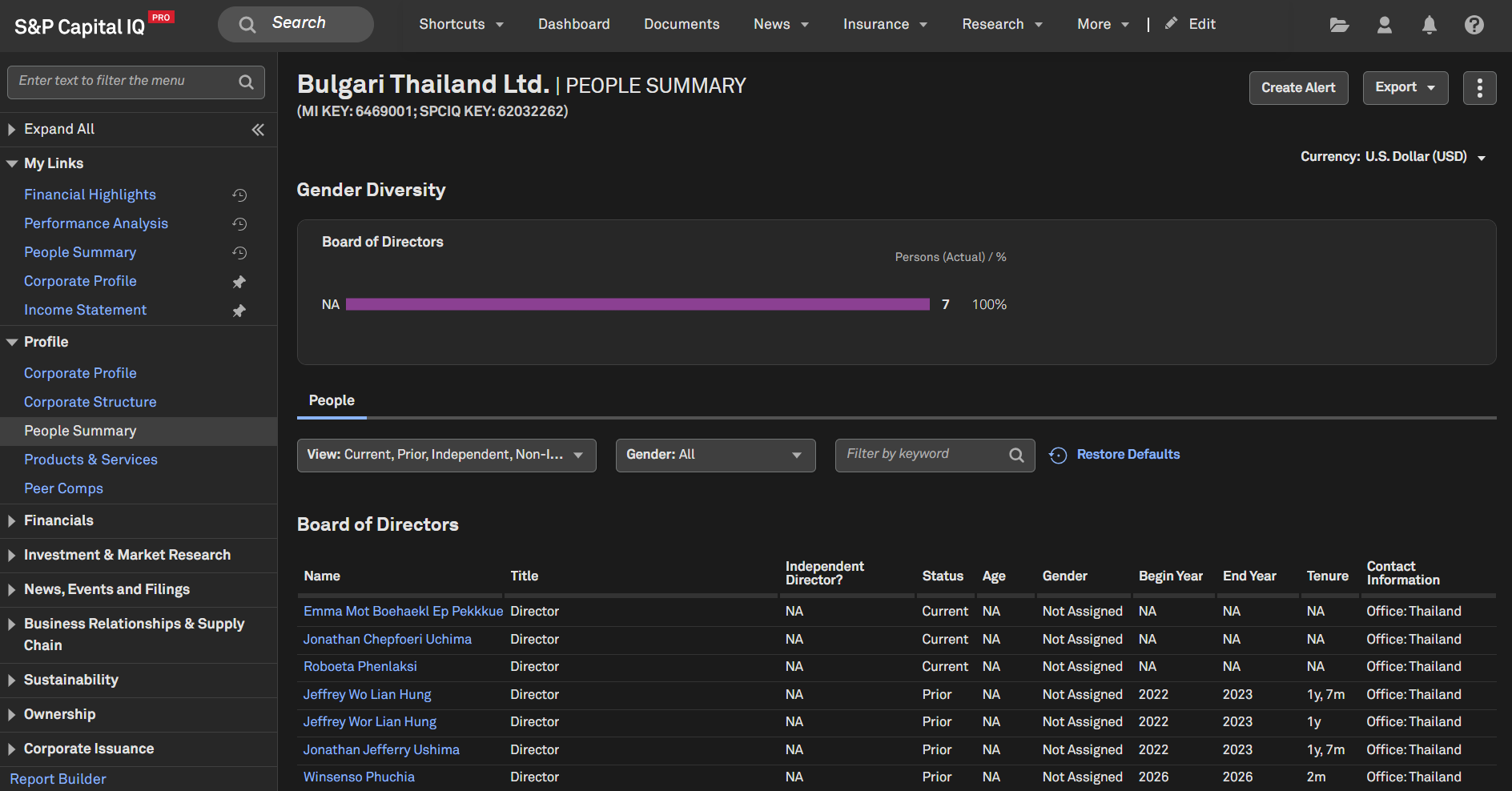
Users can access additional officers and directors for small and medium enterprises in Thailand.
Find it in the platform:
Search and select a Thailand private company in the top search to navigate to its Corporate Profile and scroll down to view the Officers & Directors widget
In the left-hand navigation, navigate to People Summary
Coverage stats:
237K private companies
News & Insight
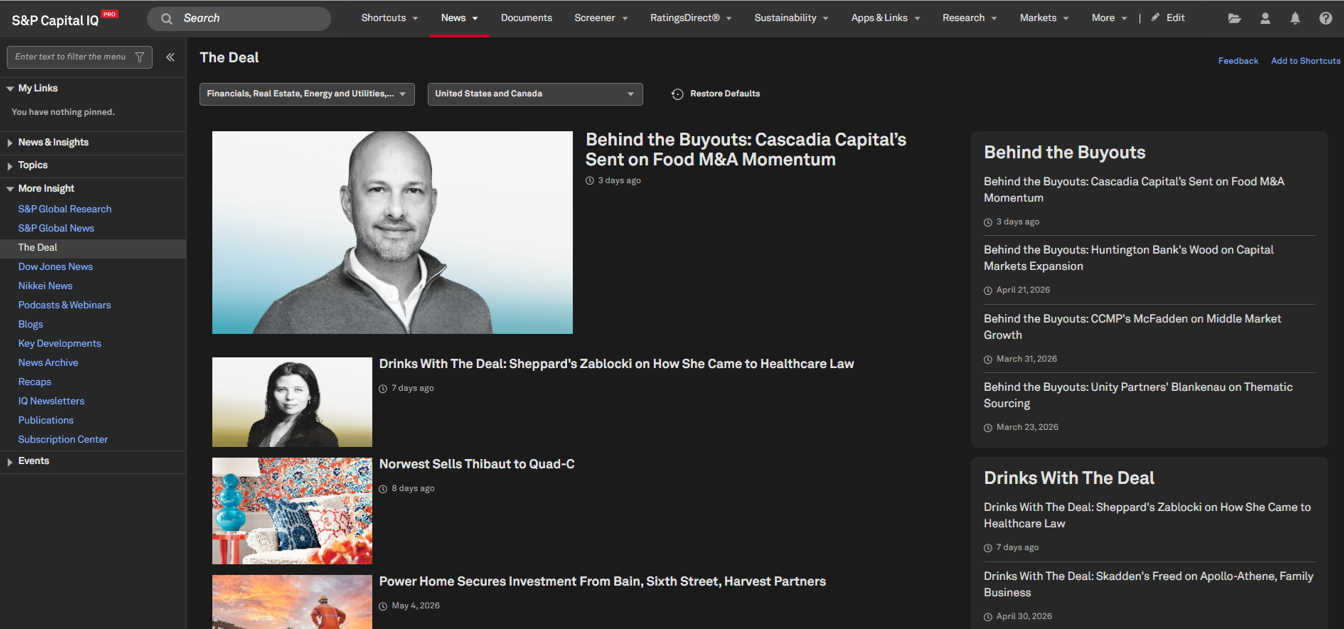
In this release, we integrated content from TheDeal.com into the S&P Capital IQ Pro platform. Now part of S&P Global, The Deal delivers real-time news and analysis on private equity and venture capital, private companies, transactions, and dealmaking.
The Deal News on S&P Capital IQ Pro
All users can access a curated selection of The Deal’s news on the S&P Capital IQ Pro platform, while those with active subscriptions to both platforms gain access to full coverage from The Deal within S&P Capital IQ Pro without any additional setup.
The Deal’s articles are seamlessly integrated across the platform, available on News Home, industry and topic landing pages, Corporate Profile, Dashboard Newswire, Document Intelligence, Advanced Search and a dedicated landing page.
Find it on the platform:
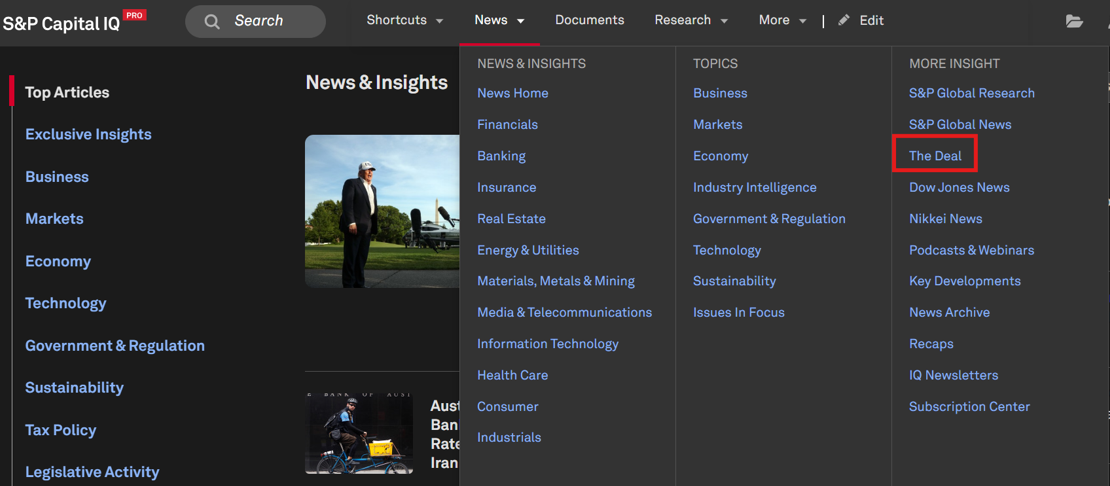
Navigate to News in the top navigation menu
Select The Deal under More Insight in the dropdown menu to navigate to The Deal dedicated landing page
Note: Access to The Deal's news requires an additional subscription, please contact your account team for details.
Enhanced News Curation in Document Intelligence
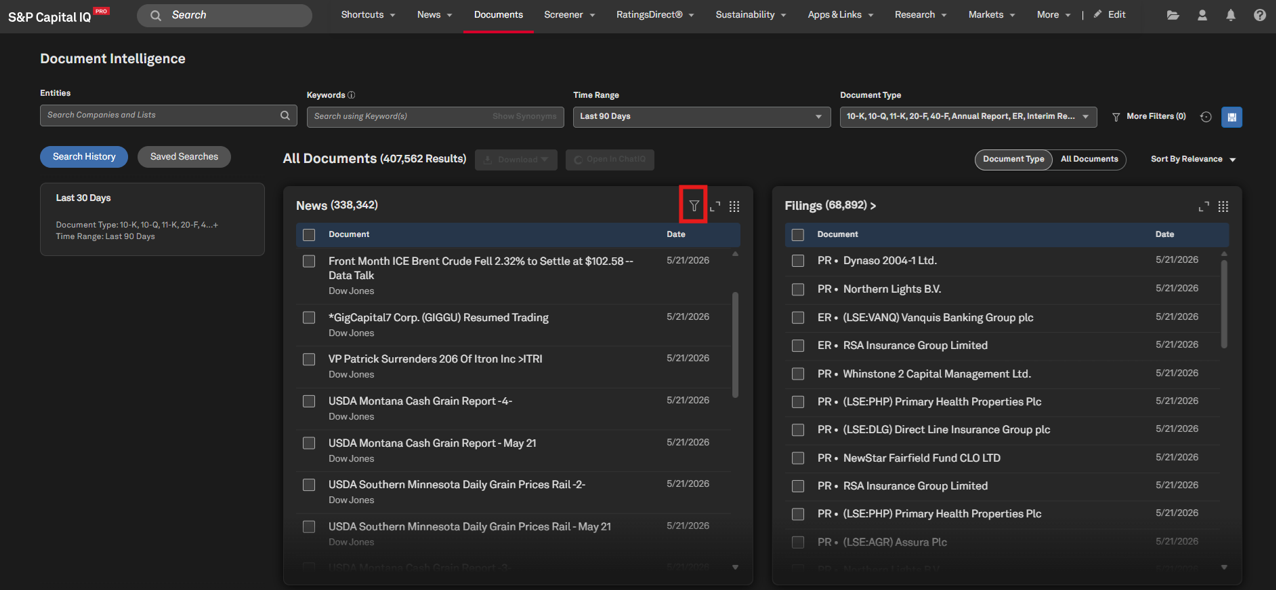
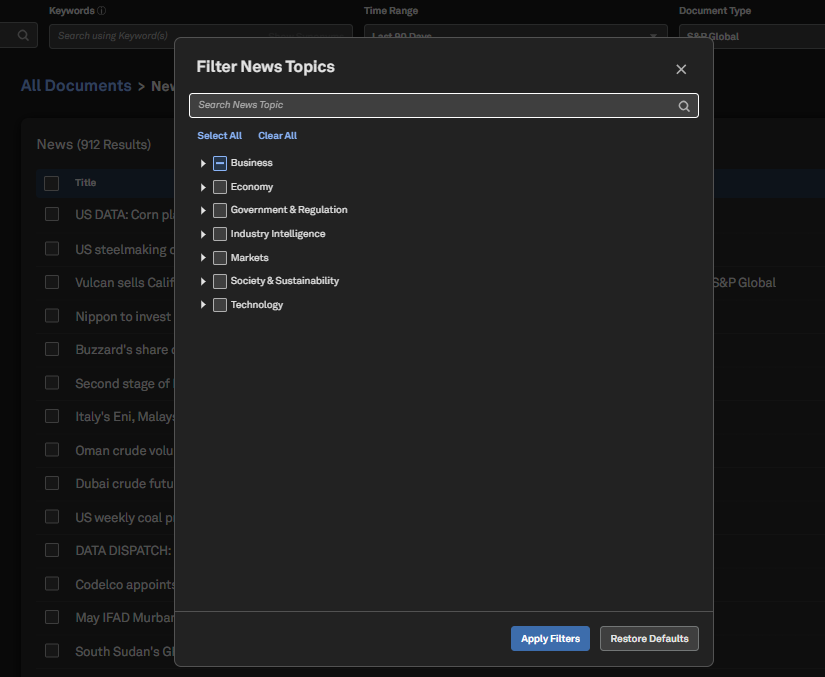
Users can now filter news sources by topic within Document Intelligence to surface more relevant articles. Users can filter by specific S&P Global News & Insights article types, including popular features like Data Dispatch, Deal Profile, and Research & Analysis.
Find it on the platform:
Navigate to the Documents tab in the top navigation to access the Document Intelligence page
To filter by topic, select the Document Type view, click Filter at the top right of the News tile, and choose your topics of interest
To filter by article type, open the Document Type dropdown menu, expand News & Insights, and select article types of interest under S&P Global
S&P Capital IQ Pro Plug-in
In this release, we introduced the Formula Builder AI Assistant in S&P Capital IQ Pro Plug-in, providing users a new way to create SPG formula syntaxes using GenAI capabilities. Furthermore, we enhanced right-click functionality to allow users to edit their SPG and CIQ formulas directly within the Formula Builder. Users can also retrieve dynamic and static lists using the new SPGRANGEV formula and access the Next Earnings Release Date through a dedicated SPG formula. Additionally, users can now retrieve all Visible Alpha line items for different statement types through a single SPGRANGEV formula.
Formula Builder AI Assistant
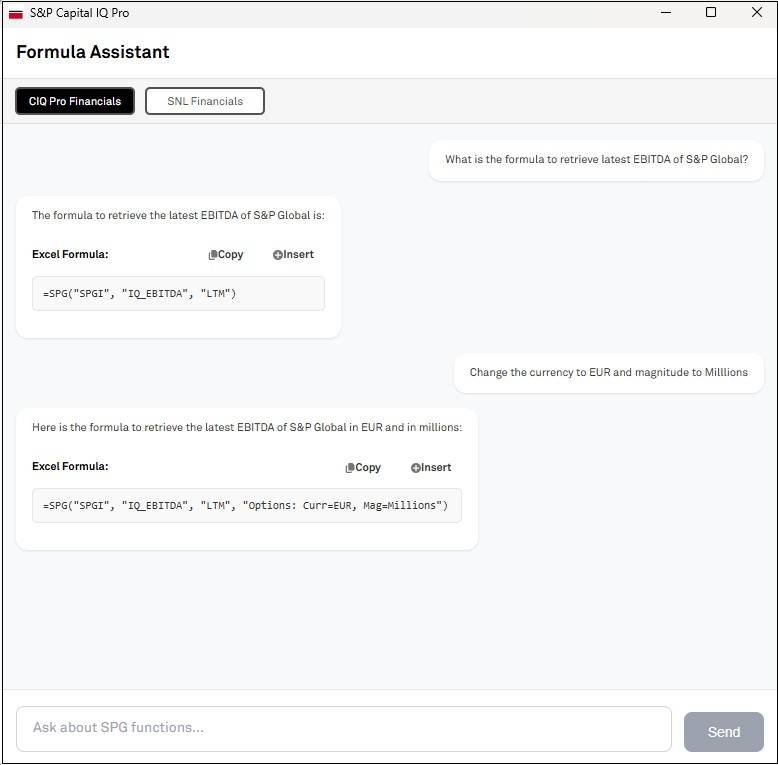
Users can now use Formula Builder AI Assistant in S&P Capital IQ Pro Plug-in to build =SPG( formulas using natural language prompts. The AI Assistant currently supports datasets including company details, financials, market data, and trailing & forward multiples.
Find it in the platform:
In Excel, click on Sign Out in the S&P Capital IQ Pro Plug-in top ribbon, then Sign In again
Close Excel and reopen it
In the S&P Capital IQ Pro ribbon, click on the Formula Builder AI Assistant
Enter your request using natural language
E.g: What is the latest year’s EBITDA of S&P Global?
‘What is the primary industry of S&P Global?’
Copy the formula syntax generated by the AI Assistant and paste it into your desired Excel cell
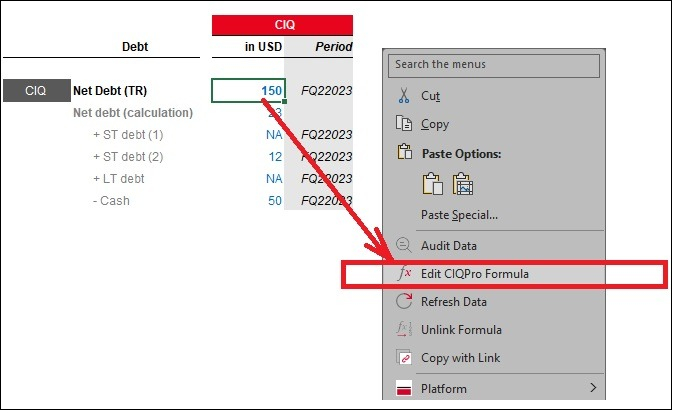
Right ‑Click to Edit Formulas in S&P Capital IQ Pro Plug-in
Users can now edit their existing SPG and CIQ formulas directly within the Formula Builder, making it easier to view the parameters behind a formula and quickly adjust formula syntax.
Find it in the platform:
In Excel, launch S&P Capital IQ Pro Plug-in
Enter a new formula or locate an existing formula and right-click on a cell that contains =SPG(, =CIQ(, =SPGRANGEV(, or =CIQRANGEV( formula
Within the drop-down menu, click on Edit Formula or Edit CIQPro Formula
Formula Builder will open with the parameters pre-populated
Update the parameters in Formula Builder, click Add Formula, and then click Apply
Note: Access to the 'Edit CIQPro Formula' option in the right-click menu requires S&P Capital IQ Pro Plug-in version 26.06 (1.0.26156.1) and above. Download and install the latest version from S&P Capital IQ Pro Office Download page or contact your IT administrator for assistance.
Dynamic and Static Lists with SPGRANGEV Formula
User can now retrieve their pre-built dynamic and static lists from the S&P Capital IQ Pro platform using the SPGRANGEV formula within the S&P Capital IQ Pro Plug-in. This enhancement enables seamless integration of lists into Excel, supporting the creation of custom constituents, comparable company analysis, and efficient tracking of relevant companies.
Find it in the platform:
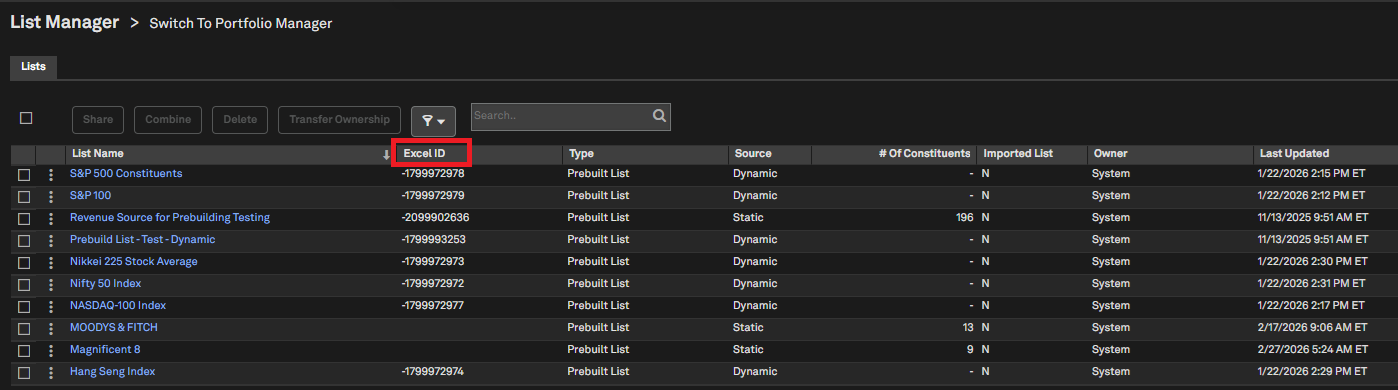
Within the S&P Capital IQ Pro platform, navigate to the Saved Items icon on the top right and select Lists & Screens > Manage Lists
Locate the relevant List ID from the Excel ID column in the Manage Lists page
In Excel, launch the S&P Capital IQ Pro Plug-in and open Formula Builder
Navigate to Companies dataset > Company Details > Lists > Lists folder
Select SP_COMPONENTS data item, and an appropriate range of companies to retrieve the data
Utilize SPL prefix before the List ID.
E.g, if the List ID is 200087691, then SPL200087691 is the unique List Identifier
Example Formulas:
=SPGRANGEV("SPL200087691","SP_COMPONENTS","1","10") - Retrieves 10 constituents from STATIC List (Magnificent 8)
=SPGRANGEV("SPL200090334","SP_COMPONENTS","1","10") - Retrieves 10 constituents from Dynamic List/Screen (S&P Europe 350)
Next Earnings Release Date
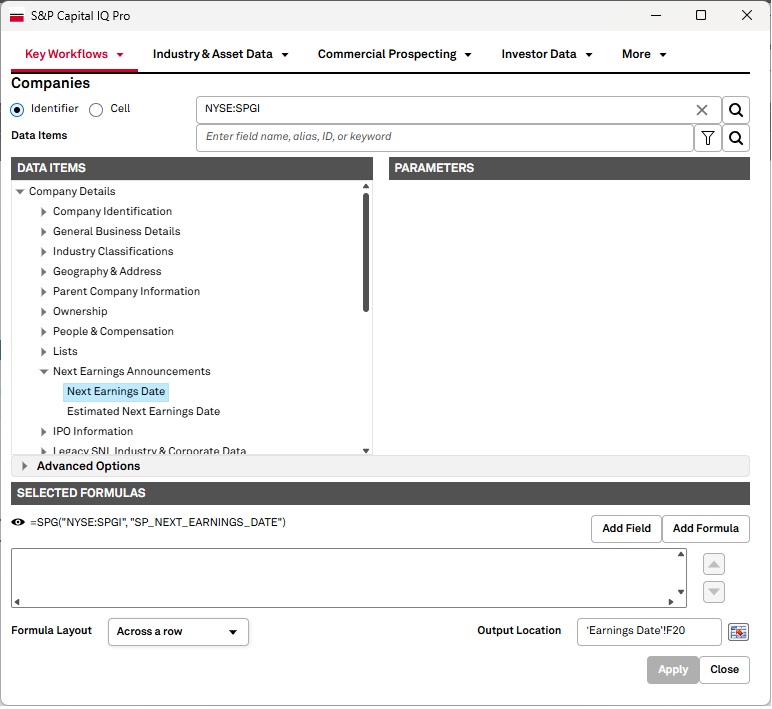
Users can now retrieve the next earnings release date within the S&P Capital IQ Pro Plug-in. If a company does not disclose this information, an estimated release date, based on the company’s previous reporting trends, will be retrieved.
Find it in the platform:
In Excel, launch the S&P Capital IQ Pro Plug-in and open Formula Builder
Navigate to Companies dataset > Company Details > Next Earnings Announcement folder
Example Formulas:
Next Earnings Date=SPG("IBM","SP_NEXT_EARNINGS_DATE")
Estimated Earnings Date=SPG("IBM","SP_EST_NEXT_EARNINGS_DATE")
All Visible Alpha Metrics in S&P Capital IQ Pro Plug-in
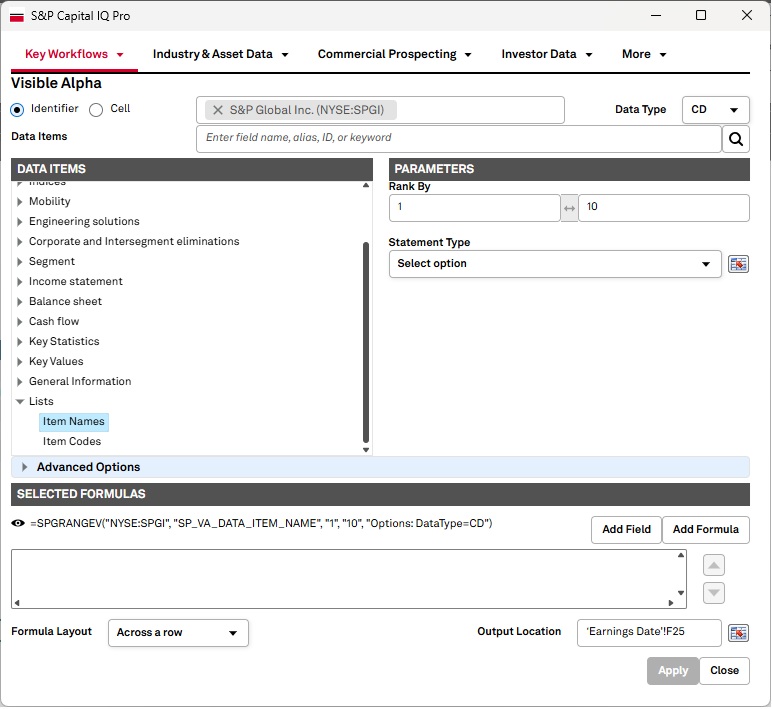
User can now utilize SPGRANGEV function to retrieve all line items for specific Visible Alpha statements within the S&P Capital IQ Pro Plug-in.
Find it in the platform:
In Excel, launch the S&P Capital IQ Pro Plug-in and open Formula Builder
Navigate to the Visible Alpha dataset and input a company name
Navigate to List > Select All Line Items
Excel Template Library
In this release, we added several new or enhanced Excel templates to meet your data analysis needs.
Power Plant Capacity by Owner Summary
This model allows users to look at aggregate plant capacities at the ultimate parent level, with the ability to filter by fuel type, location, etc.
A comprehensive model providing CDS spreads, equity performance, and credit ratings. Features include top/bottom movers, rating changes, market data highlights, and detailed CDS summaries for selected entities.
CIQ to VA Estimates Metrics Mapping
The template provides a structured mapping of Visible Alpha field names to corresponding CIQ Pro field names across industries. Use industry tabs to view mappings, relevant data, and links to additional industry-specific VA line items.
This model provides insight into an Issuer's Fixed Income Security Issuance at the Summary and Detail level and includes current pricing, analytics, reference, and schedule data.
View estimate summary information including details by broker and create custom consensus estimates.
Power Forecast Renewable Valuation
This model compares annual projected renewable power plant earnings from the Power Forecast with user-defined revenue requirements at the state level, supporting asset valuation and PPA price benchmarking
Document Intelligence
In this release, we introduced summaries of the Question and Answer (Q&A) sections from earnings call transcripts in Document Intelligence. Additionally, users can now export underlying data from charts and tables into PDFs. We also expanded entity search options in Document Intelligence to enable quick, efficient access to relevant information.
Earnings Call Q&A Summaries
Users can now view a summary of the Q&A section from earnings call transcripts directly in Document Intelligence.
Find it in the platform:
Navigate to the Documents tab in the top navigation to access the Document Intelligence page
In the Document Type filter, select Earnings Calls
Click on an Earnings Call, and view the summary on the right side
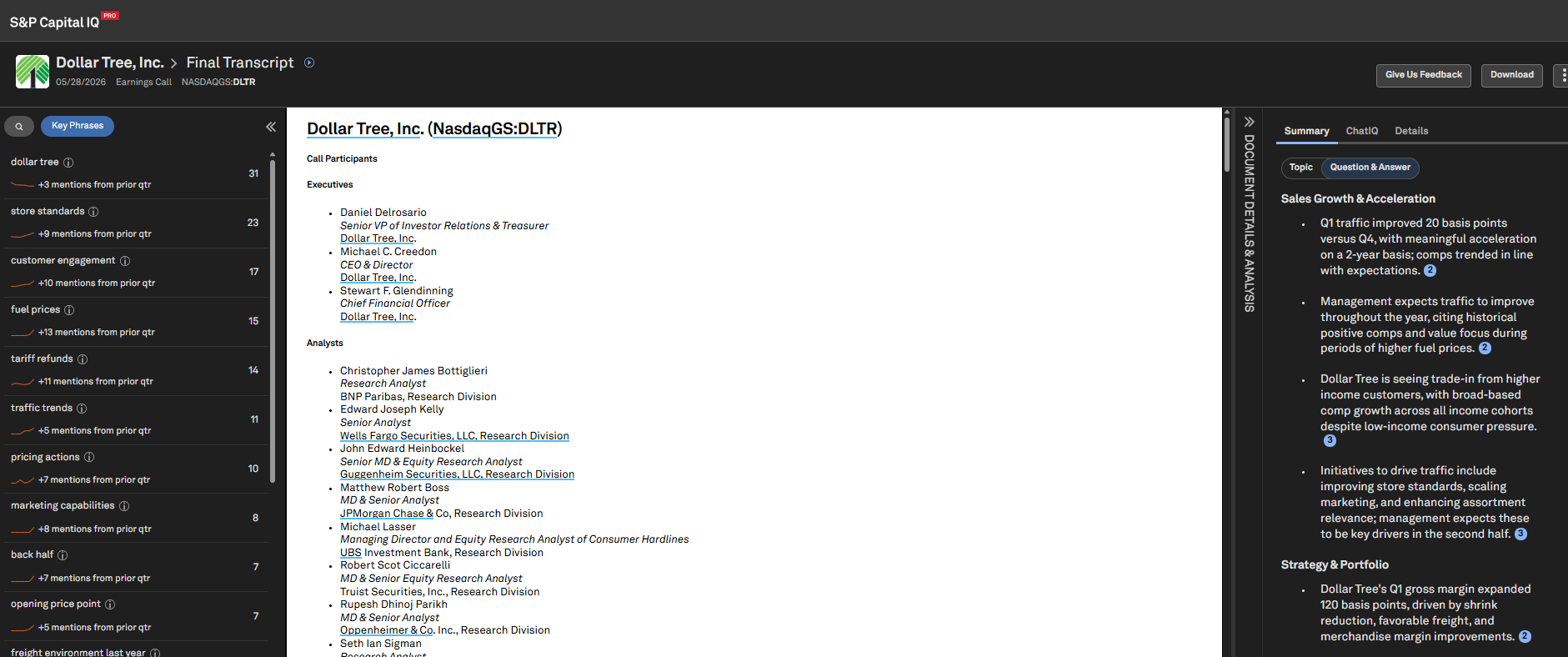
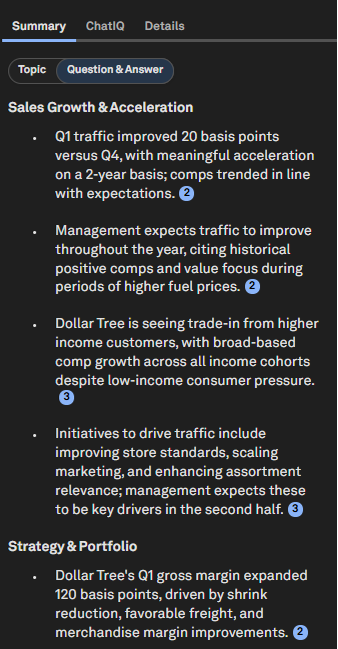
Chart and Table Extraction for PDFs
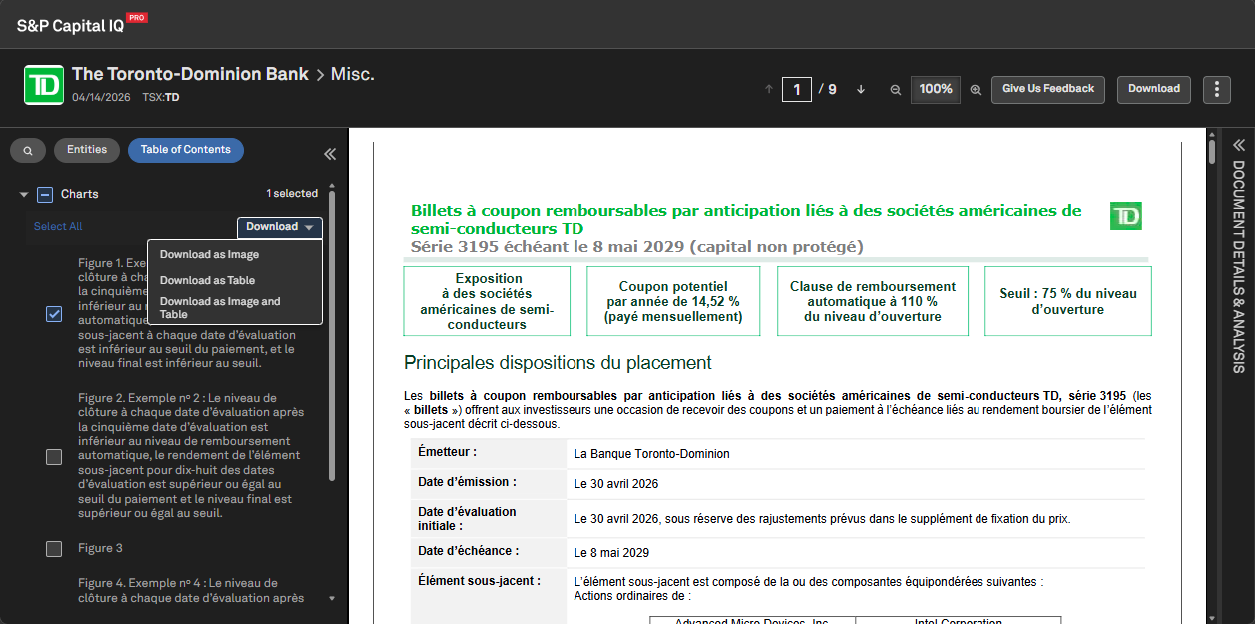
Users can now export underlying data in charts and tables within PDFs in the left-hand panel and extract underlying chart data with three flexible download options: as an image, as a table, or both. These enhancements enable users to extract more insights from PDF content for analysis and reporting.
Find it in the platform:
Navigate to the Documents tab in the top navigation to access the Document Intelligence page
In the Document Type filter, select Presentations
Select a document to open it and navigate to Table of Contents tab in the left-hand panel
Expanded Entity Search Options in Document Intelligence
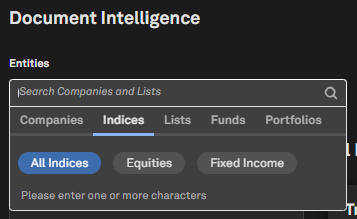
Users can now surface documents tagged to Funds in Document Intelligence. Additionally, users can search for documents tagged to companies in Portfolios and Indices.
Find it in the platform:
Navigate to the Documents tab in the top navigation to access the Document Intelligence page
Open the Entities filter, select Indices, Funds, or Portfolios tabs, and search for the required entities
Visible Alpha
In this release, we strengthened the integration between Visible Alpha and S&P Capital IQ Pro, delivering enhanced workflows to connect granular operating data, estimate analysis, and source documents.
For BioPharma users, we added a new Indication page to provide a comprehensive view of the market and competitive landscape by indication, with Excel export enabled by dynamic S&P Capital IQ Pro Plug-in formulas. We also added Quick Charts to consensus data items across BioPharma pages to improve discoverability.
We expanded the Companies Screener with curated, high-impact Visible Alpha financial, operating, and segment KPIs, enabling users to build more precise peer sets and integrate screening workflows. We introduced the new Surprise Analysis page to help users quickly identify and investigate differences between pre-earnings estimates and actuals across multiple fiscal periods.
Additionally, we enabled Visible Alpha Actual metrics filings to open directly in Document Intelligence, enabling seamless navigation from the cited filing to related documents. Finally, we added chart icons next to metric names, providing one-click access to Revisions, Trends, and Surprise views.
BioPharma Indication Page
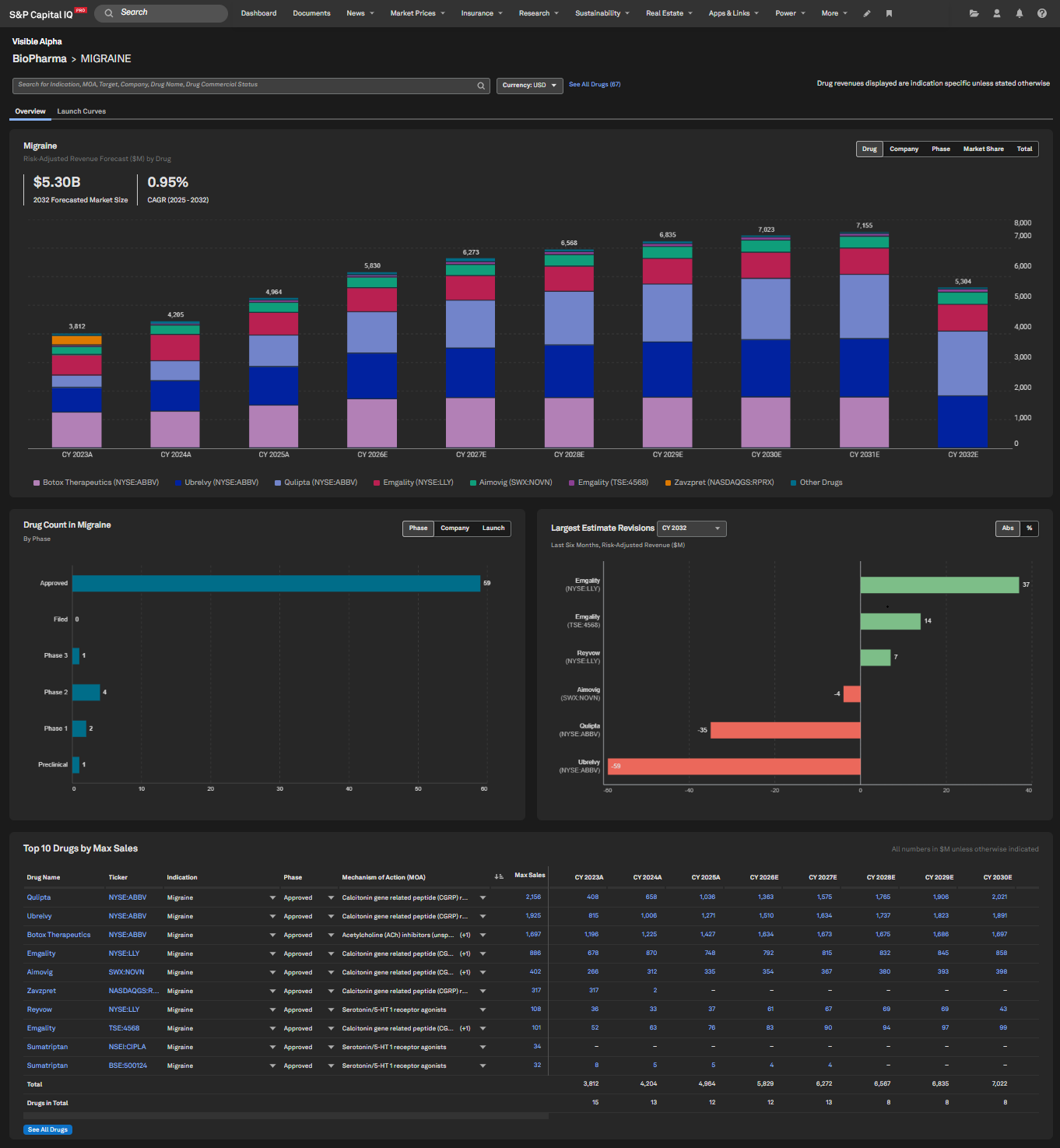
The Visible Alpha BioPharma Indication page offers an overview of an indication’s competitive landscape. It streamlines your analysis by allowing you to quickly assess market size, competitive dynamics, key drugs currently approved and in the pipeline, and drugs with major recent estimate revisions.
Find it in the platform:
Navigate to the Markets tab in the top navigation
Select BioPharma under Industries (for MI Industry users) or Sectors (for GICS users)
Search for an Indication in the search bar
In the data table, select the name of the Indication e.g. Migraine
Note: Access to Visible Alpha estimates data requires an additional subscription, please contact your account team for details.
BioPharma Data in S&P Capital IQ Pro Plug-in
Users can now export data from BioPharma pages directly into the S&P Capital IQ Pro Plug-in, enabling dynamic refresh of Excel worksheets with the latest metadata and consensus data from Visible Alpha BioPharma.
Find it in the platform:
Search for a drug or indication or any supported drug grouping covered by Visible Alpha BioPharma in the top search, e.g., GLP1
Select the search result for the BioPharma Drug
Click Export > Export to Excel as Formulas at the top right of the page
The data from the grid will download into an Excel file with formulas enabled where relevant
Exports are limited to 100 drugs for trial users and 300 drugs for paid users.
Note: Access to Visible Alpha estimates data requires an additional subscription, please contact your account team for details.
Curated Set of Visible Alpha Line Items in Screener
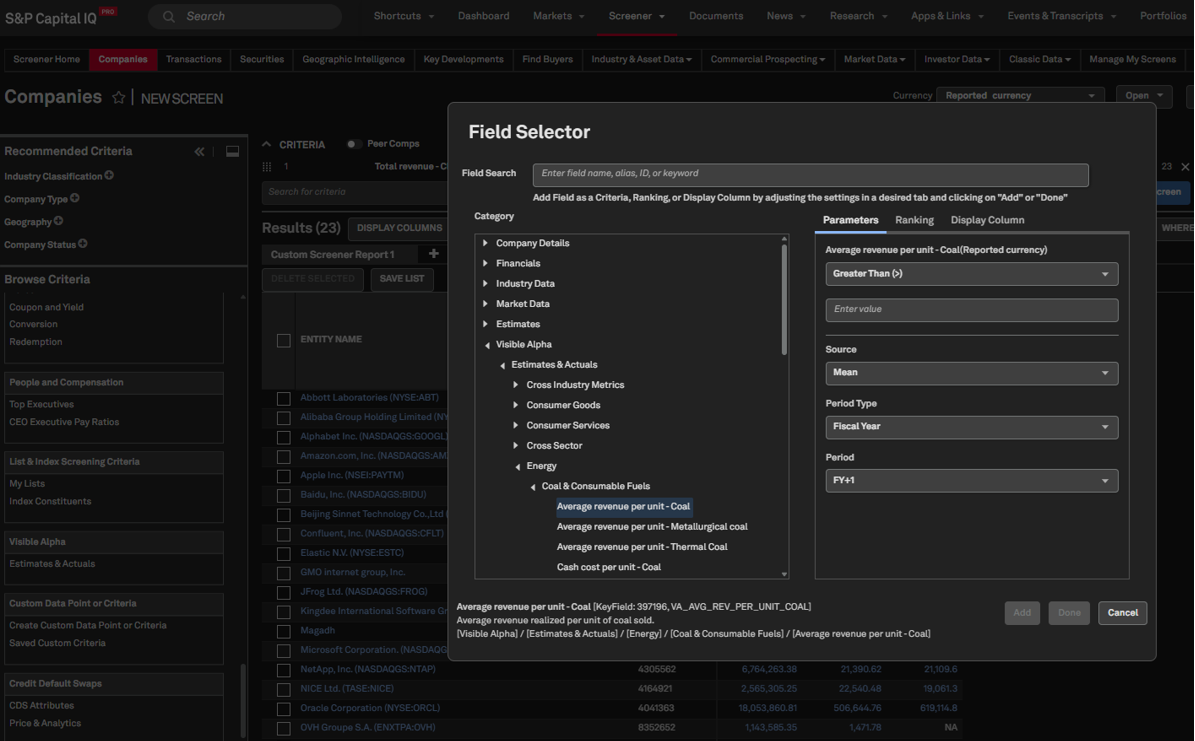
Users can now access a curated subset of Visible Alpha data items in the Screener, including financial, operating, and segment KPIs, organized by sector and industry. They can filter, compare, and export granular Visible Alpha data alongside other Capital IQ datasets without switching tools. Results can be exported to Excel with reusable cell functions, and the same data items are accessible in the S&P Capital IQ Pro Plug-in.
Find it in the platform:
Navigate to Screener from the top navigation or the Apps & Links menu and select Companies Screener
Under Browse Criteria or Display Columns, select Visible Alpha > Estimates & Actuals
Expand the required Industry folder and select the data items
Set data item parameters such as Source (Mean/Median/VA Actuals Mean), Period, Currency etc.
Click the right arrow to add them to the screen and select Apply
Click Run Screen to generate results
Use Export to Excel to download results
Note: Access to Visible Alpha estimates data requires an additional subscription, please contact your account team for details.
Surprise Analysis Page
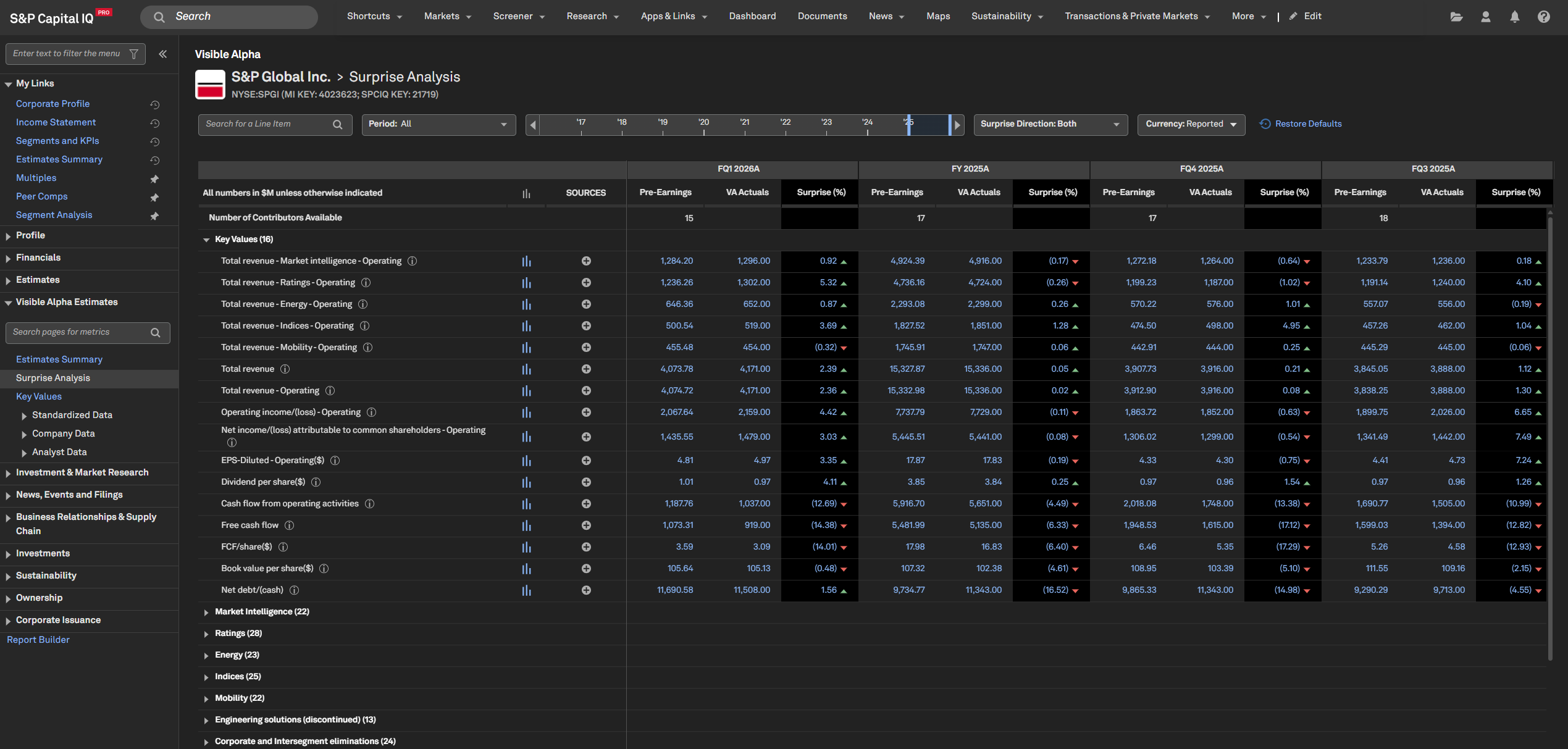
Users can now access the new Visible Alpha Surprise Analysis page, a powerful tool to quickly identify and investigate differences between pre-earnings estimates and actual results across multiple fiscal periods. This enhances the tracking of how close the forecasting was to actual performance over time, enabling users to spot trends, assess analyst performance, and make more informed investment decisions.
Find it in the platform:
Search for a public company covered by Visible Alpha in the top search e.g., S&P Global.
In the left-hand navigation menu, expand Visible Alpha
Select Surprise Analysis page
Note: Access to Visible Alpha estimates data requires an additional subscription, please contact your account team for details.
Visible Alpha Actuals Filings within Document Intelligence
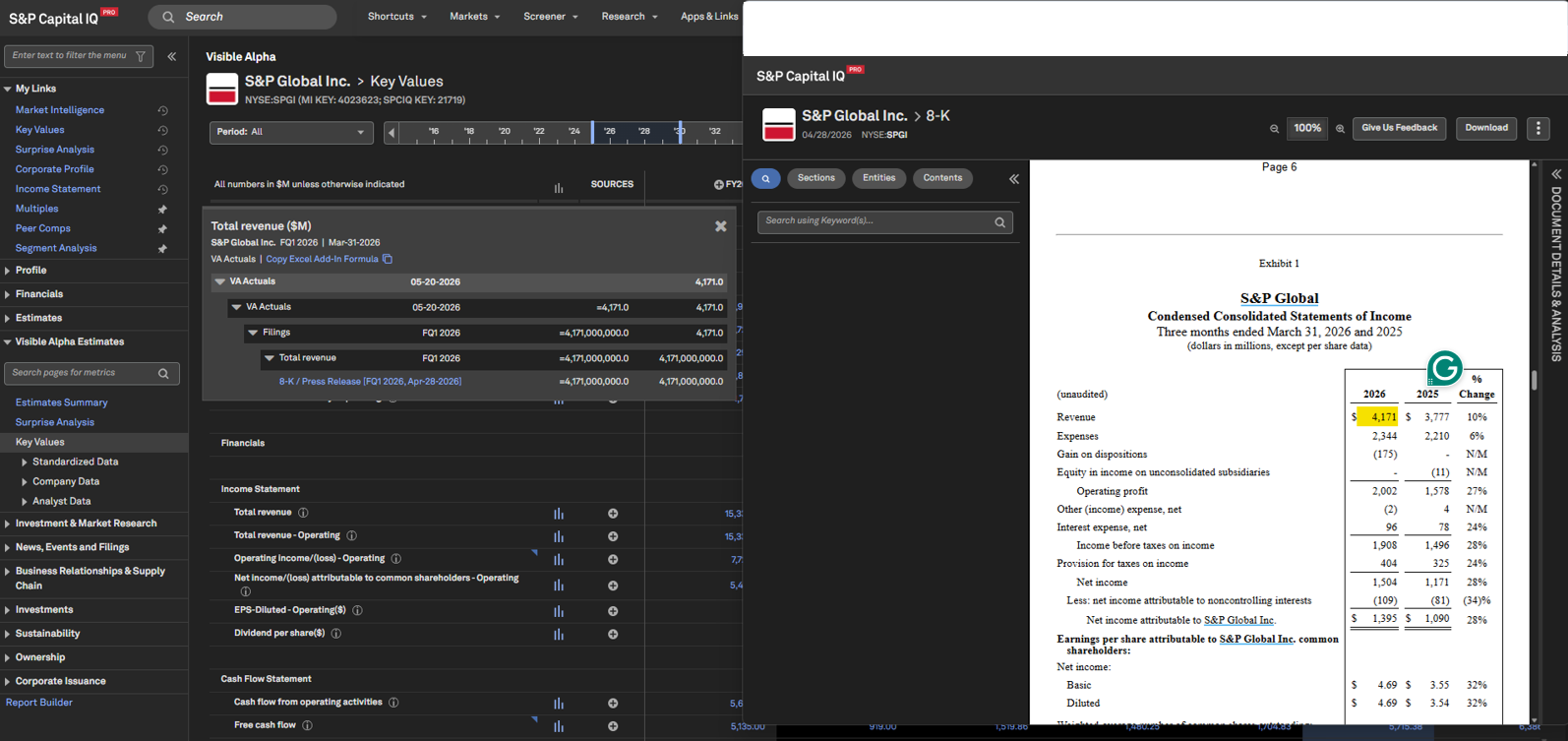
Users can now access Visible Alpha filings within Document Intelligence, seamlessly tracing the source of VA actual values while unlocking the full suite of Document Intelligence functionalities—including advanced navigation, document analysis tools, in-document search, source coordinates, and ChatIQ. This enhancement is available across the Company, Standardized, Peer Comps and BioPharma pages, empowering users to streamline workflows, gain faster, deeper insights and benefit from a more intuitive, cohesive experience.
Find it in the platform:
Search for a public company covered by Visible Alpha in the top search e.g., S&P Global
In the left-hand navigation menu, expand Visible Alpha Estimates > Standardised Data > Income Statement
Click on any value in the Latest FY with Actual column and continue to click through to the nth level to view the source document
Expand Profile > Peer comps and view the business groups tabs next to the Peers tab, and continue to click through to the nth level to view the source document
Note: This functionality is only available for Filings. If actuals are sourced directly from analyst models, the source click-through will lead to the analyst model, if users have necessary entitlements
Note: Access to Visible Alpha estimates data requires an additional subscription, please contact your account team for details.
Quick Charts – Improved Discoverability
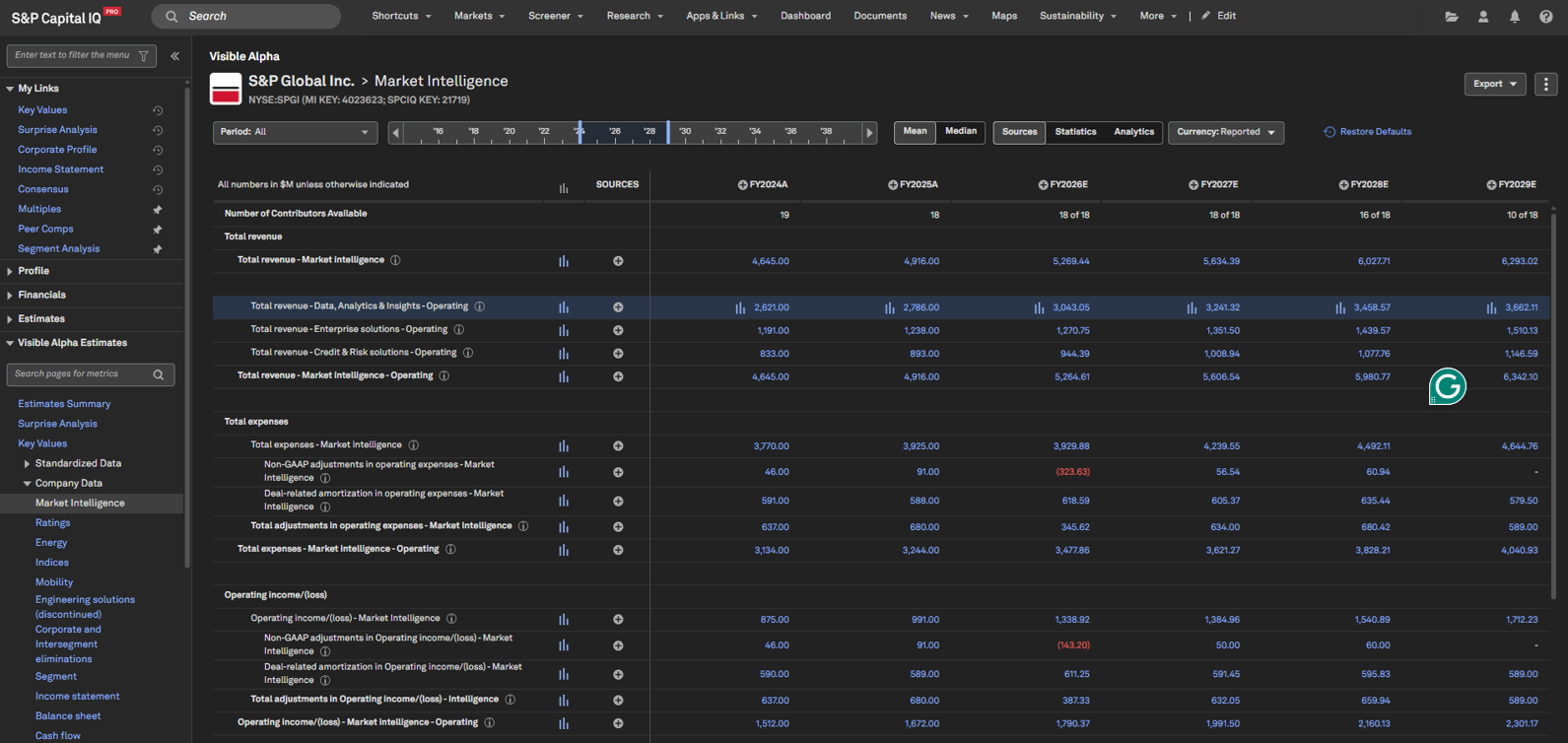
Users can now access Quick Charts on Visible Alpha Estimates pages using a new chart icon next to each metric name. Once the chart opens, users can easily switch between different views, including Revisions, dispersion (Histogram, Heatmap) and Surprise.
Find it in the platform:
Search for a public company covered by Visible Alpha in the top search e.g., S&P Global
In the left-hand navigation menu, expand Visible Alpha Estimates
Click on Key Values or select a page within Standardized Data or Company Data
Click the chart icon next to the desired metric to launch Quick Charts
Also launch Quick Charts from individual values in the table by hovering over a row and clicking the chart icon next to a value
Charting
In this release, we introduced GenAI-powered summaries for comparison series in the Stock Chart. Users can generate AI-driven explanations for movements across primary and comparison series, gaining deeper insights in a single view. Enhanced calendar controls allow users to effortlessly redefine the analytical window. Additionally, Chart Builder now supports charting Credit Default Swap (CDS) metrics and Yield Curve data for geographies and rates, enabling deeper market analysis and more informed decision-making.
GenAI-powered Summaries for Comparison Series in Stock Chart
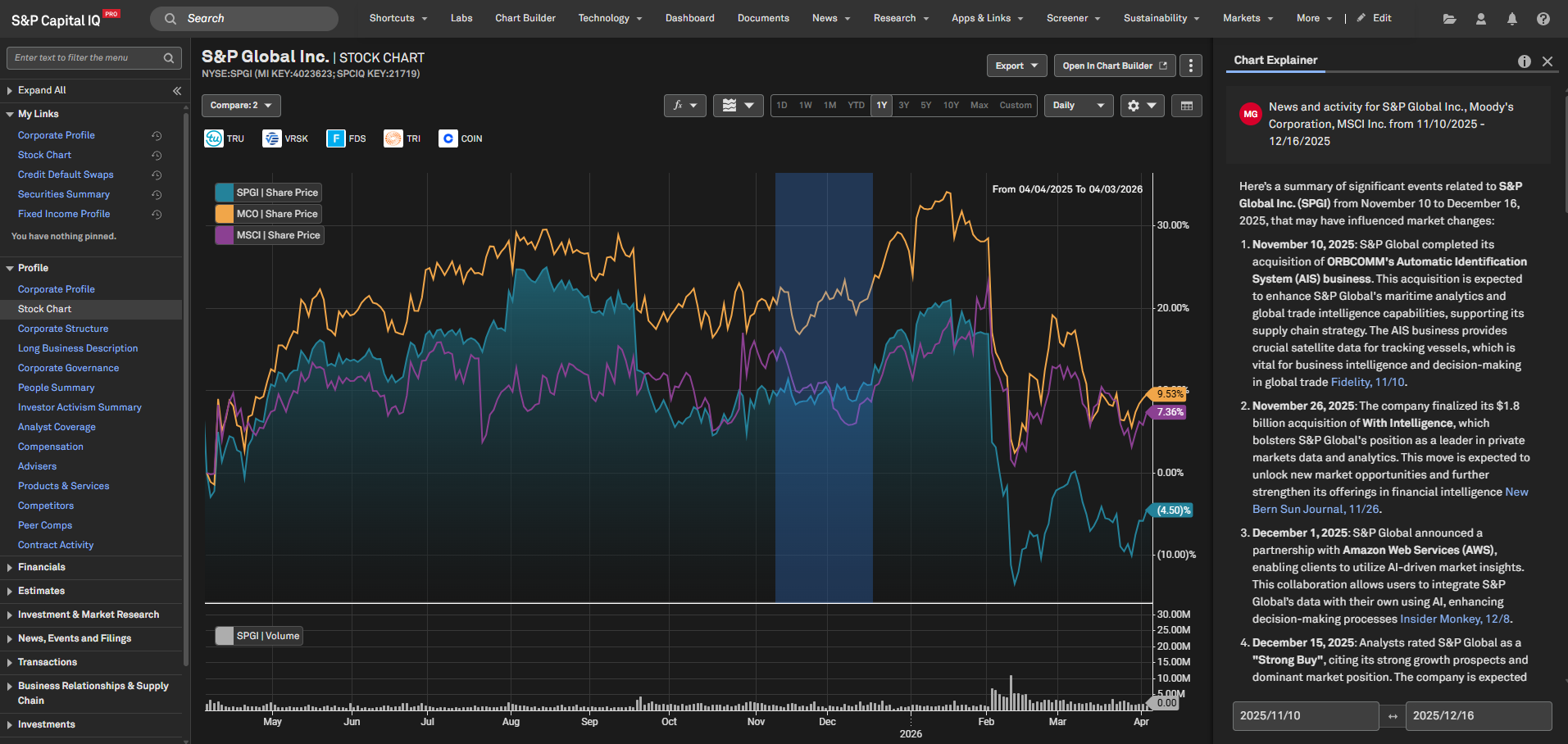
We introduced GenAI-powered summaries to explain chart movements over a selected time range, for the primary chart line and all comparison series. Users can generate deeper, multi-security insights through AI-driven explanations across comparison lines. Additionally, enhanced calendar controls ensure that selecting a new start date resets the prepopulated Chart Explainer, providing a clear starting point for precise and customized analysis periods.
Find it in the platform:
Search for and select a public company in the top search
From the left-hand navigation, select Stock Chart
Add a Compare company
Click on the Chart Explainer to open the right-hand module that provides insights into the Stock Chart
Choose two distinct time points on the Stock Chart to generate a summary of the selected data
Click on Start Date to reset the prepopulated Chart Explainer and select a new date range for generating summaries with the updated period
Yield Curve Chart for Geographies and Rates
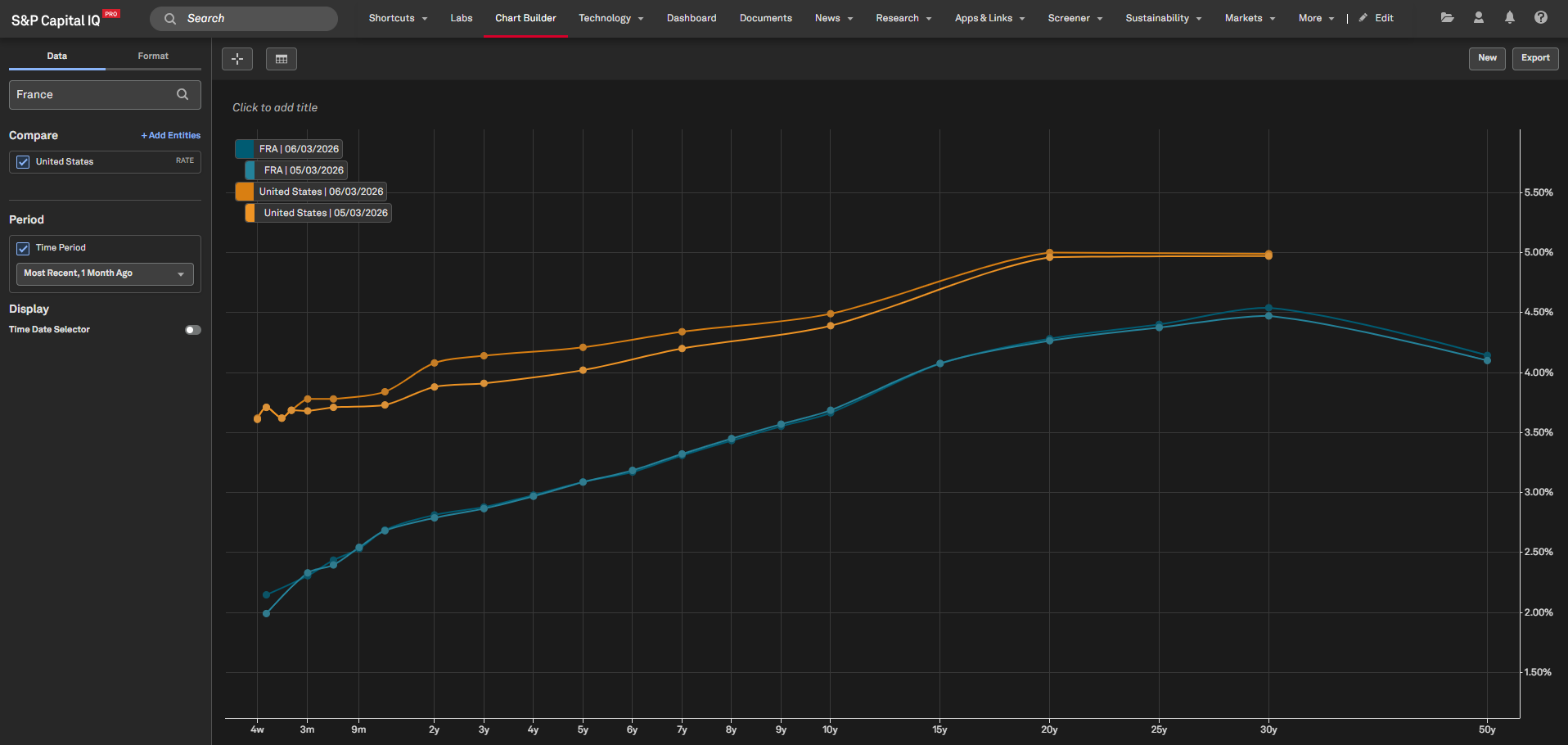
Users can now chart yield curves for geographies and rates in Chart Builder, enabling systematic visualization and analysis of contract-based securities data, including treasury securities. This feature simplifies yield interpretation across current and historical periods, supporting more informed analysis of rate structures and market trends.
Find it in the platform:
Navigate to the Apps &Links tab in the top navigation and select Chart Builder
Search and select a geography or a rate to add to the Chart
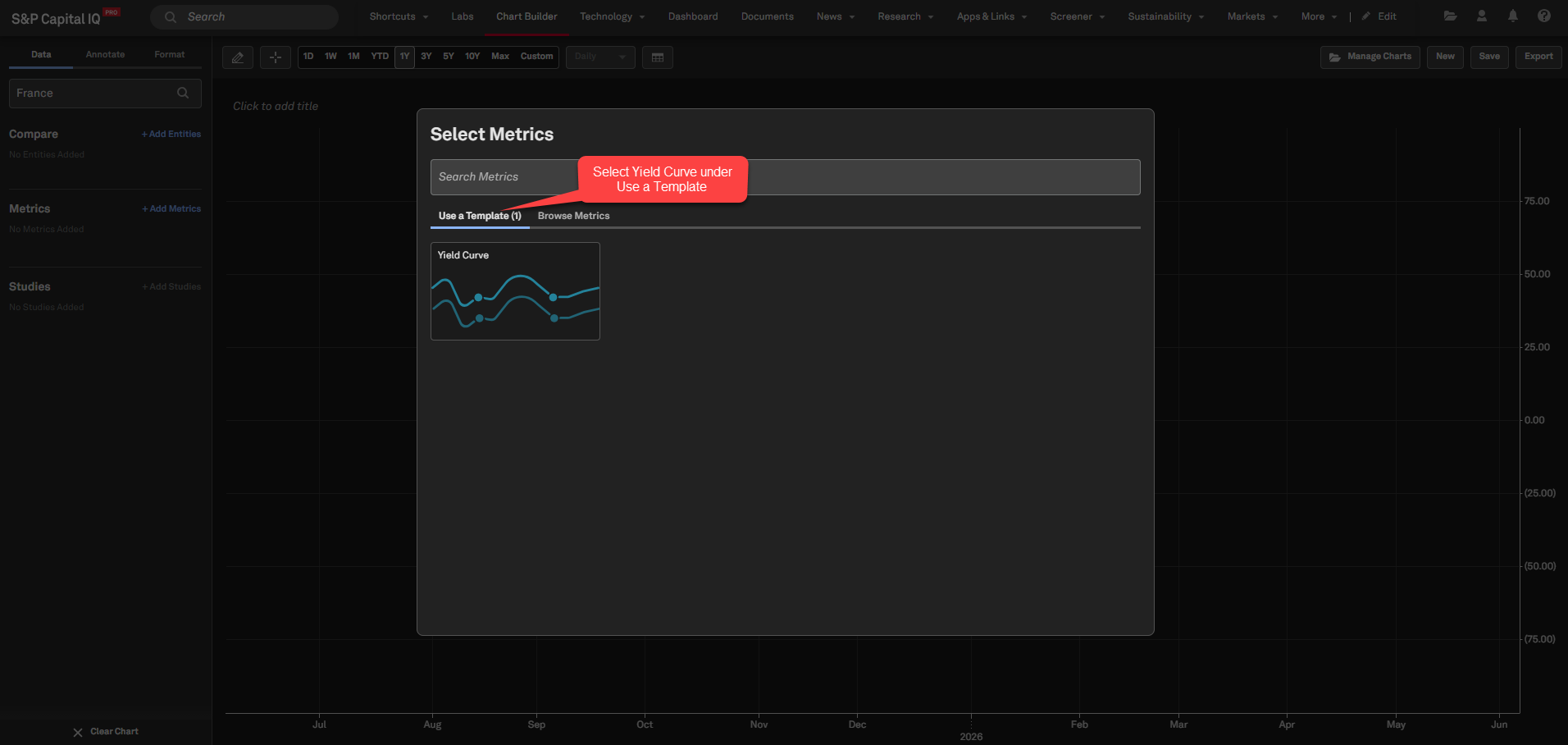
Select the Yield Curve template under Templates
View the chart rendered with the selected entity’s yield curves
Use Compare to add another entity
Use Time Period to add historical or custom periods
CDS Data in Chart Builder
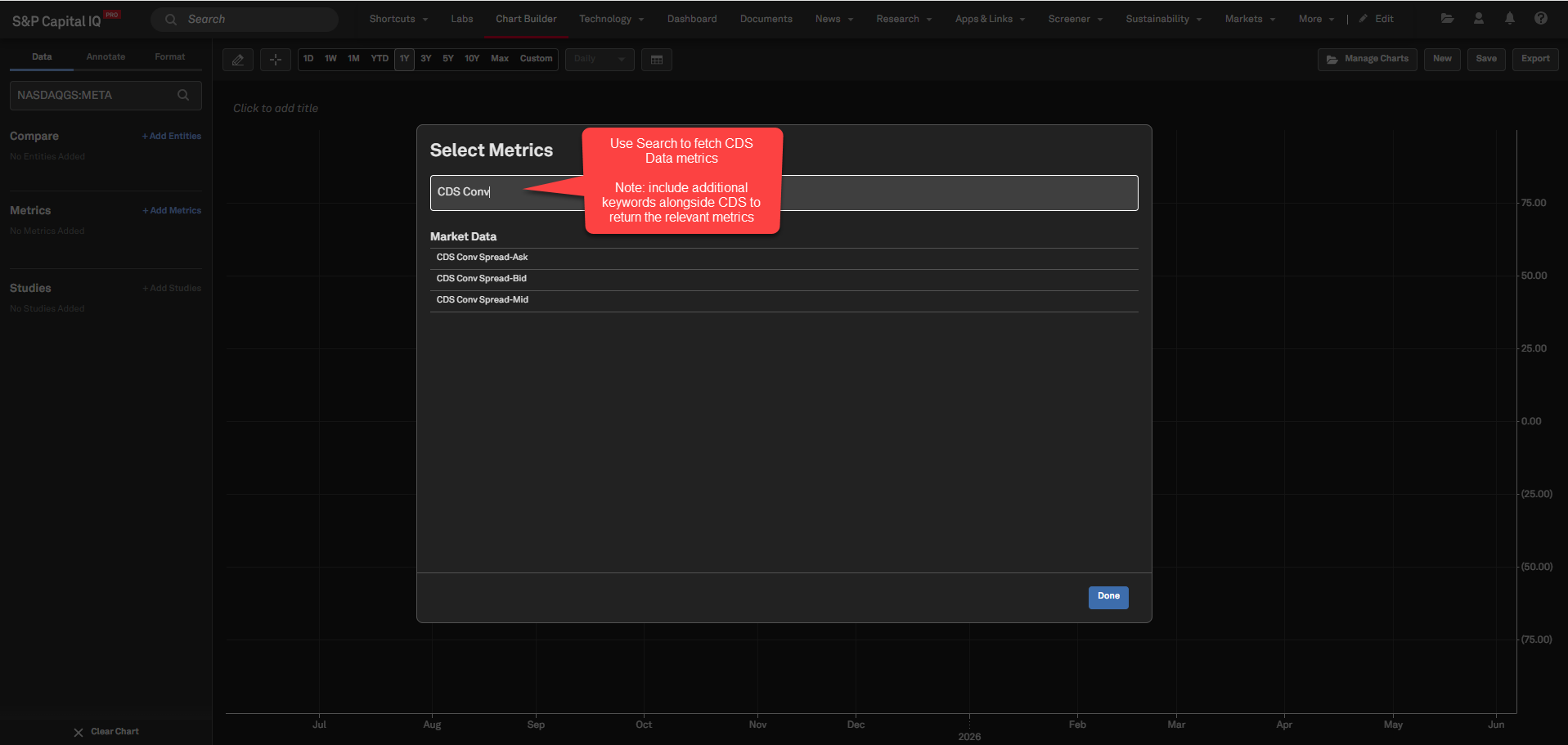
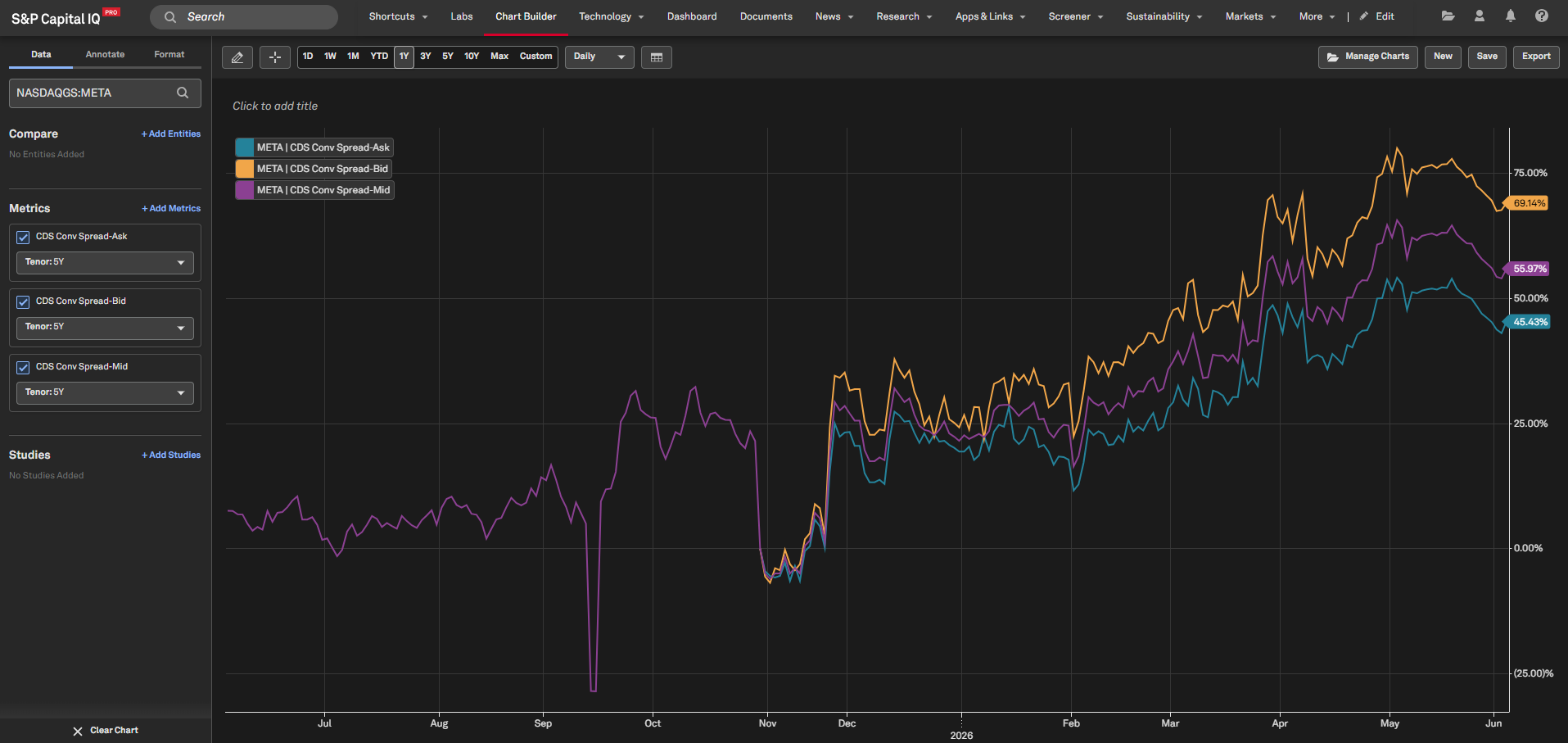
Users can now search for and plot Credit Default Spread (CDS) data for 10 company-level metrics in Chart Builder, enabling analysis of par, percent, conventional, and upfront values across bid, mid, and ask views. This enhancement streamlines access to credit market data and supports more precise charting of CDS trends for company-level analysis.
Find it in the platform:
Navigate to Apps &Links tab in the top navigation and select Chart Builder
Search and select a company to add to the Chart
Search for CDS data items in the Metric Search to plot the data
Ensure the metric search includes additional keywords alongside CDS to return the most relevant metrics, e.g.CDS conv
Coverage stats:
Coverage includes the following CDS company-level metrics: CDS Par Spread-Mid, CDS Conv Spread-Mid, CDS Upfront-Mid, CDS Percent Of Par-Mid, CDS Conv Spread-Bid, CDS Upfront-Bid, CDS Percent Of Par-Bid, CDS Conv Spread-Ask, CDS Upfront-Ask, CDS Percent Of Par-Ask
Financials
In this release, we launched a new Valuations page—a dedicated, unified workflow purpose-built to streamline M&A advisory, pitchbook creation, and investment decision-making.
New Valuations Page
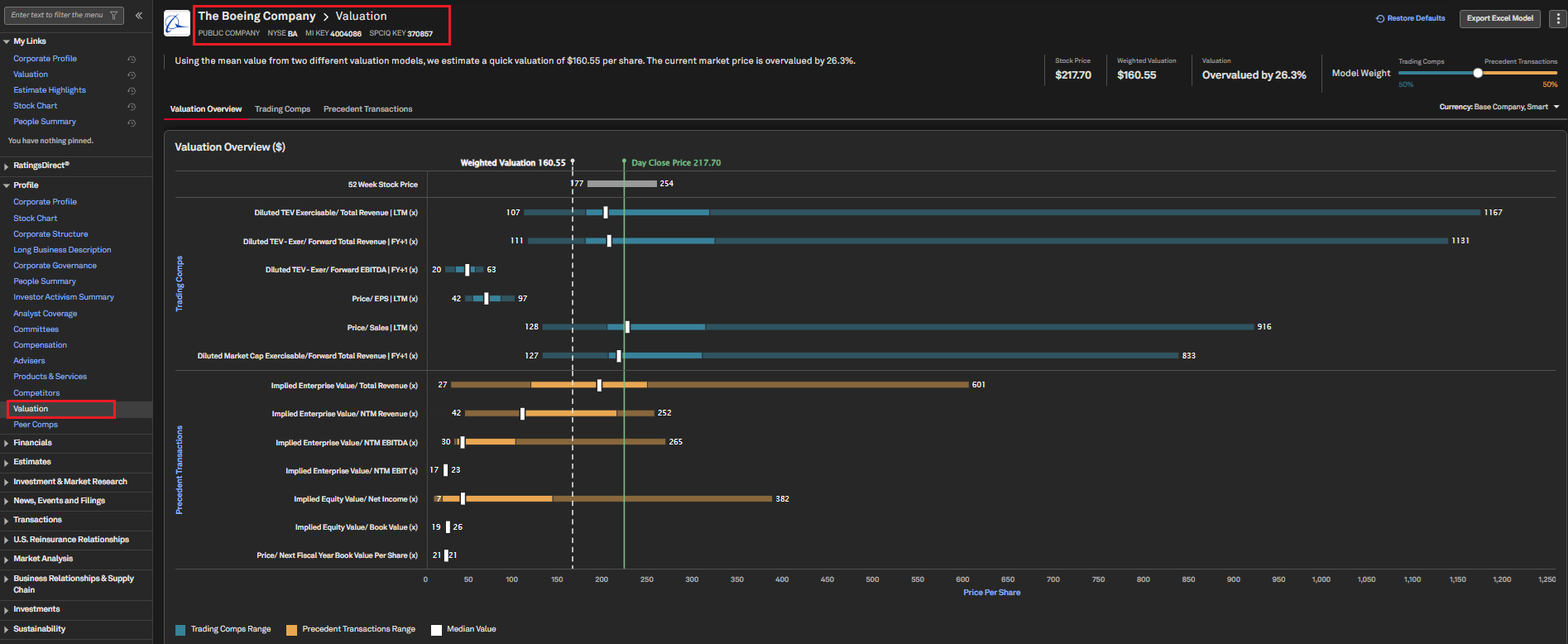
S&P Capital IQ Pro now offers a dedicated Valuations workflow, purpose-built for M&A advisory, pitchbook creation, and investment decision-making. At its core, it answers one key question: How much is this company worth?
This workflow brings together pre-configured peer groups, relevant precedent transactions, and valuation multiples, including industry-specific multiples calibrated to sector norms, into a single accelerated experience. Results are visualized in a football-field chart, providing users with an at-a-glance summary of the full valuation range across methodologies. The Valuations workflow consolidates financials, market data, and transaction data in one place, streamlining data gathering and empowering users to perform valuations more efficiently.
Two industry-standard methodologies are available side-by-side:
Trading Comparables: See how the market prices similar public companies today, with multiples benchmarked to your company's sector.
Precedent Transactions: See what acquirers have actually paid for comparable companies, grounded in real deal data.
Find it in the platform:
Search for and select a public company in the top search, and navigate to Corporate Profile
Select the Valuations page in the left-hand menu under the Profile section
Fixed Income
With this release, users can screen securities based on security-level fixed income ownership aggregates as of a specific date, providing deeper insights into ownership trends - such as aggregate ownership percentages within specific institutional categories and the total number of new or sold-out positions in fixed income securities.
Security Level Fixed Income Ownership Aggregates in Screener and S&P Capital IQ Pro Plug-in
Users can now screen securities using new aggregate fields based on security-level fixed income ownership as of a specific date, enabling ownership trend analysis at an aggregate level.
Find it in the platform:
Screener
Navigate to Screener from the top navigation or the Apps & Links menu
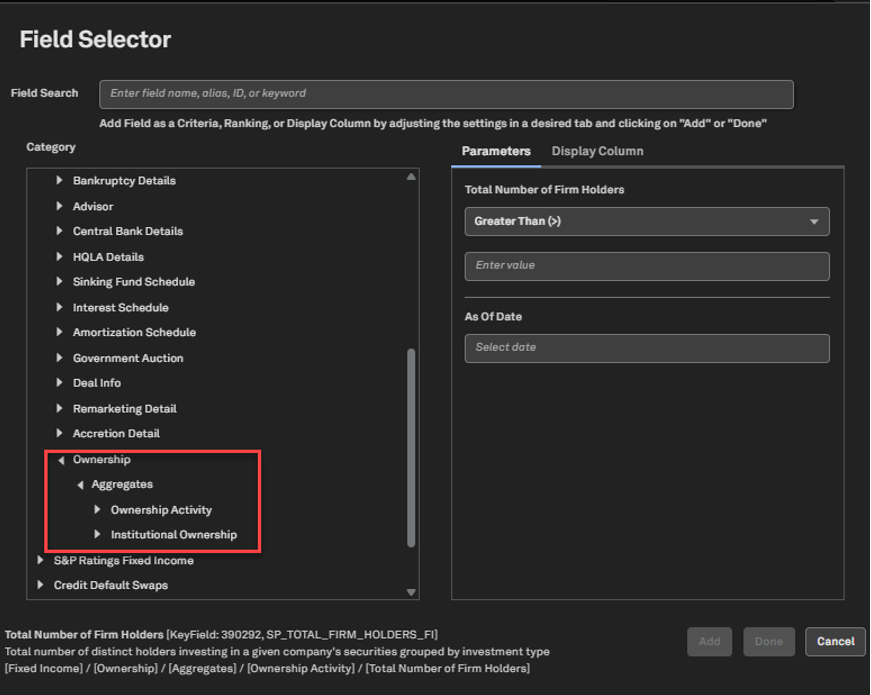
Select Securities dataset, and expand Fixed Income > Ownership > Aggregates
In the Ownership Activity folder, access the new fields which give an overview of the buying and selling activity in the bonds
In the Institutional Ownership folder, access the institutional aggregates across 15 different Institutional Owner Types
S&P Capital IQ Pro Plug-in
In Excel, launch the S&P Capital IQ Pro Plug-in and open Formula Builder
Under Key Workflows, select Securities
Expand Fixed Income > Ownership > Aggregates
Expand Aggregates to access Ownership Activity & Institutional Ownership Aggregates
Fixed Income Security Level Ownership Two-Party Formulas in S&P Capital IQ Pro Plug-In
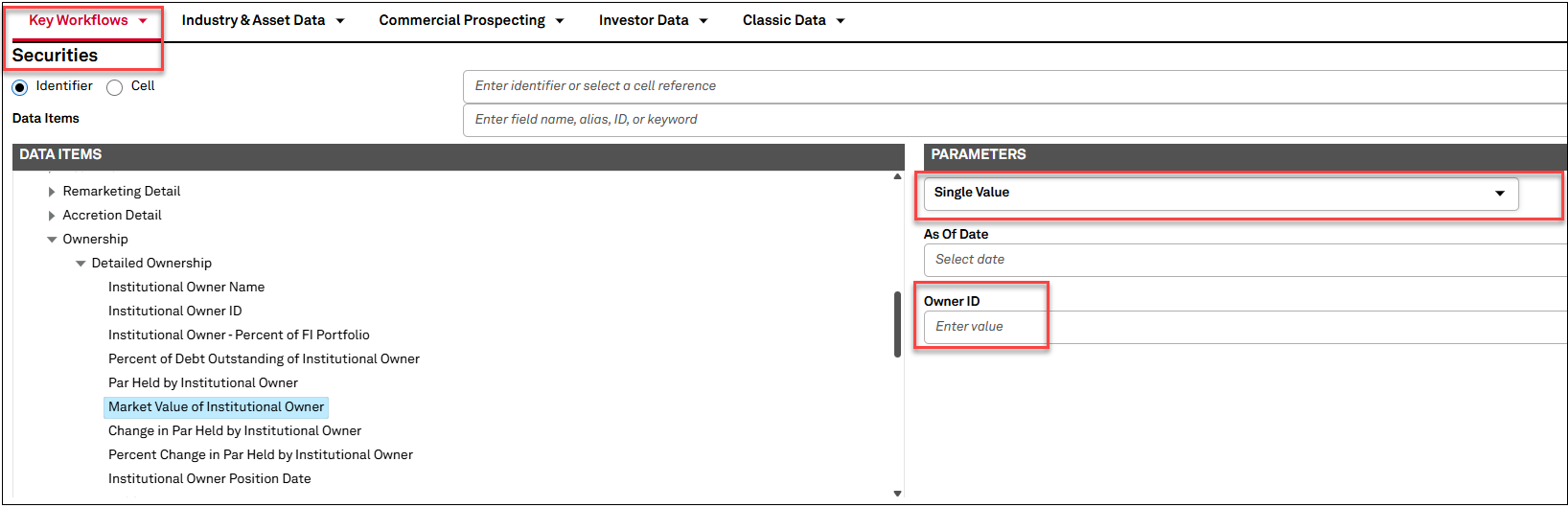
Users can now retrieve security-level ownership metrics for fixed income securities, for specific holders in S&P Capital IQ Pro Plug-in. This enhanced feature is seamlessly integrated into the existing RangeV formulas within the Detailed Ownership folder.
Find it in S&P Capital IQ Pro Plug-In
In Excel, launch the S&P Capital IQ Pro Plug-in and open Formula Builder
Under Key Workflows, select Securities
Expand Fixed Income > Ownership > Detailed Ownership
Select any data item value in the folder, e.g., Market Value of Institutional Owner
In the Parameters section, select Single Value in the dropdown and add the Key Instn of the Holder entity in the Owner ID field
Sustainability
In this release, we enhanced our environmental data offering across Screener and the S&P Capital IQ Pro Plug-in with new datapoints, including PCAF Scores for As-Reported GHG data and details on companies’ reporting boundaries, providing greater transparency for audit requirements.
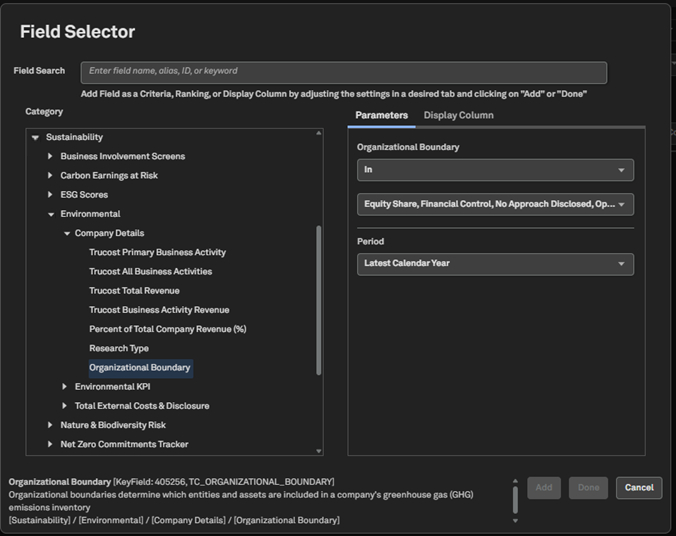
Reporting Boundary metric in Screener, S&P Capital IQ Pro Plug-in, Dashboard
Environmental dataset users can now access reporting boundary information, which indicates the approach companies use to consolidate their GHG emissions across their legal and organizational structures, available across Screener, S&P Capita IQ Pro Plug-in, and Dashboard.
Find it in the platform:
Screener
Navigate to Screener from the top navigation bar or from the Apps & Links menu
Select Companies view, navigate to the Sustainability category under Browse Criteria on the left
Expand Environmental > Company Details to view the Reporting Boundary metric
S&P Capital IQ Pro Plug-in
In Excel, launch the S&P Capital IQ Pro Plug-in and open Formula Builder
Expand Sustainability > Environmental > Company Details to view the Reporting Boundary metric
Dashboard
Navigate to Dashboard and open the Add Widget menu on the top right
Select List or Portfolio or Quote widget and open Field Selector using the settings gear icon at the top-right corner of the widget
Expand Sustainability > Environmental > Company Details to view the new Reporting Boundary metrics
PCAF Scores for As-Reported GHG Data in Screener, S&P Capital IQ Pro Plug-in, Dashboard
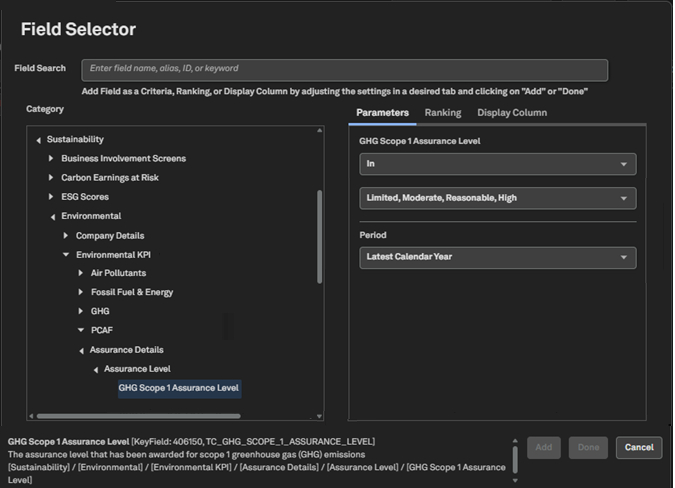
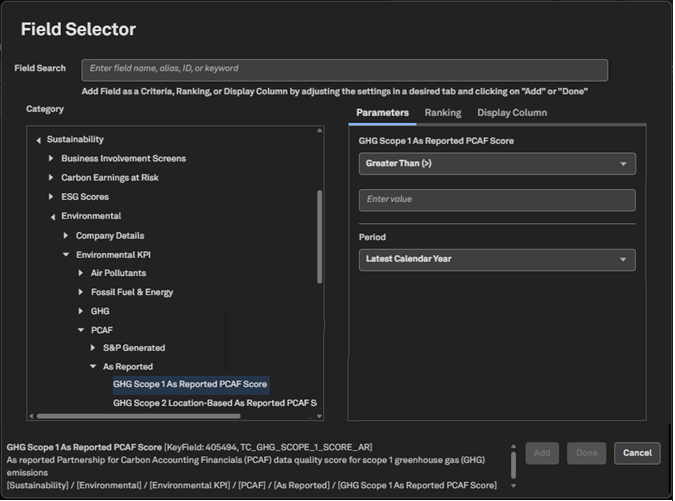
Environmental dataset users can now access PCAF Data Quality Scores for As-Reported Scope 1, 2 and 3 GHG emissions disclosures in Screener, S&P Capital IQ Pro Plug-in and the Dashboard, enabling greater transparency, comparability of emissions disclosures and deeper insights into emissions data quality.
Find it in the platform:
Screener
Navigate to Screener from the top navigation bar or from the Apps & Links menu
Select Companies view, navigate to the Sustainability category under Browse Criteria on the left
Expand Environmental > Environmental KPI > As Reported > PCAF to view PCAF scores metrics
S&P Capital IQ Pro Plug-in
In Excel, launch the S&P Capital IQ Pro Plug-in and open Formula Builder
Expand Sustainability > Environmental KPI > As Reported > PCAF to view PCAF scores metrics
Dashboard
Navigate to Dashboard and open the Add Widget menu on the top right
Select List or Portfolio or Quote widget and open Field Selector using the settings gear icon at the top-right corner of the widget
Expand Environmental > Environmental KPI > As Reported > PCAF to view new metrics
Portfolio Analytics
In this release, we enhanced Portfolio Analytics alerts by enabling users to set thresholds on security weights at both the individual holding level and across all portfolio holdings, including benchmark-relative options. This enables users to receive email notifications whenever weights move outside the defined ranges.
Security Weight Alerts
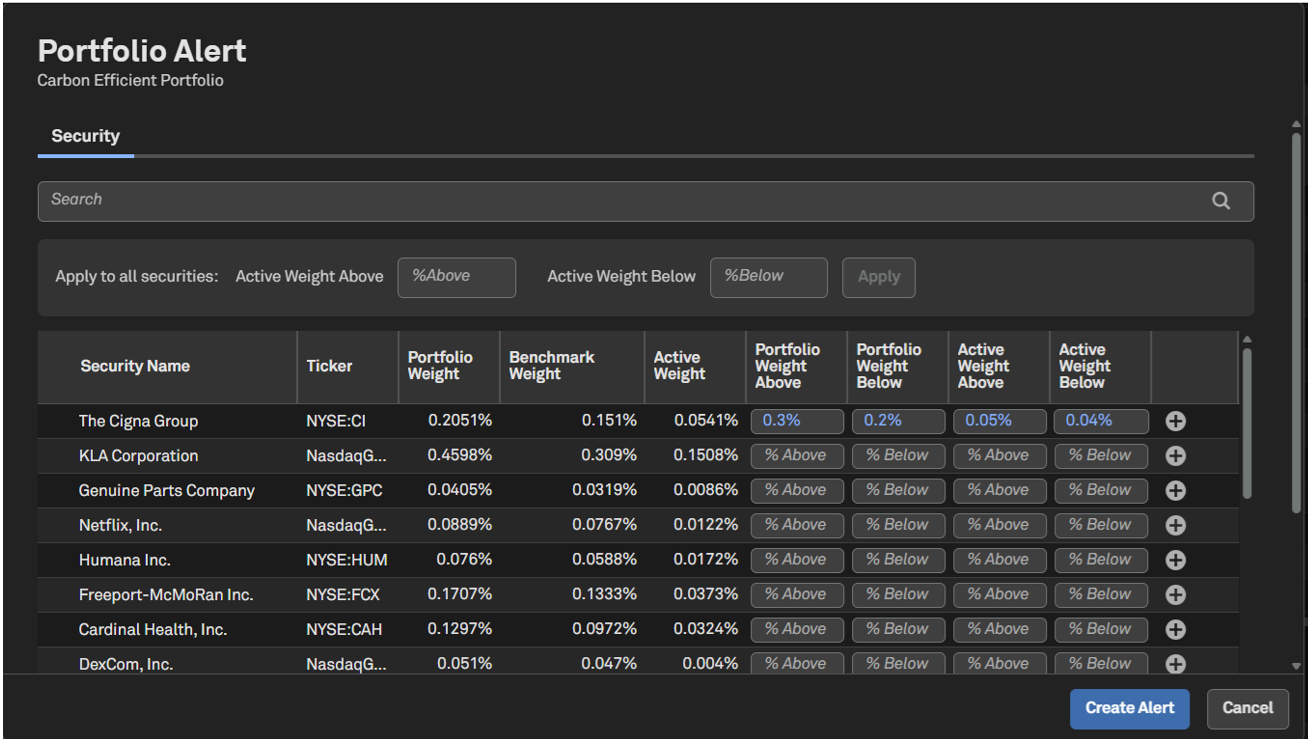
Users can now create alerts for portfolio holding weights based on absolute values or benchmark-relative thresholds to receive email notifications whenever weights drift outside the configured ranges. These alerts can be set for individual securities or applied across the entire portfolio in a single action.
Find it in the platform
Navigate to the Portfolios tab from the top navigation and select Portfolios under Management to access the Portfolio Dashboard
Click the ellipsis menu to the left of the portfolio name and select Create Alert
Or select Create Alert from the Bell icon on the right side of the top navigation
Choose to apply the same weight range threshold to all securities in the portfolio or for individual holdings
Set weight thresholds for portfolio weights only, weights relative to the benchmark or both
Select the alert frequency and click on Create Alert on the bottom right
Insurance
In this release, we expanded U.S. Statutory Insurance coverage in S&P Capital IQ Pro platform for enhanced analysis of insurer investment disclosures. We introduced new data items under the Bond Portfolio Composition and Bond Average Asset Quality sections on the Investment Analysis page, for all filer types, including P&C, Life, and Health. A new Schedule D Part 1A page is added, and the Summary Investment Schedule page is updated to include the new data items.
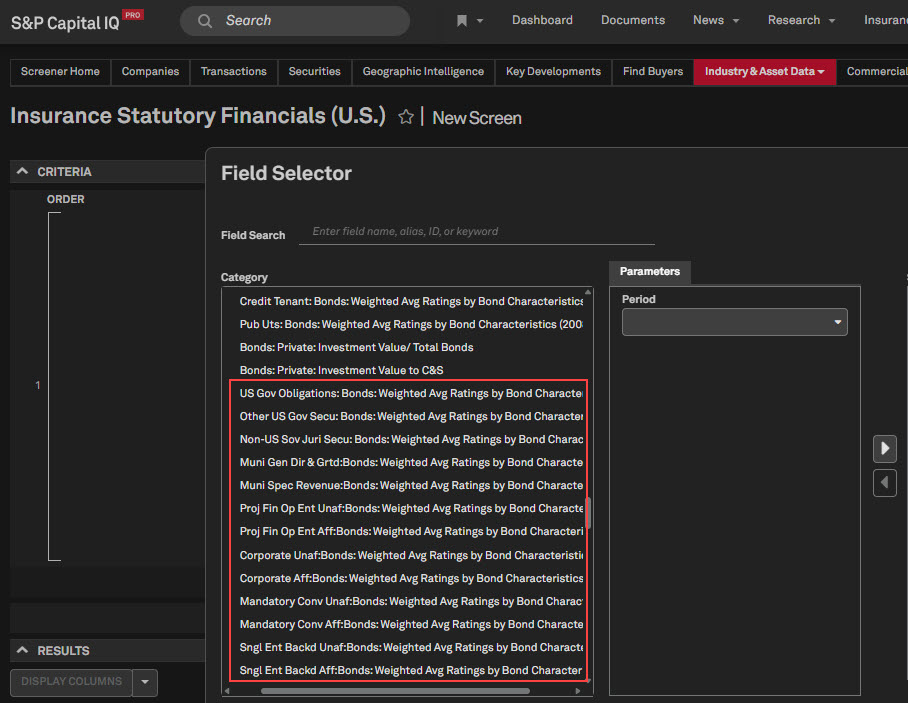
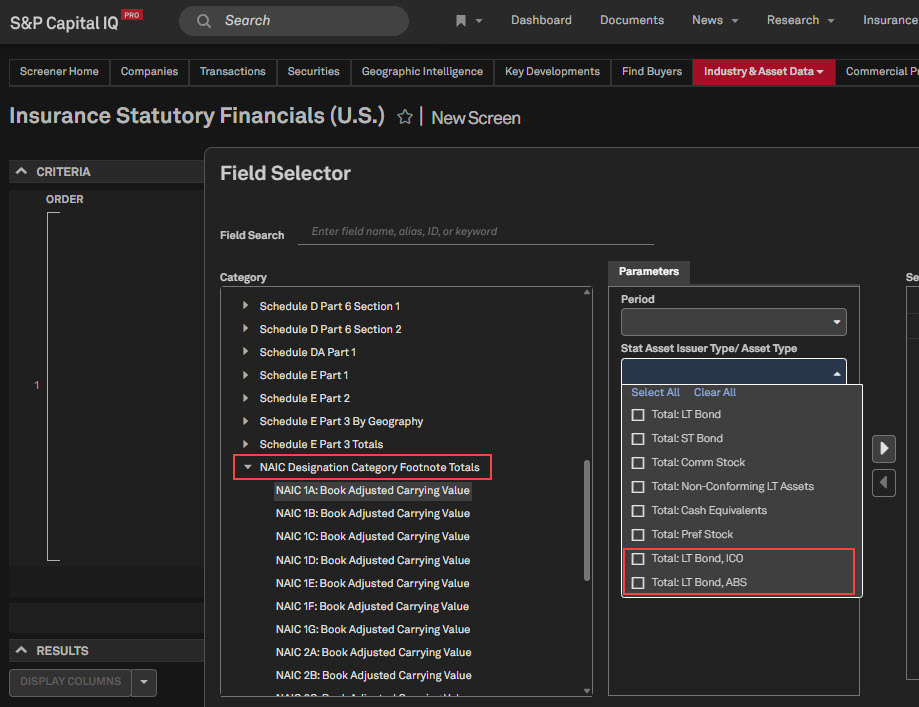
In Screener, the Investment Analysis subcategory now features new data items in additional dropdowns for Schedule DA Part 1 and Schedule BA Part 1, and the dropdown now includes ICO and ABS for the NAIC Designation Footnotes. Electronically filed fields, such as Collateral Type and Investment Characteristics, are also added.
Additionally, we introduced the U.S. Insurance Manual Library functionality on S&P Capital IQ Pro, transitioning it from the legacy ratefiling.com platform. The Manual Library is a digital archive that consolidates thousands of filings into complete, structured manuals, offering analyst-curated competitor rates, rules, and form manuals for insurance pricing and product analysis.
New Schedule D Part 1A Page
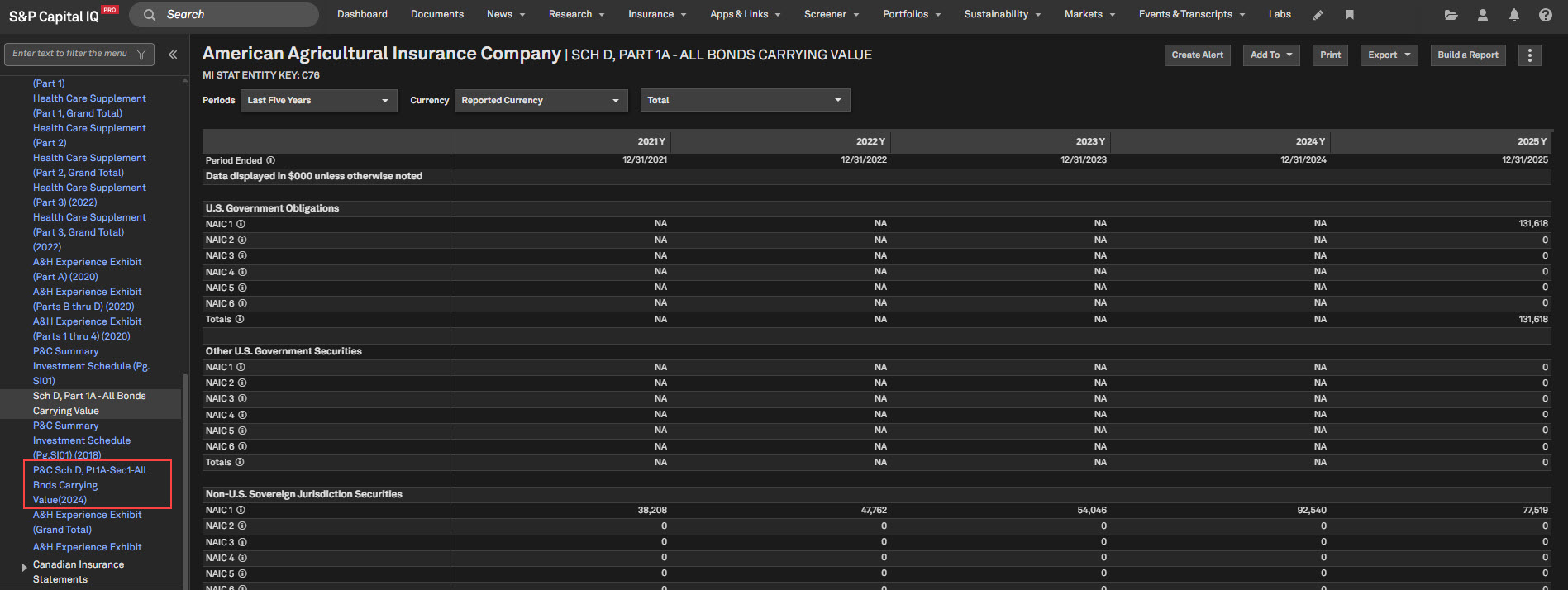
In accordance with the latest Principal-Based Bond Definition (PBBD), a new page titled ‘Sch D, Part 1A - All Bonds Carrying Value’ is added for all filer types to display the most recent NAIC updates. The existing page, ‘Sch D, Part 1A - Sec 1 - All Bonds Carrying Value’ is marked as historical by appending 2024 to its title.
Find it in the platform:
Search for and select an Insurance company from the top search
In the left-hand menu, navigate to Financials > U.S. P& C Statutory, NAIC Format > Sch D, Part 1A-All Bonds Carrying Value
Investment Analysis Page - New Metrics in Bond Portfolio Composition & Bond Average Asset Quality sections
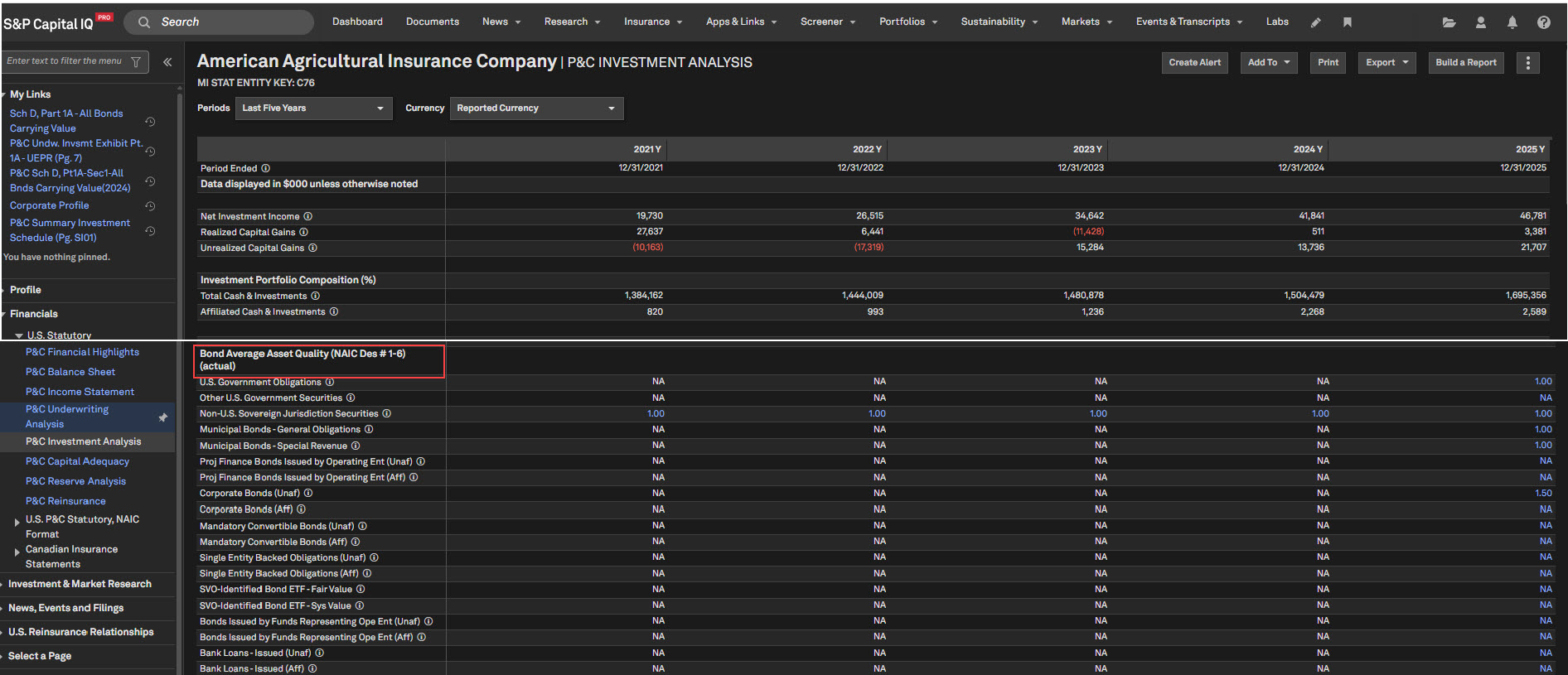
Users can now access the enhanced Investment Analysis page, featuring new data items from Schedule D Part 1A, incorporated in the Bond Portfolio Composition and Bond Average Asset Quality sections, covering all relevant categories at the total level. This update ensures comprehensive, detailed insights into bond portfolios and asset-quality metrics, aligned with the latest regulatory reporting standards.
Find it in the platform:
Search for and select a relevant company from the top search
In the left-hand menu, navigate to Financials > U.S. Statutory > P&C Investment Analysis
Updates to the Summary Investment Schedule
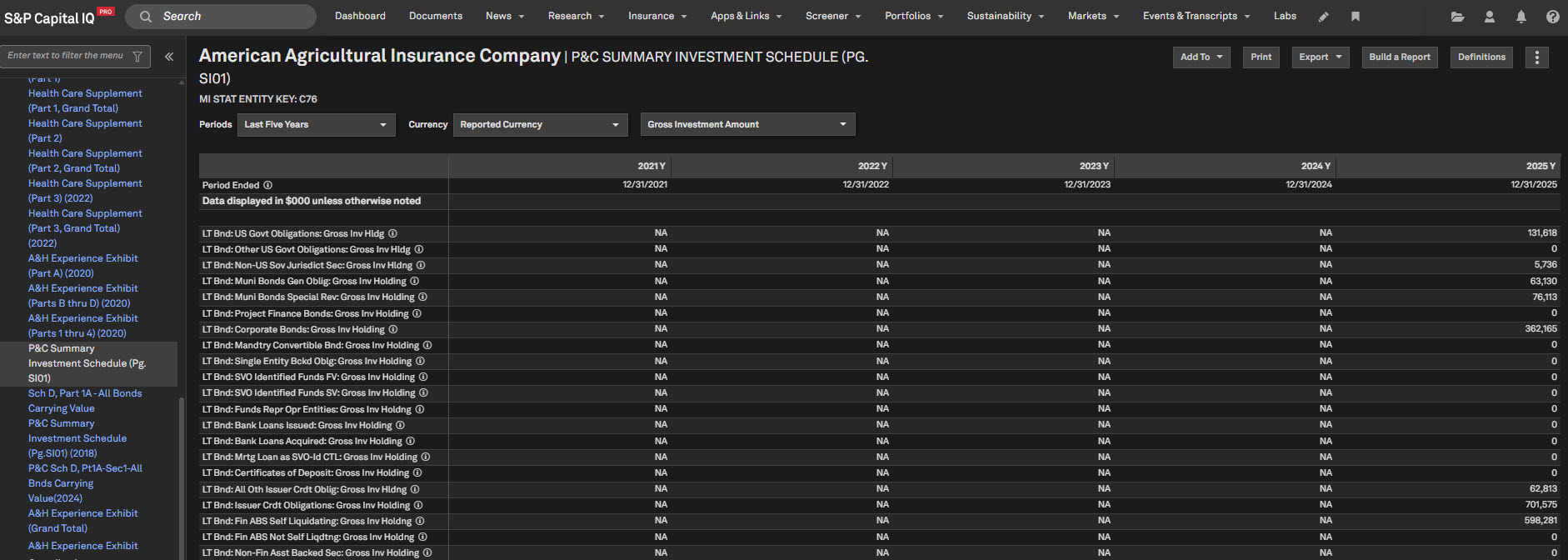
Users can access new data items in the Summary Investment Schedule on the dedicated Summary Investment Schedule (Pg. SI01) page. This update ensures the list of items exactly matches those in the 2025 annual statement of the insurance company, providing a comprehensive, up-to-date view of the data. Fields no longer required to be filed by companies are moved to the bottom of the page and marked as historical, with ‘2024’ added to their captions for clear identification. This enhancement improves clarity and aligns with the latest reporting requirements.
Find it in the platform:
Search for and select a relevant company from the top search
In the left-hand menu, navigate to Financials > U.S. Statutory, NAIC Format > Summary Investment Schedule (Pg. SI01)
New Screener Categories
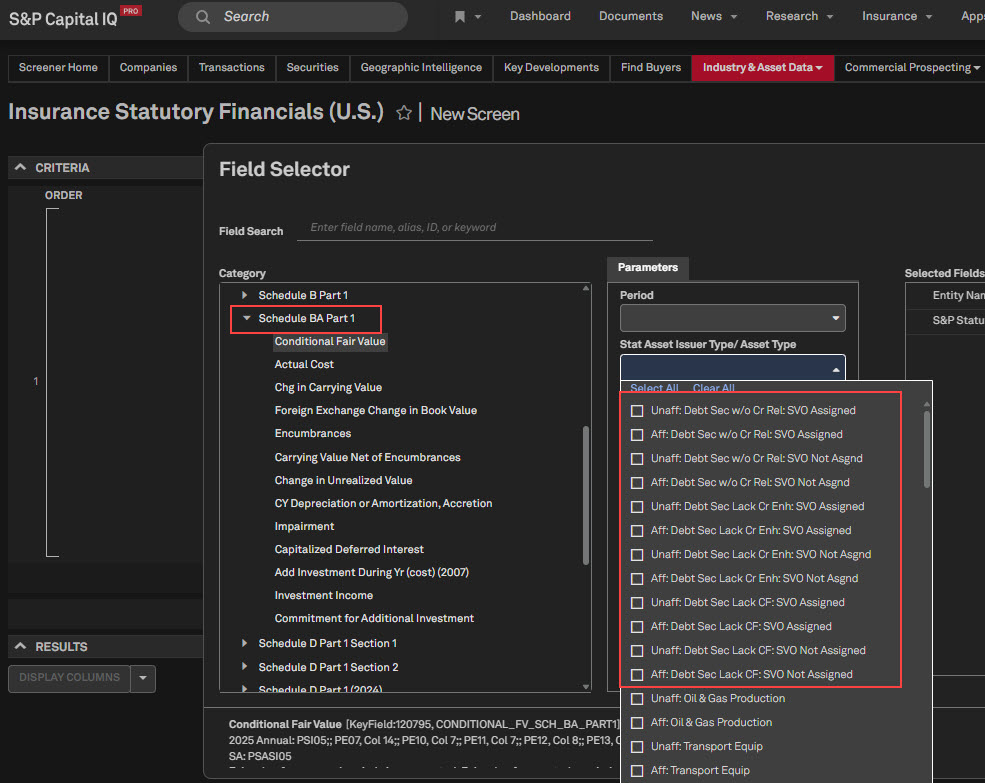
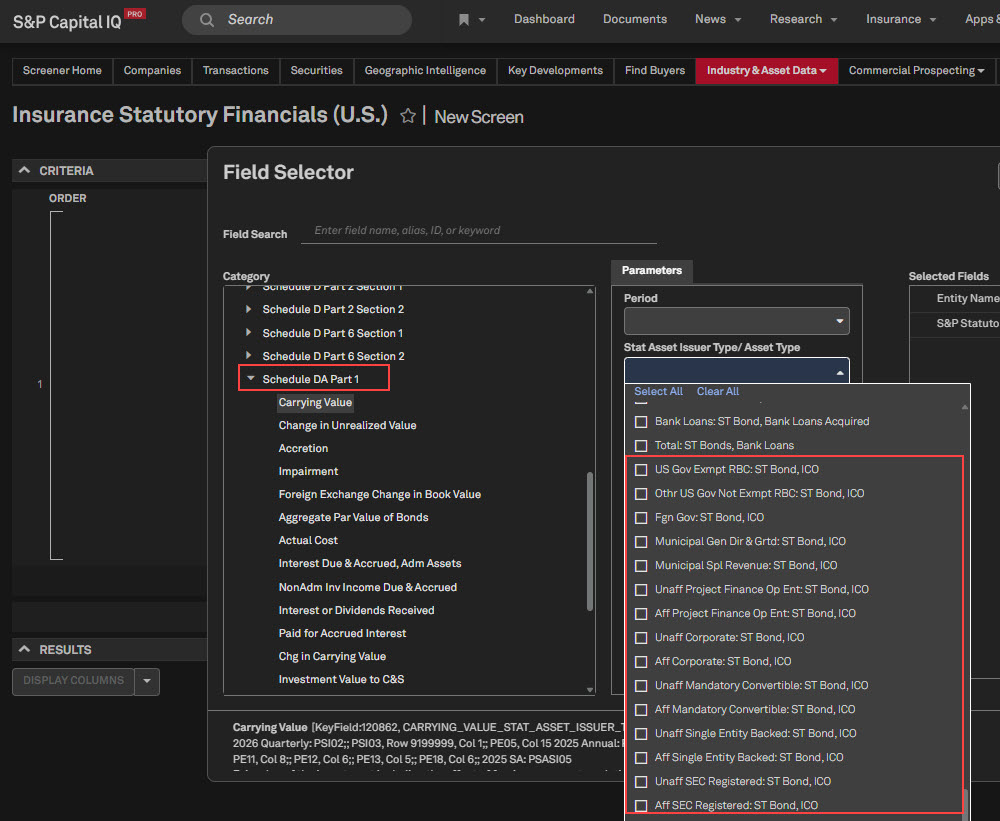
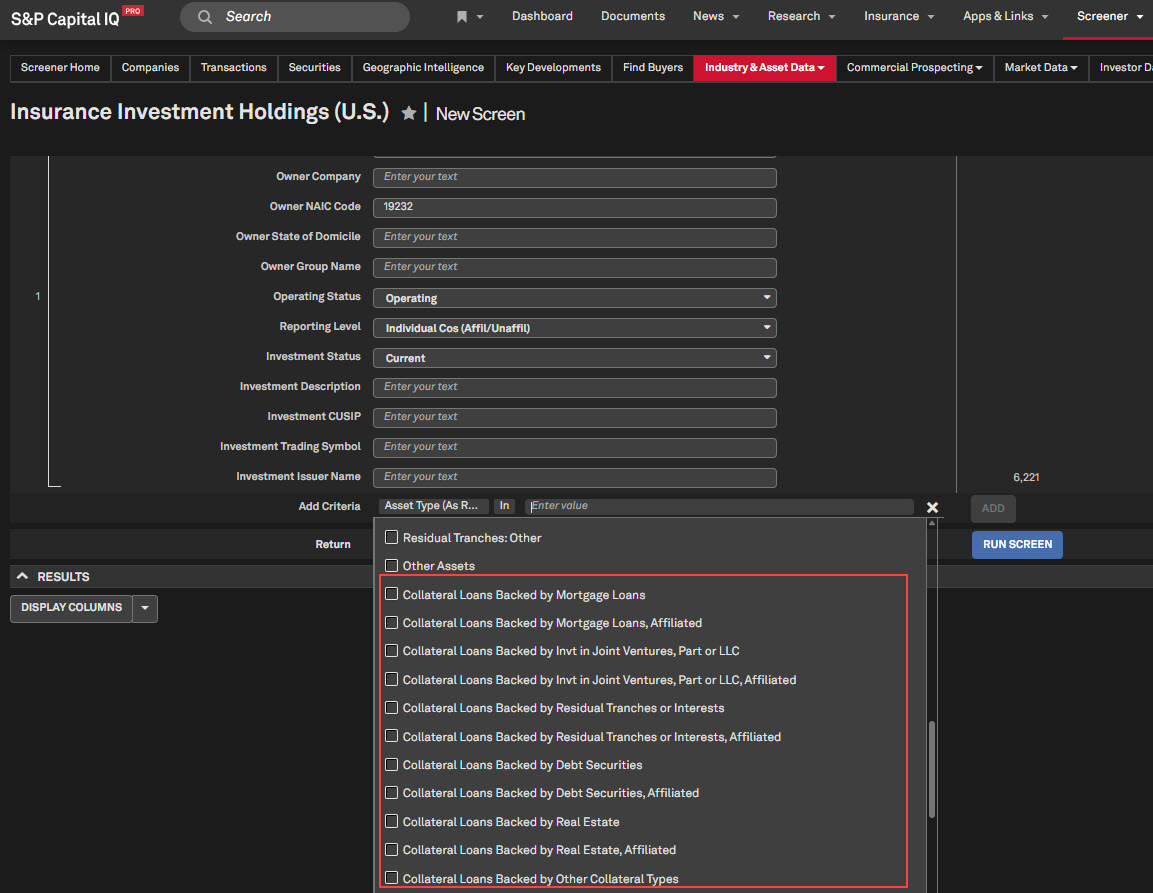
New categories in the Stat Asset/Issuer Type dropdown are incorporated into Schedule BA Part 1 and Schedule DA Part 1 in Screener to reflect the 2025 NAIC annual updates. Additionally, Schedule BA categories are now available in the Investment Holdings and Transactions datasets, enabling users to retrieve relevant information more efficiently.
Find it in the platform:
Navigate to Screener from the top navigation or the Apps & Links menu
In Add Criteria, expand Investment Data Summary > Schedule DA Part 1 or Schedule BA Part 1
Select Insurance Investment Holdings (U.S.) or Insurance Investment Transactions (U.S.)
In Add Criteria, expand Investment Asset Information > Other Long-Term Invested Assets
New Data Items in Screener
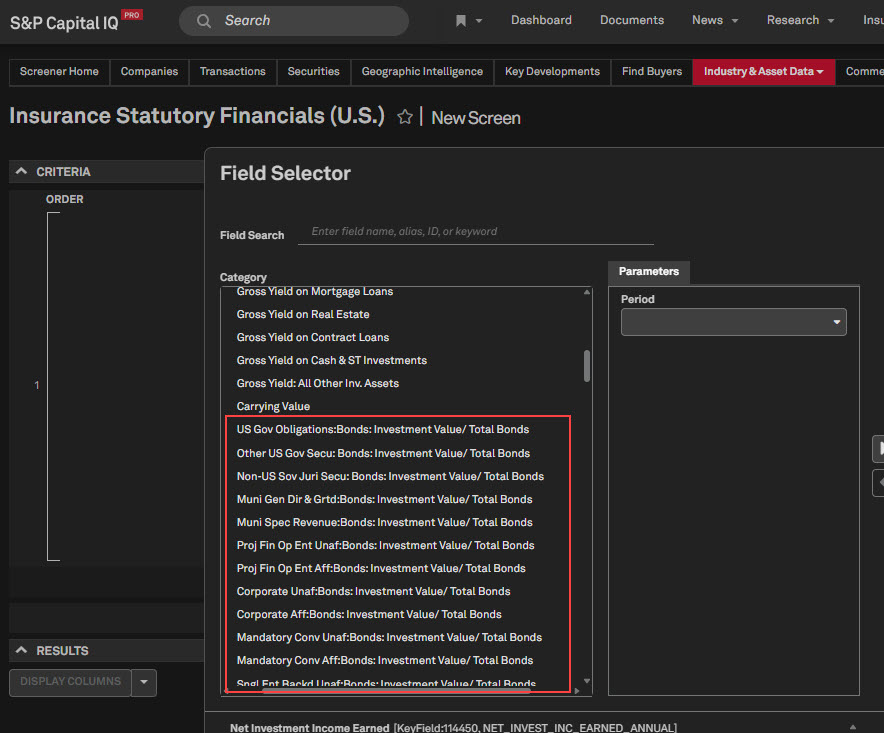
Users can access new data items in the Investment Analysis, Notes to Financials, and NAIC Designation Footnotes within the Insurance Statutory Financials dataset in Screener. Additionally, several minor updates are implemented to further enhance data accuracy and comprehensiveness.
Find it in the platform:
Navigate to Screener from the top navigation or the Apps & Links menu
In Add Criteria, expand
SNL Highlight Pages > Investment Analysis (Annual)
Notes to Financials > Aggregate Collat Loans by Qualifying Inv Collat
Investment Data Summary > NAIC Designation Category Footnotes Totals
In Add Criteria, expand
Investment Asset Information > Bonds
Investment Asset Information > Common Stock
U.S. Insurance Manual Library
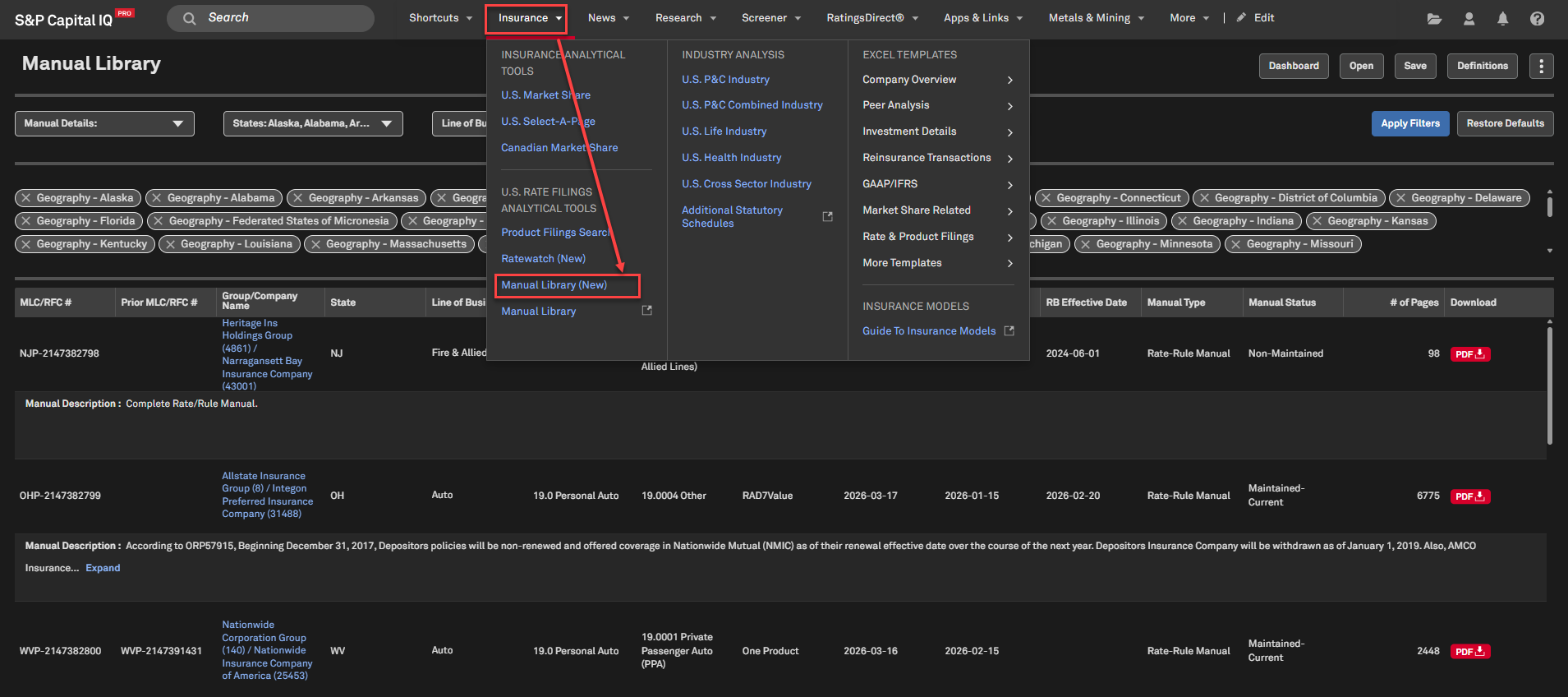
Users now have access to a digital archive of competitor rates, rule manuals, and form libraries. Maintained manuals are updated regularly with clear status indicators to support efficient regulatory and competitive workflows. Additionally, users can submit ad hoc requests to create custom manuals for specific groups, lines of business, and states.
Find it in the platform:
Navigate to the Insurance tab in the top navigation
Select Manual Library (New)
Coverage stats:
U.S. Insurance companies that report to NAIC/individual Department of Insurance
Energy
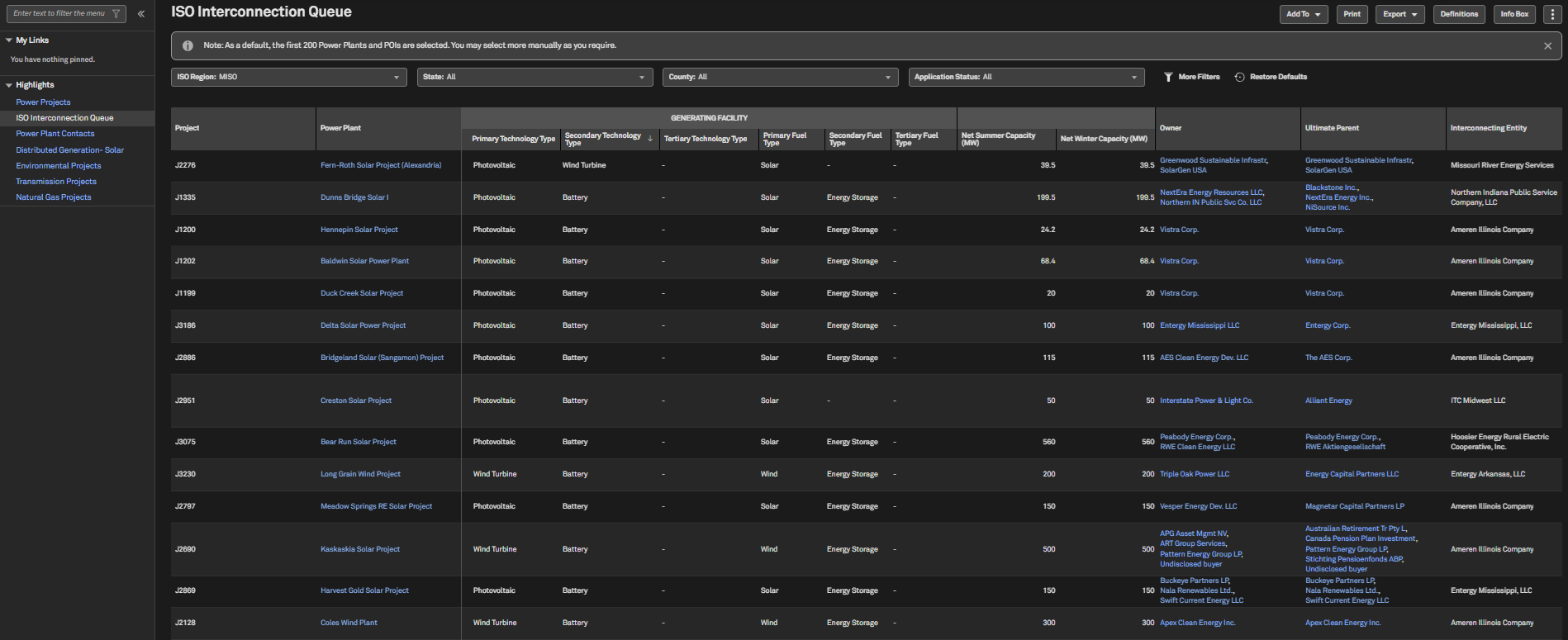
In this release, we added the Midcontinent Independent System Operator(MISO) Interconnection Queue region to the ISO Interconnection Queue page, featuring Interconnection Queue data and the relevant metrics. Additionally, we added new Renewable & Storage data items from Electric FERC Form 1.
MISO Interconnection Queue
Users can access MISO Interconnection Queue information on the ISO Interconnection Queue page, available under the Projects tab. This information enables users to monitor shifts in electricity demand, track load defection, and safeguard against energy transition and technology risks.
Find it in the platform:
Navigate to Projects from the top navigation
If it's not visible, click Edit on the right side of the navigation and add Projects from the Additional Menu Items and click Save
Select ISO Interconnection Queues
Set the region as MISO to access relevant data
Coverage stats:
All projects available in the MISO Interconnection queue starting from 2026
FERC Renewable & Storage data
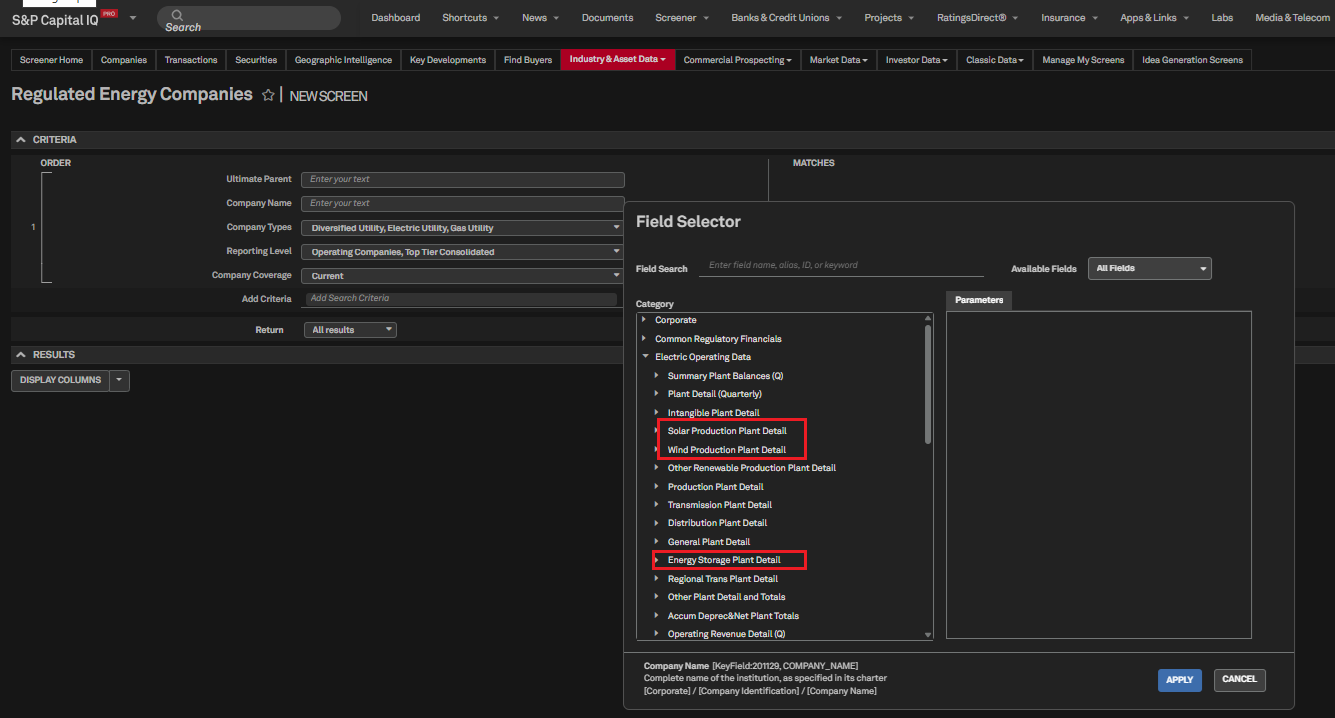
Users can access solar, wind, storage and other storage data from the Regulated Energy Companies dataset within Screener and use it to benchmark electric utility expenses and compare the efficiency of renewable power production.
Find it in the platform:
Navigate to Screener from the top navigation or the Apps and Links menu
Select Energy & Utilities > Regulated Energy Companies
Go to Display Columns and navigate to Electric Operating Data > O&M Expense Detail
Set the desired parameters and move the new O&M fields to the Selected Fields column
Click Apply and Run Screen
Coverage stats:
All reporting entities starting from 2025
Metals & Mining
In this release, we expanded the Mine Economics Cost Curve to include Graphite and introduced Modeled Cost pages for Manganese properties, offering deeper insights into production, cost structures, and project economics across these commodities. Additionally, we enhanced the Drill Results Screener by integrating the complete rare earths commodity tree, facilitating more intuitive commodity selection and targeted analysis of rare earth drill activity. Additionally, we integrated the Value in Use (VIU) metric for Iron Ore in the cost curve, empowering users to assess the true economic value of iron ore products based on their chemical and physical properties, and supporting more informed purchasing, benchmarking, and strategic decisions.
Introducing Graphite in the Mine Economics Cost Curve
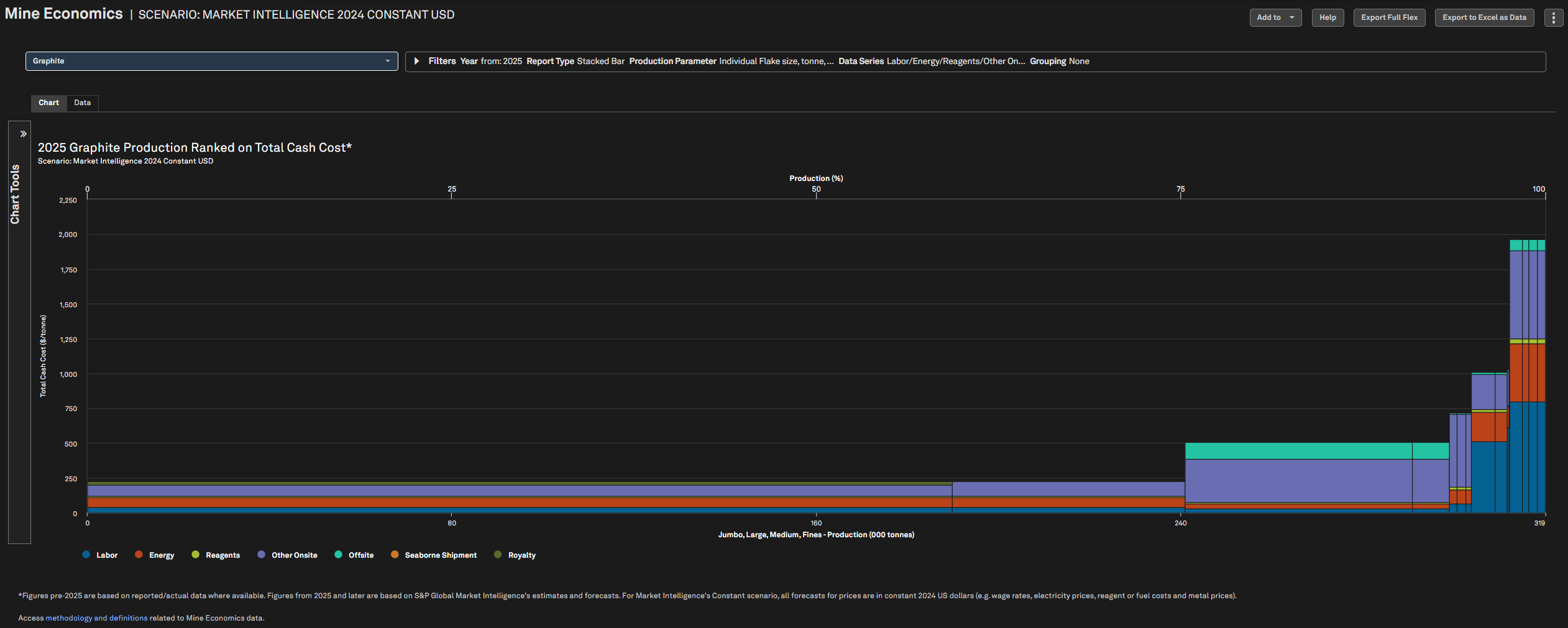
Users can access the new graphite cost curves, which feature modeled cost data for graphite mines from 1991 to 2050. This cost curve provides a visual representation of graphite mining costs, enabling users to analyze the economic viability of different mining operations. Users can utilize this tool to assess production costs, identify potential cost-saving opportunities, and perform scenario analysis for future pricing and operational strategies.
Find it in the platform:
Navigate to Metals & Mining in the top navigation and select Mine Economics Cost Curve
Select Graphite in the commodity dropdown
Coverage stats:
Commodities covered include Cobalt, Copper, Gold, Graphite, Iron Ore, Lead, Lithium, Manganese, Molybdenum, Nickel, Palladium, Platinum, Rhodium, Silver and Zinc.
Addition of Modeled Cost pages for Manganese Properties
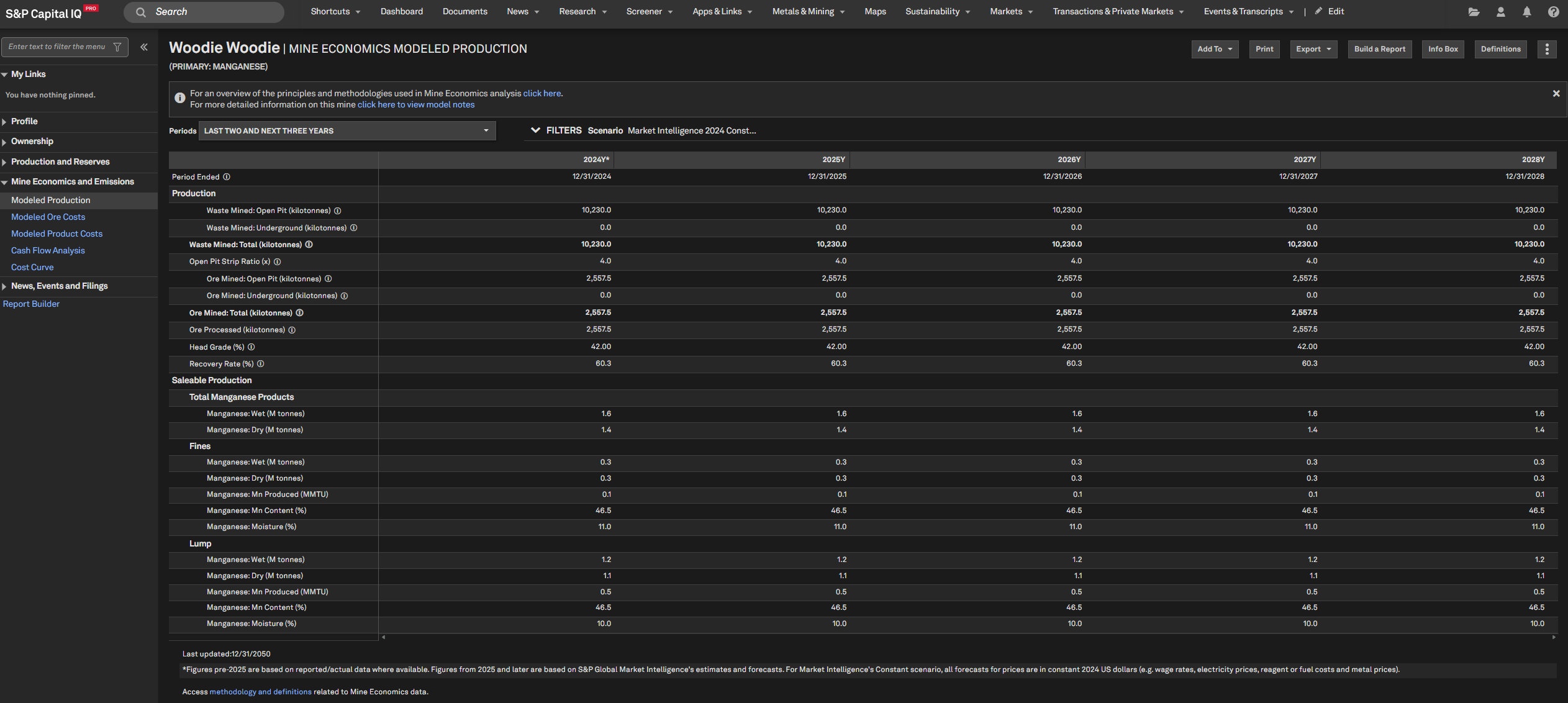
Users can access the extended Modeled Cost pages for manganese properties, which now include four new analysis pages: Modeled Production, Modeled Ore Cost, Modeled Product Cost, and Cash Flow Analysis. These modeled views enable users to effectively evaluate long-term cost structures, production outlooks, and project economics.
Find it in the platform:
Search for and select a manganese property in the top search e.g. UMK
In the left-hand navigation, expand Mine Economics & Emissions to view newly added pages
Or select Metals & Mining from the top navigation and click on Mine Economics Cost Curve
Select Manganese and go to the Data tab
Click on any property’s hyperlink to navigate to its modeled cost pages
Coverage stats:
Commodities covered include Cobalt, Copper, Gold, Iron Ore, Lead, Lithium, Manganese, Molybdenum, Nickel, Palladium, Platinum, Rhodium, Silver and Zinc.
Expanded Rare Earths Commodity Tree in Drill Results Screener
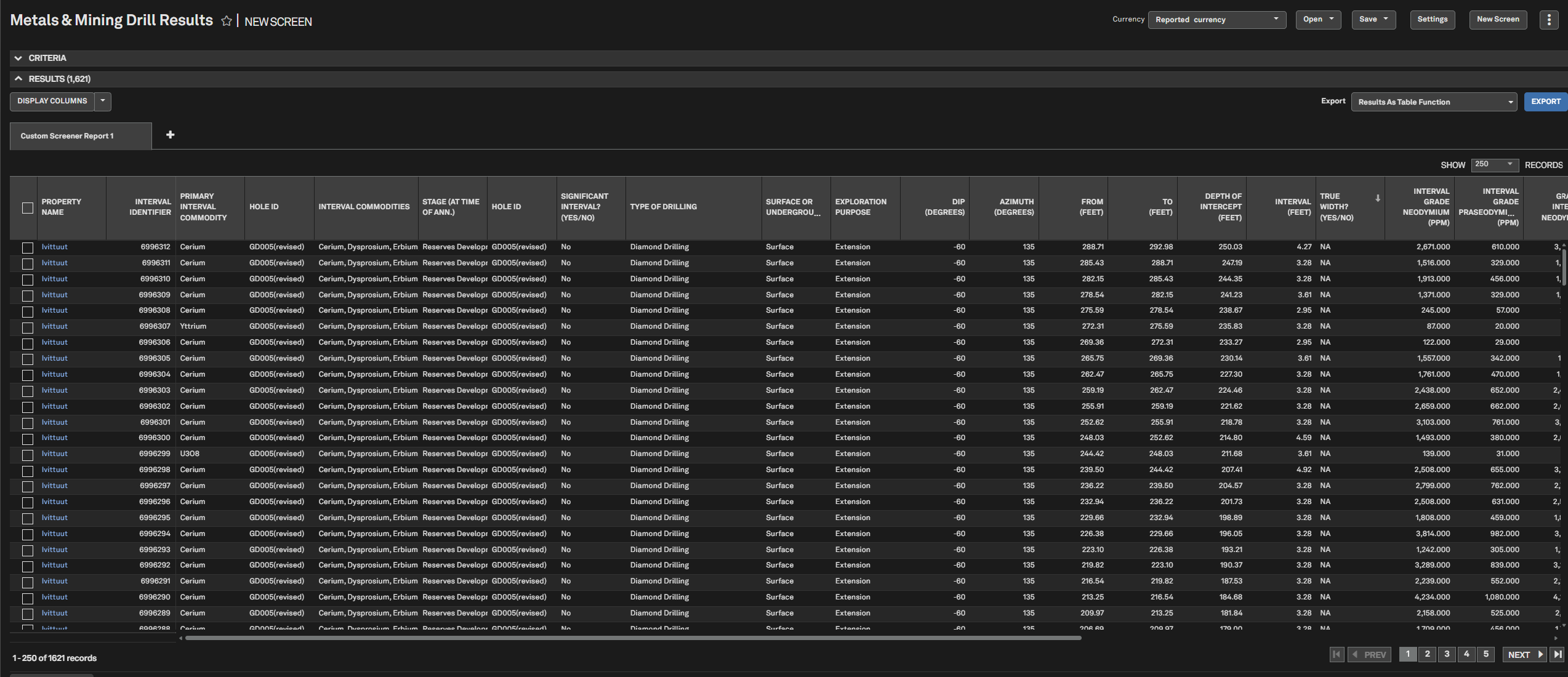
Users can access the enhanced Drill Results Screener, now featuring the full rare earths commodity tree. This update enables the direct selection of Rare Earths, Light Rare Earths, and Heavy Rare Earths, making commodity selection more intuitive and enabling more precise filtering and analysis of rare-earth drill results.
Find it in the platform:
Navigate to Screener from the top navigation or the Apps & Links menu
Under Industry & Asset Data, select Metals & Mining Drill Results
In the Add Criteria, expand Commodity > Rare Earth Elements
Value In Use Integration for Iron Ore Cost Curve
Users can now access the Value in Use (VIU) metric for Iron Ore within the cost curve analysis. VIU quantifies the economic benefit of iron ore based on its chemical and physical properties, enabling users to assess the true value of different iron ore products and grades.
Find it in the platform:
Navigate to Metals & Mining from the top navigation and click on Mine Economics Cost Curve
In the Commodity dropdown, select Iron Ore
Go to the Data Series dropdown and select any Value in Use cost series displayed
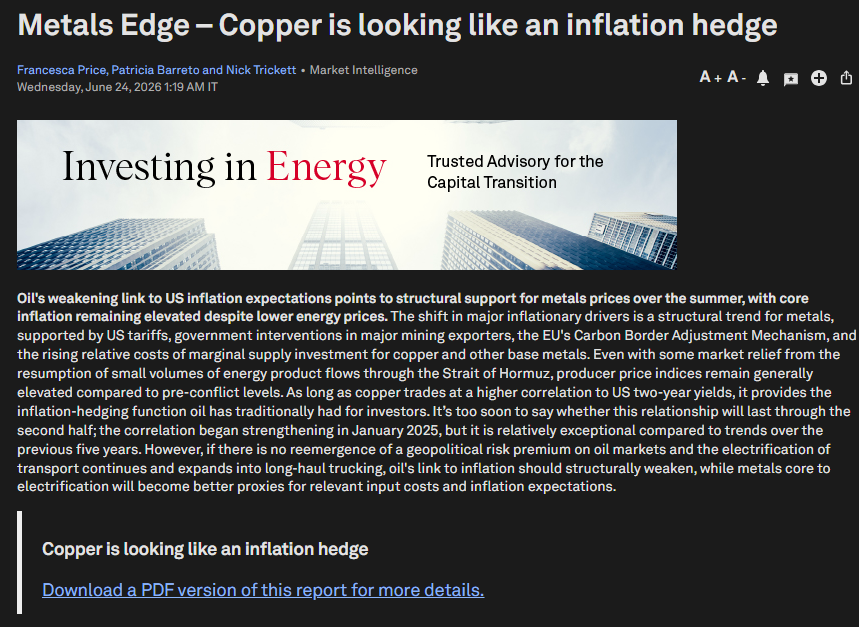
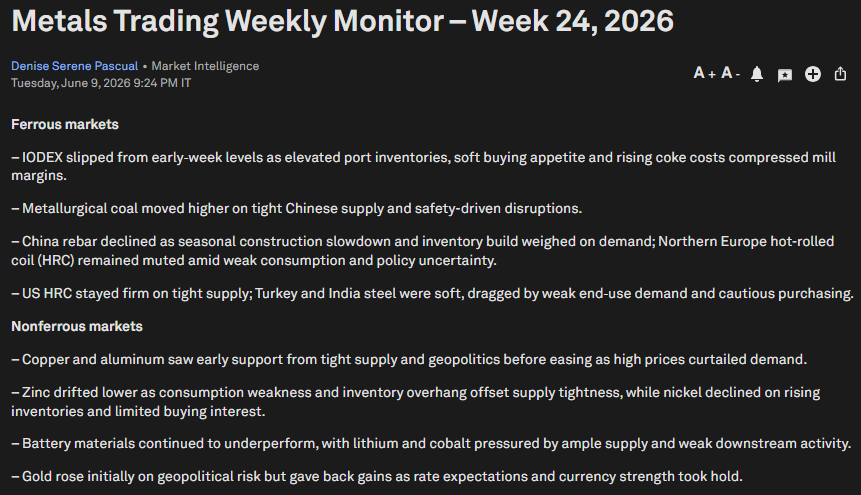
Introducing Metals Trading Research (MTR) and Short-Term Analytics (STA) reports in the Research Library
We have launched a suite of new Metals research reports to empower traders and financial clients with timely, actionable insights across metals supply, pricing, and trading opportunities.
MTR Weekly Monitor: A weekly dashboard-style report divided into Ferrous and Non-Ferrous metals, providing comprehensive price assessments, analysis of week-on-week movements, and links to relevant news and research for strategic planning and risk management.
First Take Metals (FTM): Concise, real-time updates on price direction in response to breaking news, categorized as Bullish, Bearish, or Neutral. FTM insights are also shared instantly via a dedicated WhatsApp channel for rapid client access.
Metals Market Impact (MMI): Ad-hoc reports focused on identifying arbitrage opportunities and actionable trading implications across metals markets and geographies, leveraging insights from other research products.
Weekly Edge (Metals/Critical Minerals Edge): High-frequency, newsletter-style reports integrating macro, geopolitical, and market analysis, offering directional and probabilistic views without forecasts, and serving as an incubator for new ideas and client engagement.
Quarterly Alumina Production Report: Detailed quarterly analysis of global and regional alumina supply trends, referencing supply-demand forecasts and market balance, with implications for price outlook and industry developments.
Find it in the platform:
Navigate to the Research tab in the top navigation
In Filters, choose Industry as Metals & Mining
Results appear as Research Articles, with dedicated report types coming soon
Real Estate
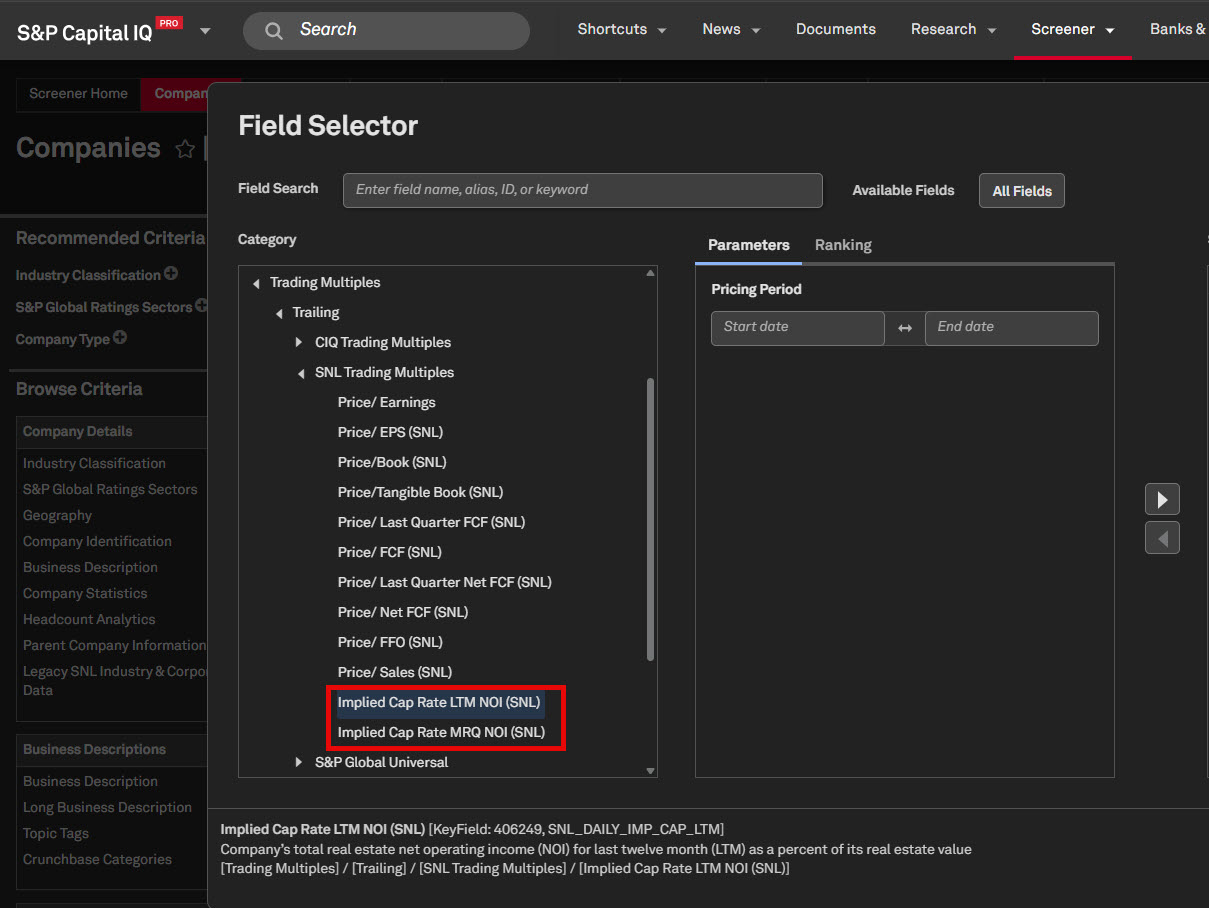
In this release, we introduced two new Daily Capitalization Rate data items for covered REITs in Screening, empowering users to evaluate REIT performance with greater accuracy and confidence.
Daily Capitalization Rate Metrics
Users can now seamlessly incorporate Daily Capitalization Rate metrics in Screener, enabling more informed decision-making.
Find it in the platform:
Navigate to Screener from the top navigation or the Apps & Links menu
Select the Companies dataset, open the Field Selector from Add Criteria or Display Columns
Expand Trading Multiples > Trailing > SNL Trading Multiples
Select the new metrics to add to the screen
RatingsDirect
In this release, we delivered significant enhancements across user experience, research discovery, and data depth. We redesigned the Corporate Profile for public and private companies to offer a cleaner, more intuitive layout, seamlessly integrating RatingsDirect and Capital IQ data for streamlined navigation.
Credit Transition Signals (Beta) , formerly Credit Transition Product, now offers full global coverage across Corporates, Banks, and Insurance sectors, reinforcing its position as a core tool for monitoring credit risk and transition dynamics. Research discovery is further improved with a more intuitive Research Search page and clearer distinction between entity-specific and sector-level articles. In addition, CreditStats Direct insurance coverage has been expanded to include IFRS 17 Financial Highlights, and Liquidity Reserve data has been surfaced for structured finance deals.
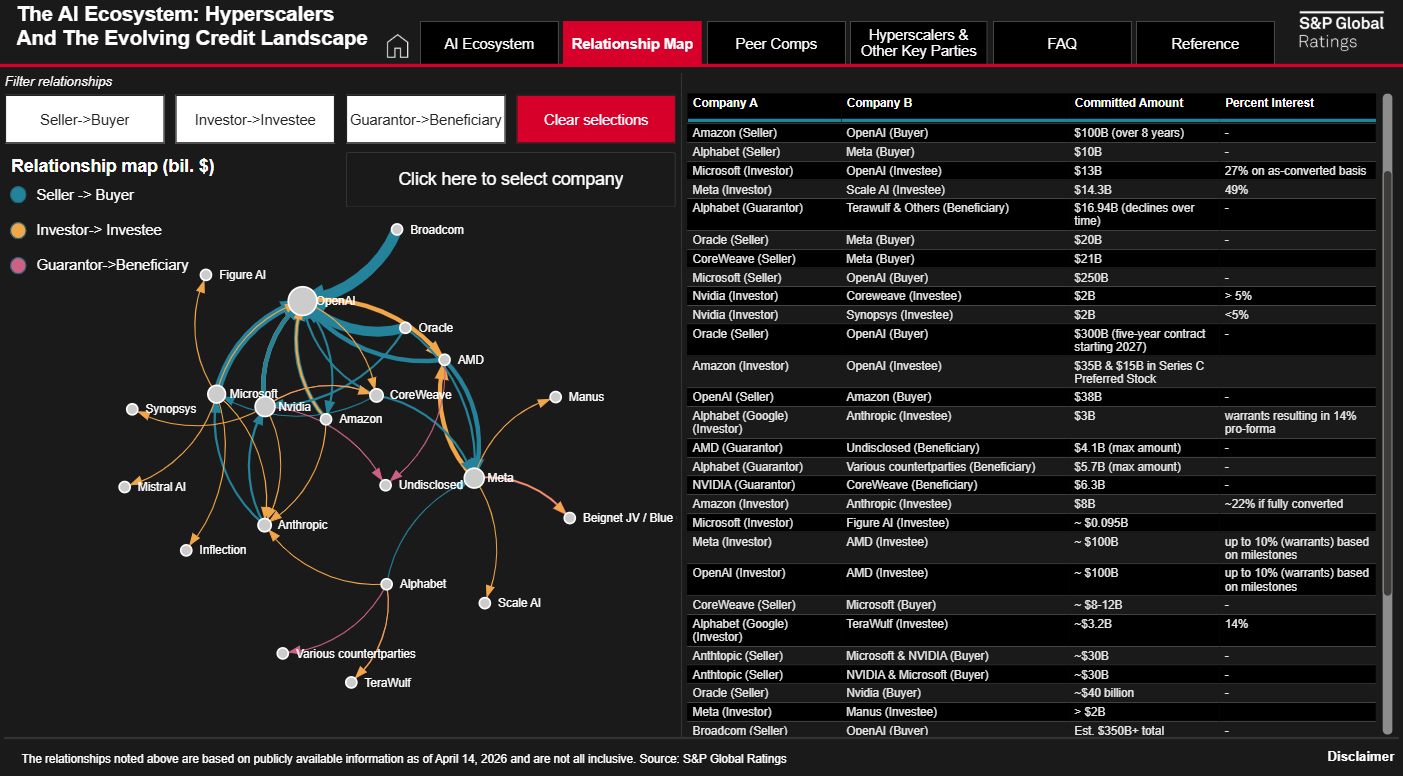
Data Visualizations - The AI Ecosystem: Hyperscalers and the Evolving Credit Landscape
Users can view a new interactive dashboard that offers a dynamic view of the AI ecosystem, highlighting hyperscalers and their role in the evolving credit landscape. The dashboard enables users to explore key participants through relationship maps and peer comparisons, illustrating commercial, investment, and contractual linkages. It also surfaces funding commitments, contingent guarantees, select financial metrics, and more, to help contextualize the scale and credit implications of AI-related activity.
Find it in the platform:
Navigate to the RatingsDirect
tab in the top navigation and select Data VisualizationsSelect the tile The AI Ecosystem: Hyperscalers and the Evolving Credit Landscape
Commentary Articles – Entity vs. Sector Tagging Improvements
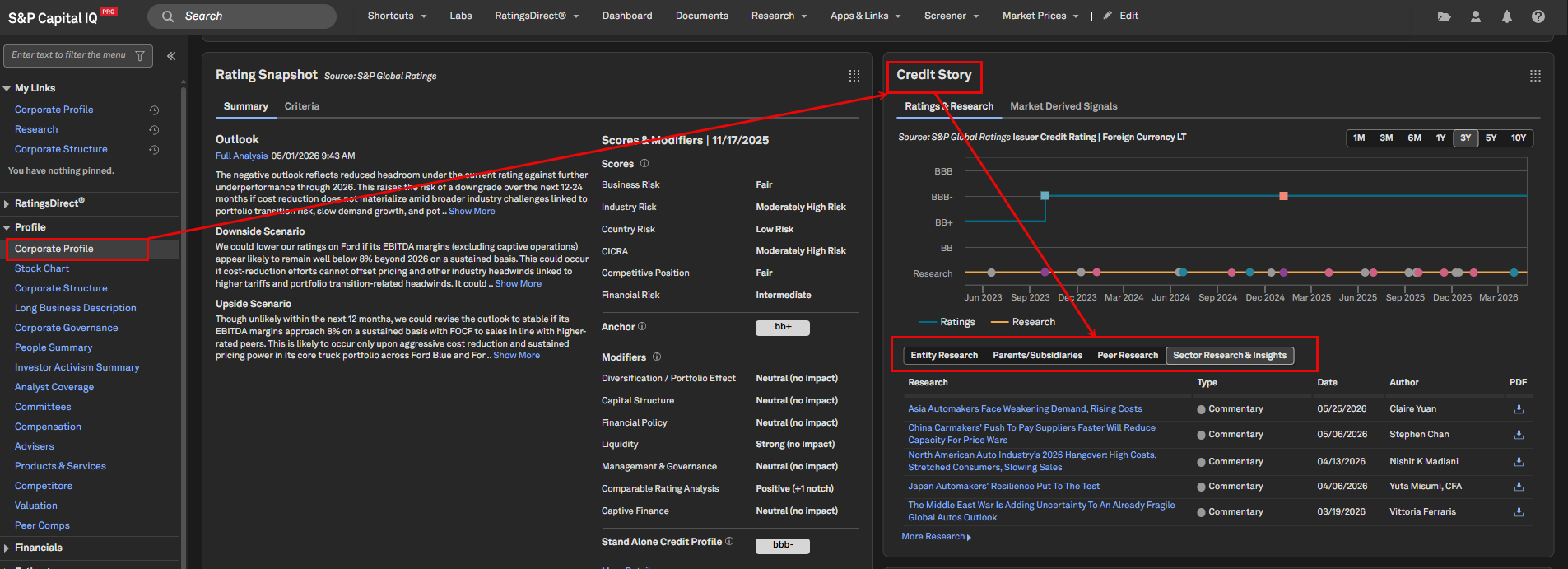
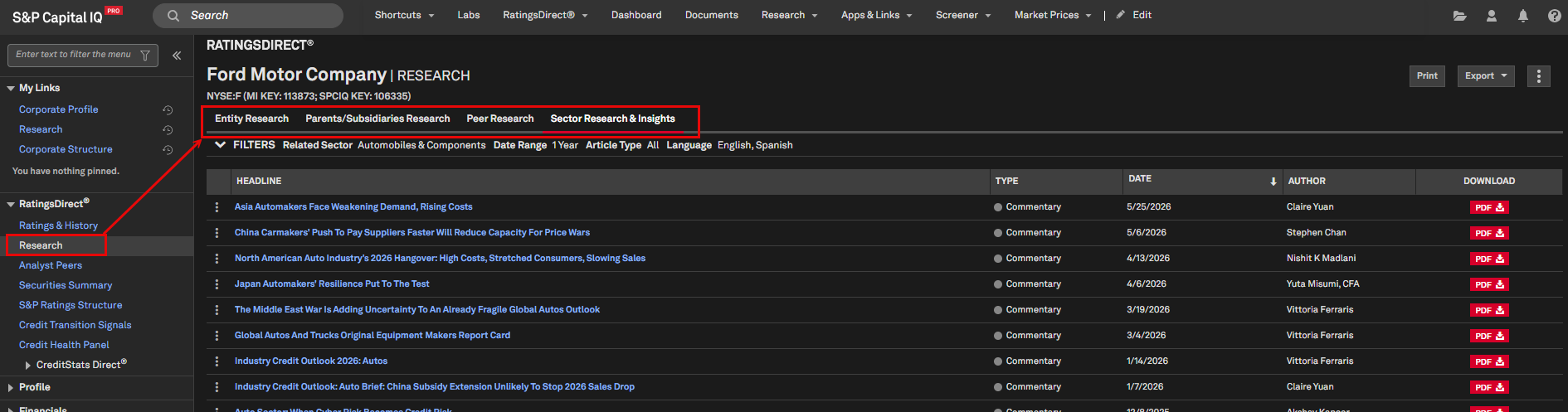
We refined tagging logic for commentary articles, enabling a clearer distinction between entity-specific and sector-level research. Below is a summary of the display logic for each research tab, available on both the Corporate Profile and Research pages for relevant entities.
Entity Research: Displays entity-specific articles where the selected entity has been tagged by S&P Ratings. As an exception, this tab also includes Industry Credit Outlooks for the entity’s S&P Global Ratings subsector(s)
Parents/Subsidiaries Research: Aggregates all entity-specific articles for each parent/subsidiary within the entity’s S&P Ratings Structure. This tab is useful for quickly identifying recent articles tagged to an entity’s ultimate parent
Peer Research: Aggregates all entity-specific articles for each S&P Ratings analyst-defined peer of the selected entity
Sector Research/Insights: Displays all Commentary articles tagged to the entity’s subsector(s)
Find it in the platform:
Search for a rated entity in the top search bar and navigate to its Corporate Profile
View the Credit Story widget
Navigate to the entity’s Research page and select any of the tabs listed above to view related articles
Credit Transition Signals (Beta) – Full Coverage
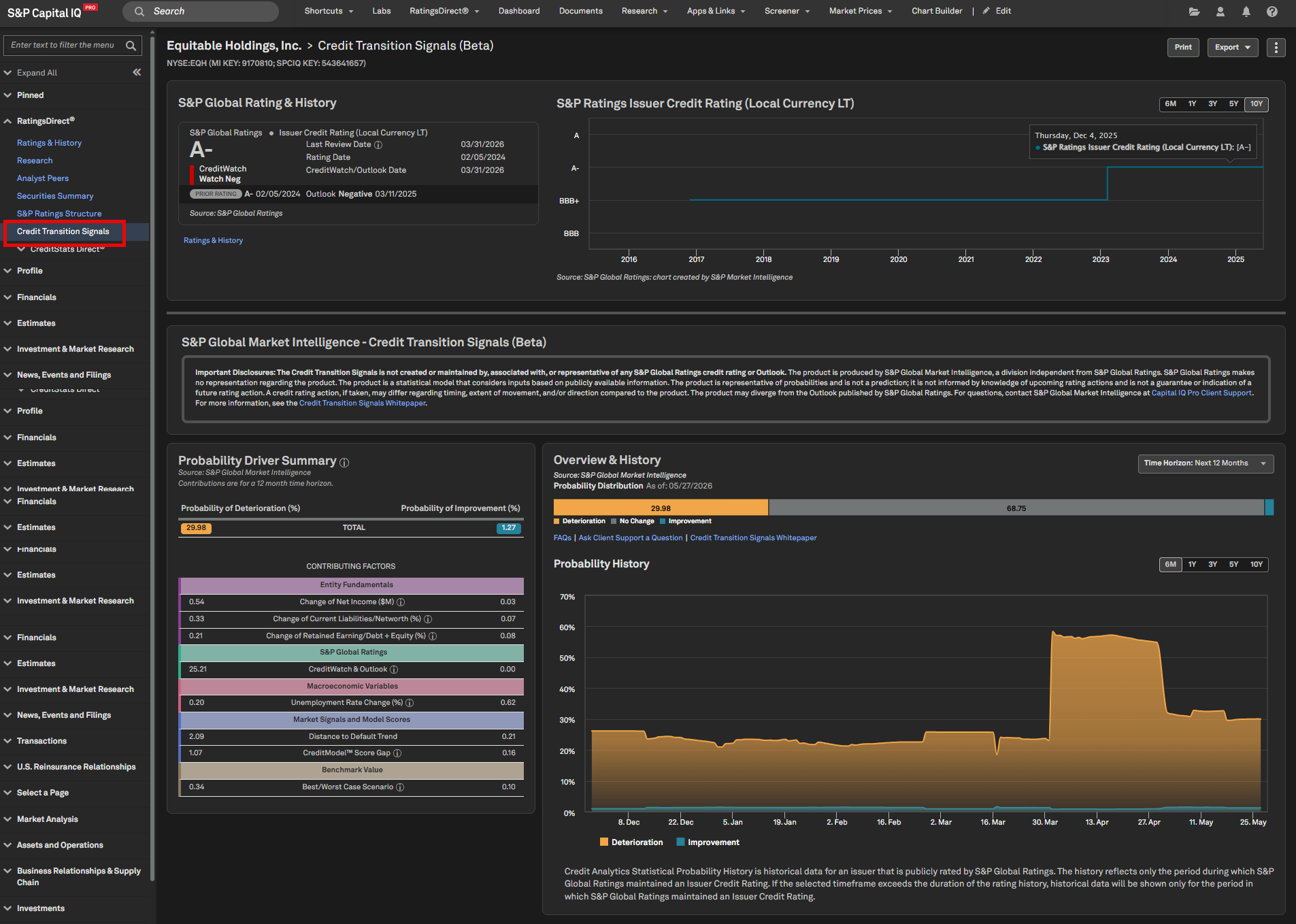
Credit Transition Signals, previously launched as Credit Transition Product (Beta), now offers full coverage across corporates, banks, and insurance entities in all regions. This enhanced coverage strengthens users’ ability to evaluate portfolio risk and proactively monitor the probability of credit quality changes. The model incorporates inputs such as Ratings history, CreditWatch/Outlook, Financials, Macroeconomic data, and Credit Analytics scores.
Note: This is a statistical model, not a prediction, and does not guarantee or indicate a future rating action. Please refer to the white paper for more details.
Find it in the platform:
Entity Profile
Search for and select a covered entity in the top search bar e.g. NYSE:EQH
Navigate to the Corporate Profile and view the Credit Transition Signals (Beta) widget
In the left-hand menu, navigate to RatingsDirect
> Credit Transition Signals for more details
Screener
Navigate to Screener from the top navigation or the Apps & Links menu and select Companies Screener
Under Browse Criteria, expand Company Details > Issuer Ratings > S&P > Credit Transition Signals
S&P Capital IQ Pro Plug-In
In Excel, launch S&P Capital IQ Plug-in and open Formula Builder
Under Data Items, expand Company Details > Issuer Ratings > S&P > Credit Transition Signals
Important Disclosure: This product is not created or maintained by, associated with or representative of any S&P Global Ratings credit rating or Outlook. Credit Transition Signals is produced by S&P Global Market Intelligence, a division independent from S&P Global Ratings. S&P Global Ratings makes no representation regarding the product. The product is a statistical model that considers inputs based on publicly available information. The product is representative of probabilities and is not a prediction; it is not informed by knowledge of upcoming rating actions and is not a guarantee or indication of a future rating action. A credit rating action, if taken, may differ regarding timing, extent of movement, and/or direction compared to the product. The product may diverge from the Outlook published by S&P Global Ratings. For questions, contact S&P Global Market Intelligence at support.capiqpro@spglobal.com. For more information, see the Credit Transition Signals Whitepaper.
Insurance CreditStats Direct - IFRS Coverage Expansion
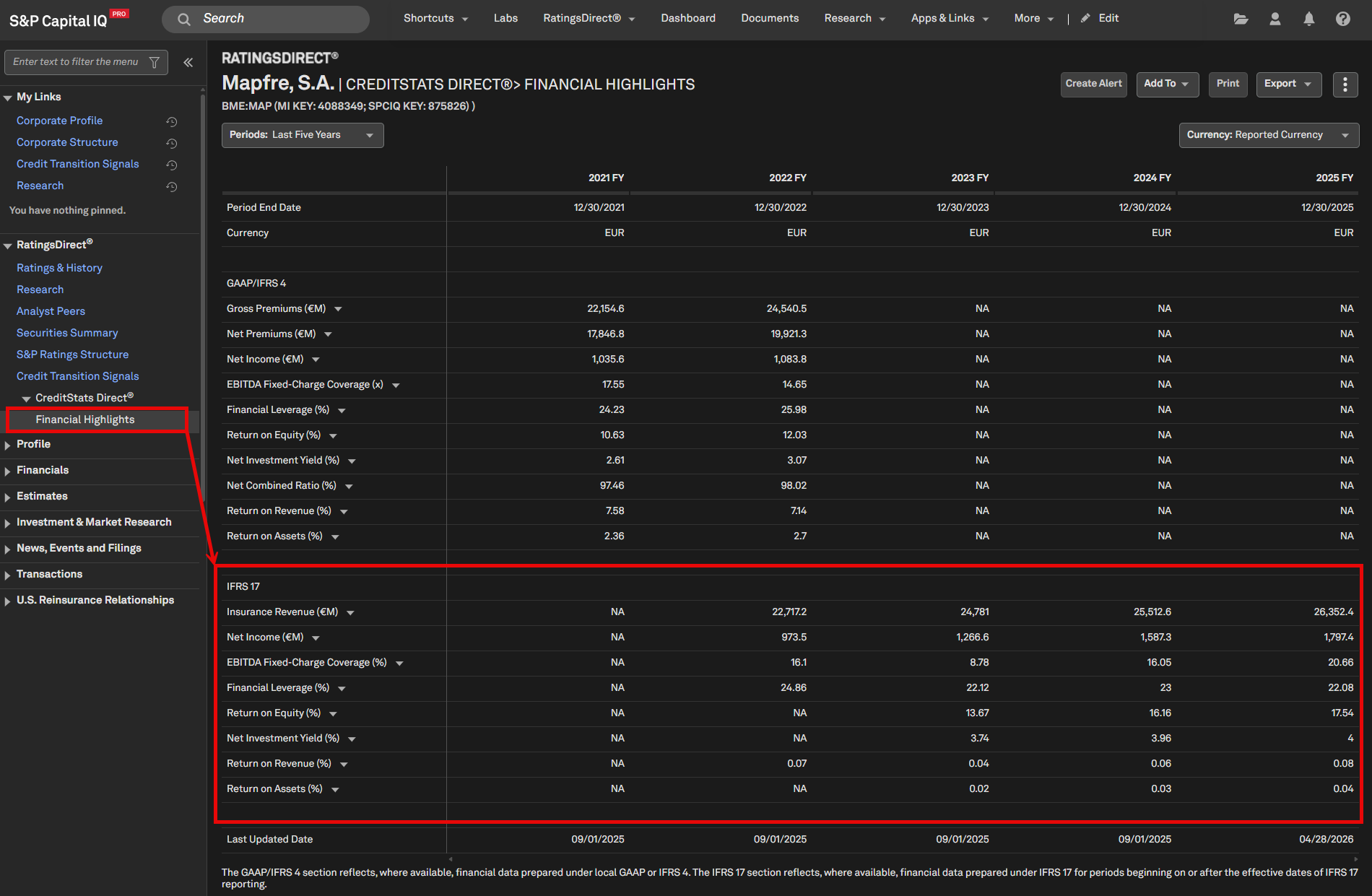
Users can now access CreditStats Direct financial highlights for insurers reporting under IFRS, expanding global coverage and improving comparability across insurance entities. This enhancement aligns financial presentation with IFRS 17, enabling more consistent analysis across regions and providing users with broader, standardized inputs for valuation and risk assessment.
Find it in the platform:
Entity Profile
Search for and select a rated insurer that reports under IFRS methodology in the top search e.g. Mapfre, S.A.
Expand CreditStats Direct
in the left-hand menu, and select Financial Highlights
Screener
Navigate to Screener from the top navigation or the Apps & Links menu and select Companies Screener
Under Browse Criteria, expand Financials > CreditStats Direct
> Insurance > Financial Highlights > IFRS 17
S&P Capital IQ Pro Plug-In
In Excel, launch S&P Capital IQ Plug-in and open Formula Builder
Under Data Items, expand Financials > CreditStats Direct
> Insurance > Financial Highlights > IFRS 17
Research Search – Usability Enhancements
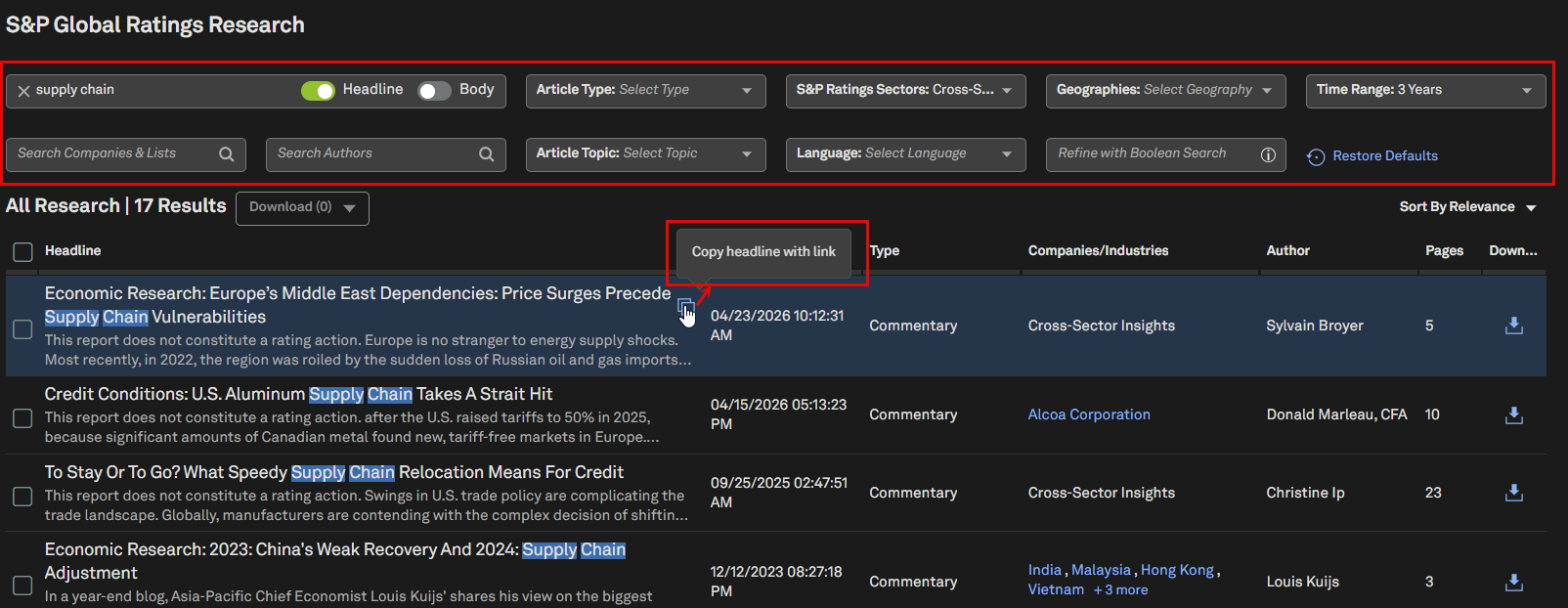
The S&P Global Ratings Research Search page now features an improved layout that makes filters easier to find and use, helping users quickly narrow results to the most relevant content. A new ‘Copy Headline with Link’ button is added, enabling quick sharing of research articles. These enhancements streamline research discovery and support more efficient collaboration.
Find it in the platform:
Navigate to the RatingsDirect
tab and select Research SearchAccess the redesigned layout that makes it easier to locate all filters
Hover over an article headline, click the blue Copy Headline with Link icon, and paste to share the article link
Structured Finance Performance Data – Liquidity Reserve
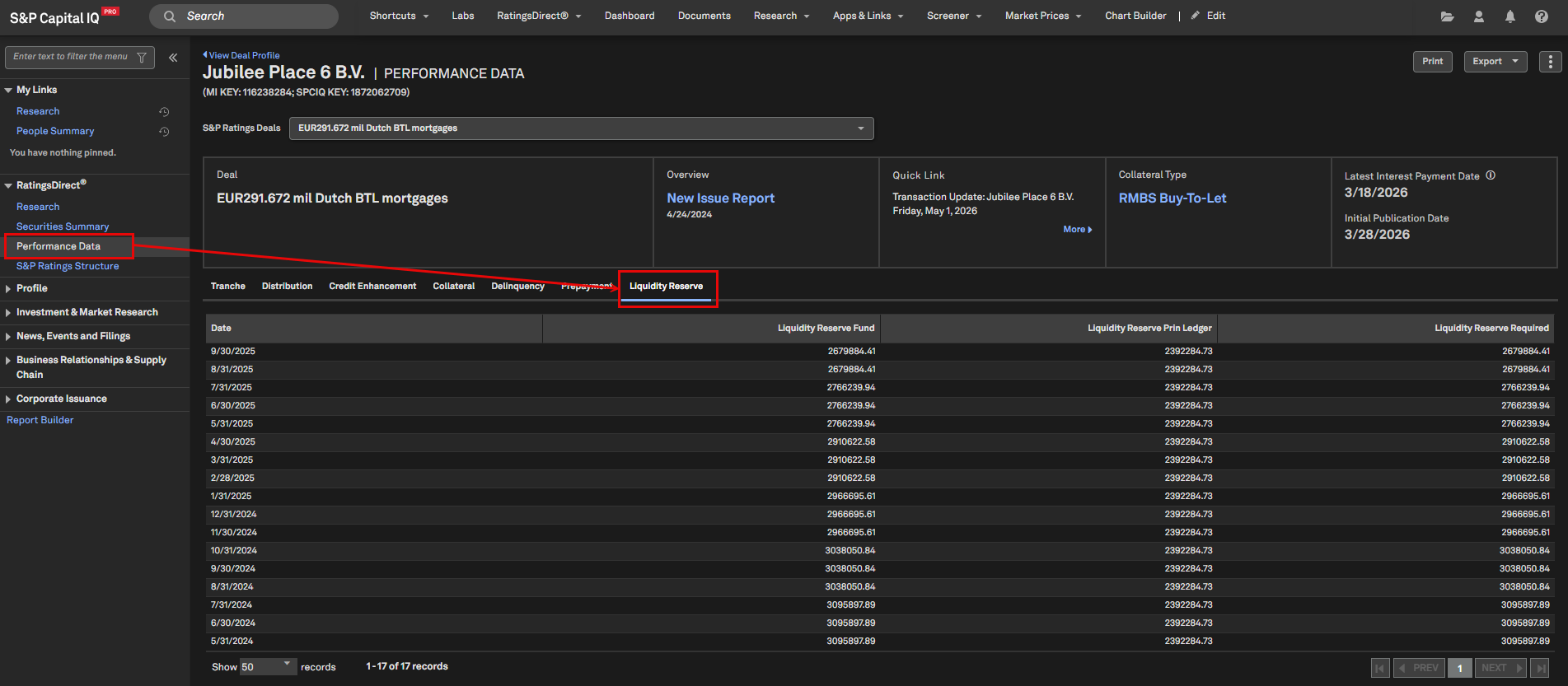
Liquidity reserve metrics are now digitized and displayed as a new tab on the Performance Data page for structured finance deals, improving data transparency and accessibility for investors and regulators.
Find it in the platform:
Search for and navigate to a rated Structured Finance deal from the top search e.g. Jubilee Place 6 B.V.
Select the Performance Data page from the left-hand navigation
Click on the Liquidity Reserve tab to view relevant details
CreditCompanion
In this release, we introduced the new CreditMemo Builder , a tool within the CreditCompanion generative-AI product suite. Credit Memo Builder generates credit memos by compiling a variety of datasets including company financials, agency ratings, credit scores, filings, transcripts, and research. The tool supports drafting and organization of credit memos, while analytical conclusions and judgments remain with the user.
Additionally, CreditCompanion Chat is further enhanced with architectural improvements and extended support of U.S. Public Finance queries.
Credit Memo Builder
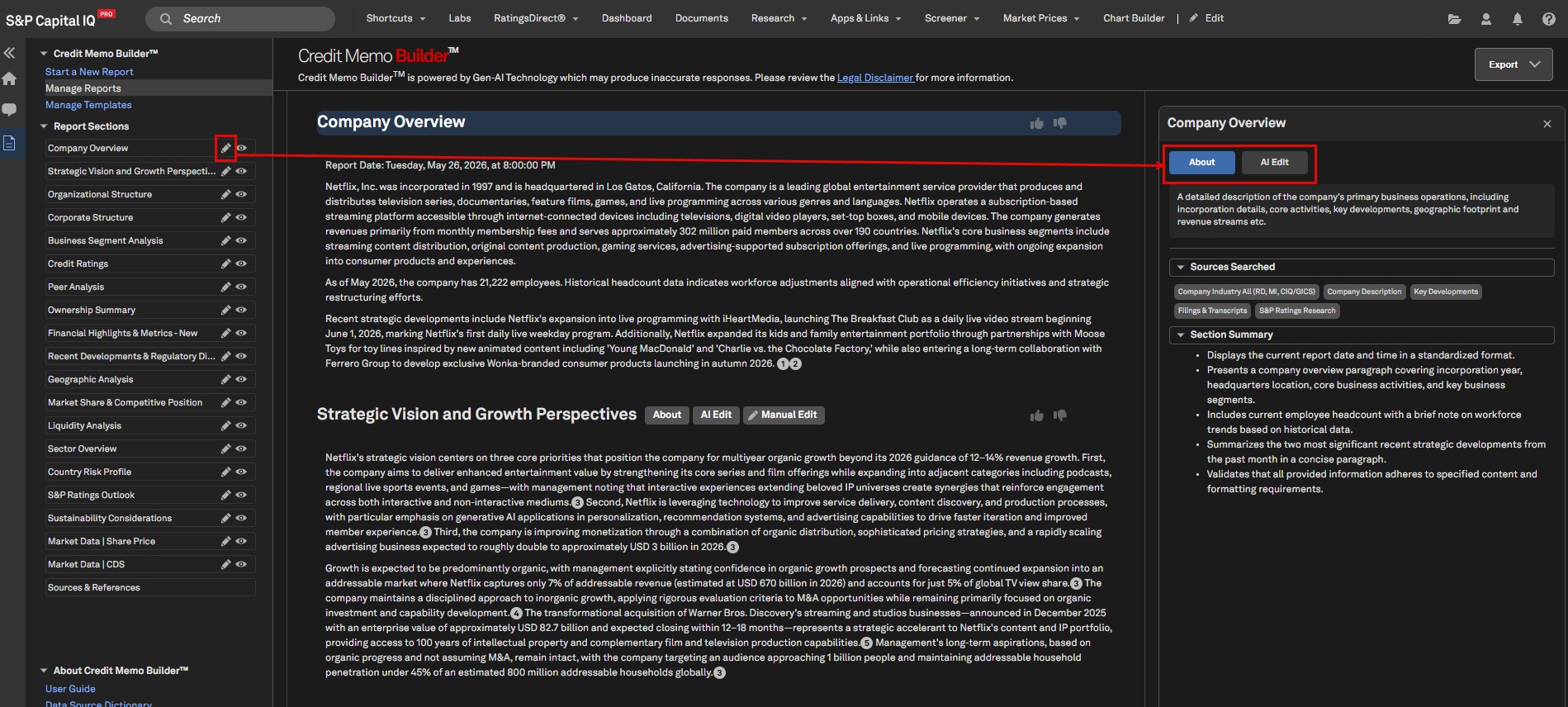
Credit Memo Builder leverages generative AI to synthesize data from across S&P Global’s data estate into a single, credit-focused report. Users can get started with pre-built templates or may customize templates for their unique credit memo standards. Hands-on support is available to help with template customization.
Data can be compiled from a variety of sources, including:
S&P Capital IQ Pro documents (filings, transcripts, etc.), and financials
S&P Ratings data and research
Credit Analytics public and private company scoring models
Proprietary documents uploaded by users
Credit Memo Builder supports clients throughout the report generation process. Once a memo is generated, users can refine the report manually or make edits with AI. Finally, a client may export the report as a Word document.
Credit Memo Builder supports one-click regeneration of prior reports to incorporate newly available data, updated documents, and refreshed financials. This minimizes rework and helps ensure credit memos remain current without requiring users to rebuild prompts. Report history is available in one place, making it easy to locate previous reports and templates.
To support transparency, Credit Memo Builder provides in-line citations with source excerpts and visibility into the AI reasoning used during report generation. These features provide auditability and help users better understand and trust AI-assisted conclusions.
Find it in the platform:
Navigate to the RatingsDirect
menu from the top navigation and select CreditCompanionSelect the Credit Memo Builder tile
Note: Please contact your account team to request a trial of CreditMemo Builder
CreditCompanion Chat – USPF Ratings History
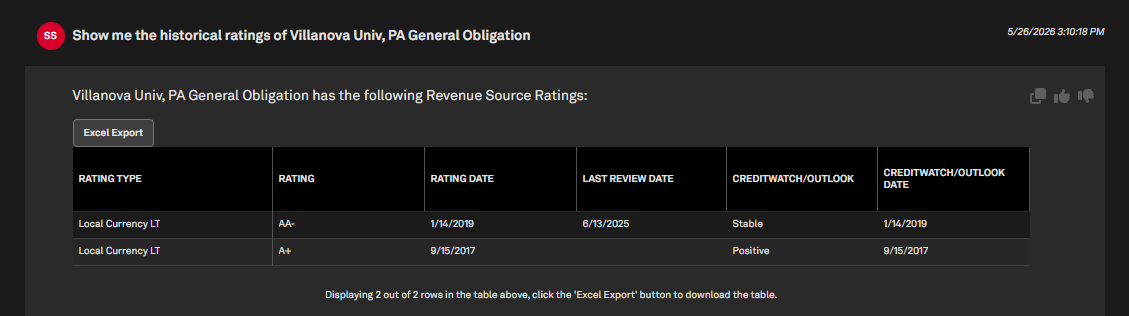
The CreditCompanion Chat tool now allows users to access detailed rating histories for U.S. Public Finance entities and their revenue sources through conversational prompts, providing clearer insights into credit quality trends over time to support trend analysis and investment decisions.
Find it in the platform:
Navigate to the RatingsDirect
menu from the top navigation and select CreditCompanionEnter your question in the Ask a Question bar
Example prompt: Show me the historical ratings of @New York City, NY Appropriation Contract
CreditCompanion Chat – USPF Data Querying
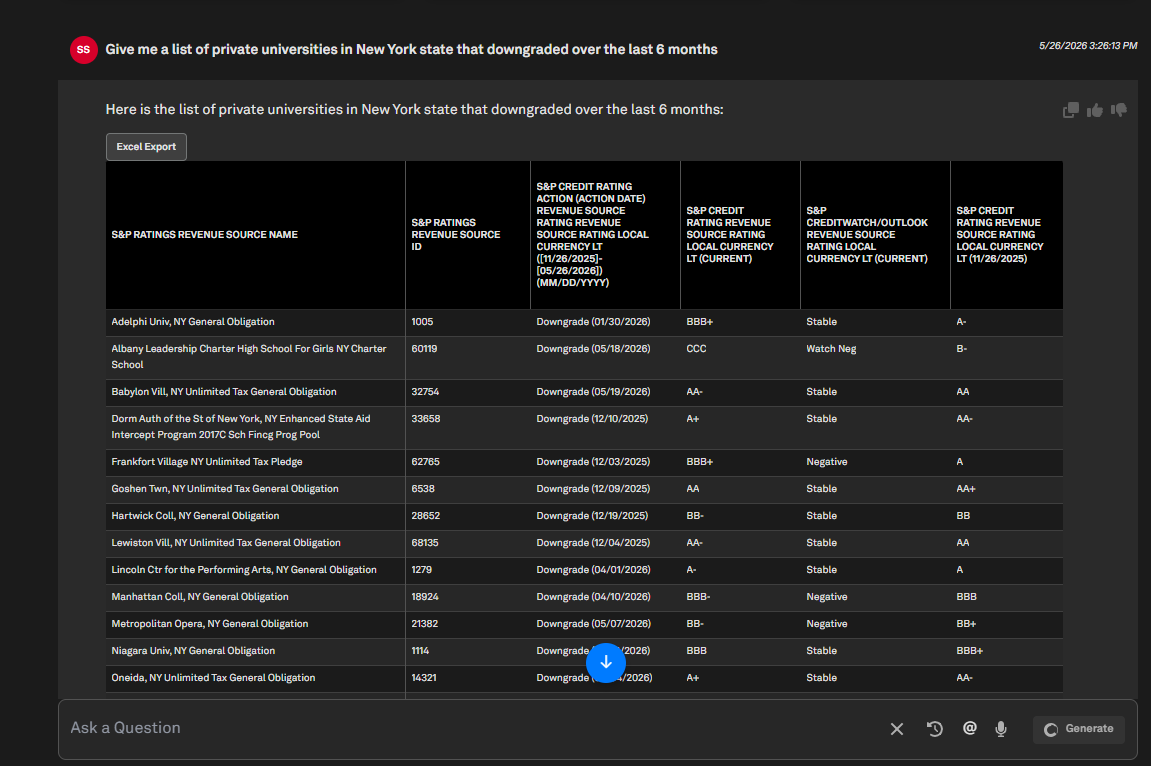
CreditCompanion Chat now features broader U.S. Public Finance data coverage, enabling users to dynamically query and generate lists of municipal entities and revenue sources by key credit factors, making it easier to pinpoint and compare issuers that meet specific credit criteria using natural language prompts.
The tool supports queries across the following datasets:
S&P Credit Ratings
S&P Credit Rating Actions
S&P CreditWatch/Outlooks
Sector Classifications
U.S. Geographic Attributes
Find it in the platform:
Navigate to the RatingsDirect
menu from the top navigation and select CreditCompanionEnter your question in the Ask a Question bar
Example prompt: Give me a list of private universities in New York state that downgraded over the last 6 months
CreditCompanion Chat – USPF Full Financial Tables
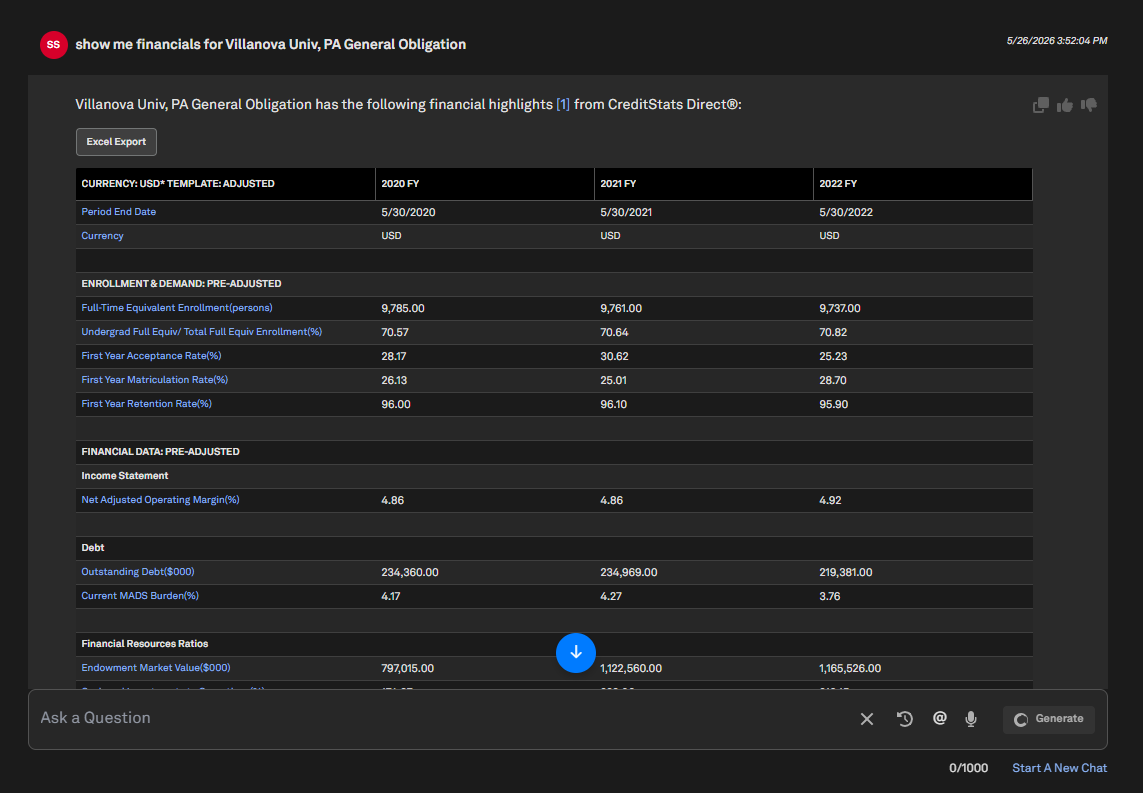
CreditCompanion Chat now supports displaying full financial tables for U.S. Public Finance revenue sources and obligors directly within the chat experience. This enhancement allows users to retrieve more complete financial details through conversational prompts, making it easier to review key financial information without leaving the workflow.
Find it in the platform:
Navigate to the RatingsDirect
menu from the top navigation and select CreditCompanionEnter your question in the Ask a Question bar
Example prompt: Show me financials for @Villanova Univ, PA General Obligation
Investment Research
We are pleased to announce that research from Pareto Securities and Leerink Partners are now available in the S&P Global Aftermarket Research (AMR) collection. Pareto Securities’ research, previously available as Real-Time Research since 2007, now offers over 62,700 reports to AMR license holders. Leerink Partners’ research, available since 2006, expands access with more than 53,000 reports for AMR users. This enhancement broadens our Aftermarket Research coverage, delivering greater global insights.
Additionally, ChatIQ is now integrated in the Investment Research page, offering a consistent conversational experience with Document Intelligence to accelerate access to insights.
Pareto Securities Is Now Available in S&P Global’s Aftermarket Research Collection
Pareto Securities further enhances the value of our Aftermarket Research collection, providing users with access to comprehensive Nordic research content. Their team of 39 publishing analysts covers 257 companies across Industrials, Energy, Financials, Consumer, Technology, Materials, Healthcare, Utilities, and Telecommunications.
Find it in the platform:
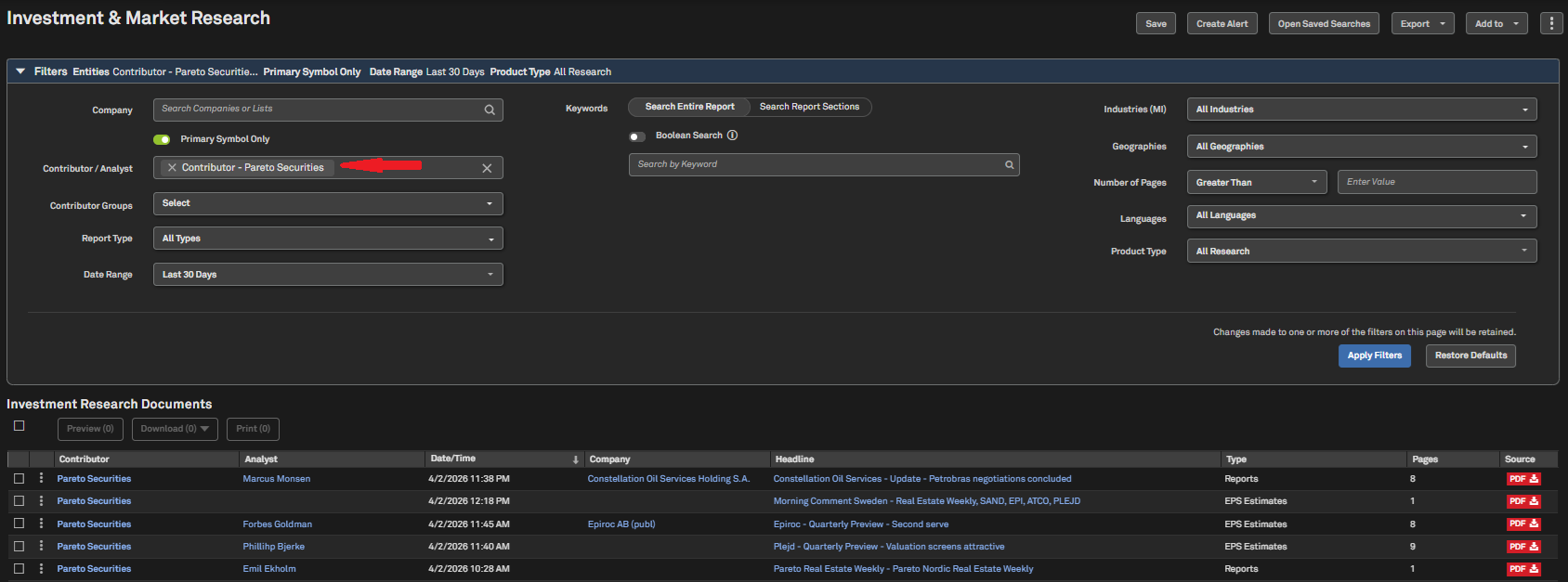
Navigate to the Research tab in the top navigation and click on Investment & Market Research
In the Contributor/Analyst filter, search for Pareto Securities and click Apply Filters
Pareto Securities Aftermarket Research collection is also available in Document Intelligence, Dashboard, Corporate Profile, and Alerts
Coverage stats:
Pareto Securities coverage includes more than 45 million reports from over 1,800 investment banks and independent research providers, including J.P. Morgan, UBS, Jefferies, Barclays, Citigroup, ABG Sundal Collier
Note: Access to Investment Research data requires an additional subscription, please contact your account team for details.
Leerink Partners Is Now Available in S&P Global’s Aftermarket Research Collection
Leerink Partners enhances the value of our Aftermarket Research collection by providing users with access to its extensive healthcare research content. With analysts averaging over 15 years of experience, Leerink Partners covers more than 300 companies and offers detailed financial forecasts, in-depth strategic insights, market trend analysis, and expert valuations. Their team specializes in key healthcare segments, including Biotechnology, Pharmaceuticals, Life Science Services, and Healthcare Equipment, Technology, and Facilities.
Find it in the platform:
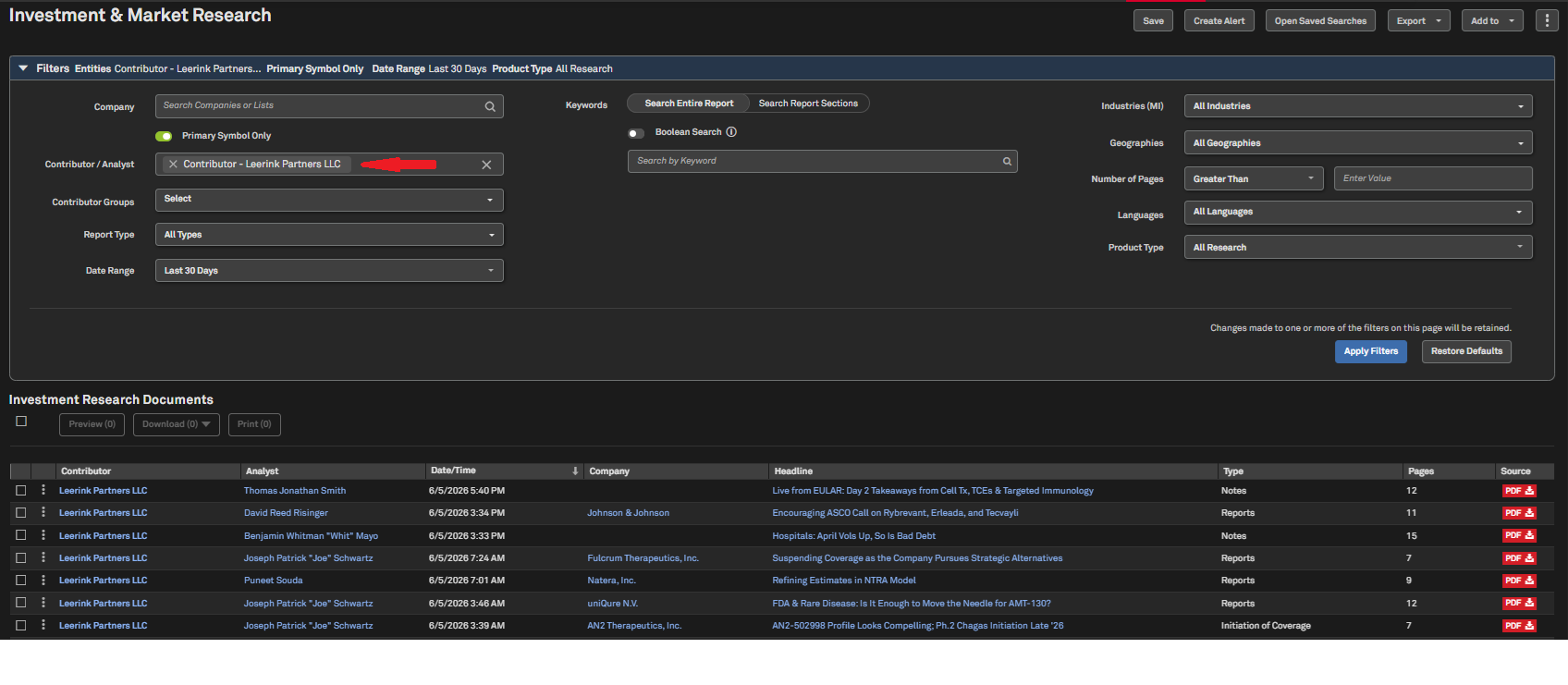
Navigate to the Research tab in the top navigation and click on Investment & Market Research
In the Contributor/Analyst filter, search for Leerink Partners and click Apply Filters
Leerink Partners Aftermarket Research collection is also available in Document Intelligence, Dashboard, Corporate Profile, and Alerts
Coverage stats:
Investment research coverage includes more than 45 million reports from over 1,800 investment banks and independent research providers, including J.P. Morgan, UBS, Jefferies, Barclays, Citigroup, ABG Sundal Collier
Note: Access to Investment Research data requires an additional subscription, please contact your account team for details.
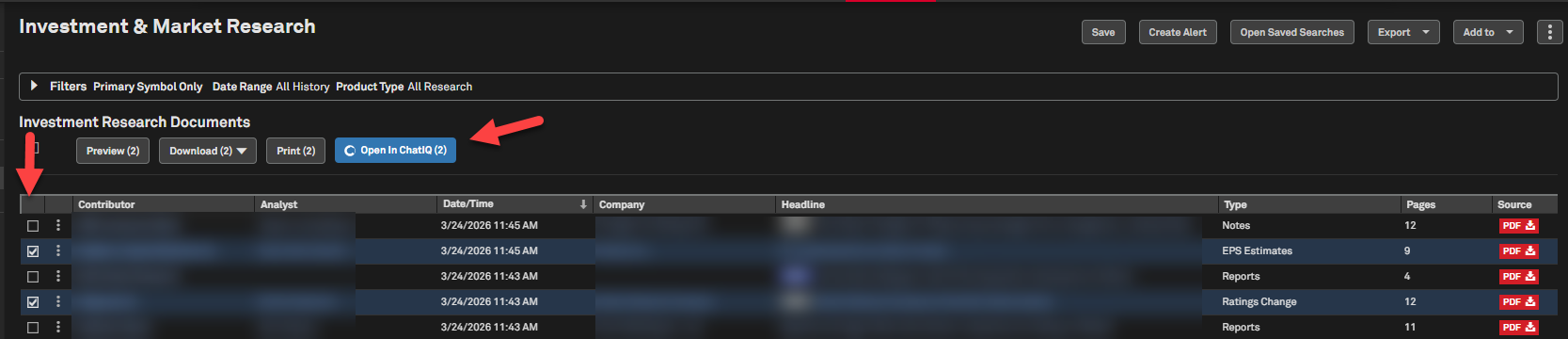
Multi-Document ChatIQ in Investment Research
Users can now launch multi-document ChatIQ directly from the Investment Research page, selecting one or more documents to drill into using conversational queries. All selected reports are automatically downloaded as a zipped folder of individual PDFs, providing faster and more efficient access.
Find it in the platform:
Navigate to the Research tab in the top navigation and click on Investment & Market Research
Select one or more documents on the Investment Research page
The Open in ChatIQ feature will be highlighted
Click on Open in ChatIQ, which opens a separate tab
Select pre-populated questions or enter your own questions to chat with the selected documents
Market Data
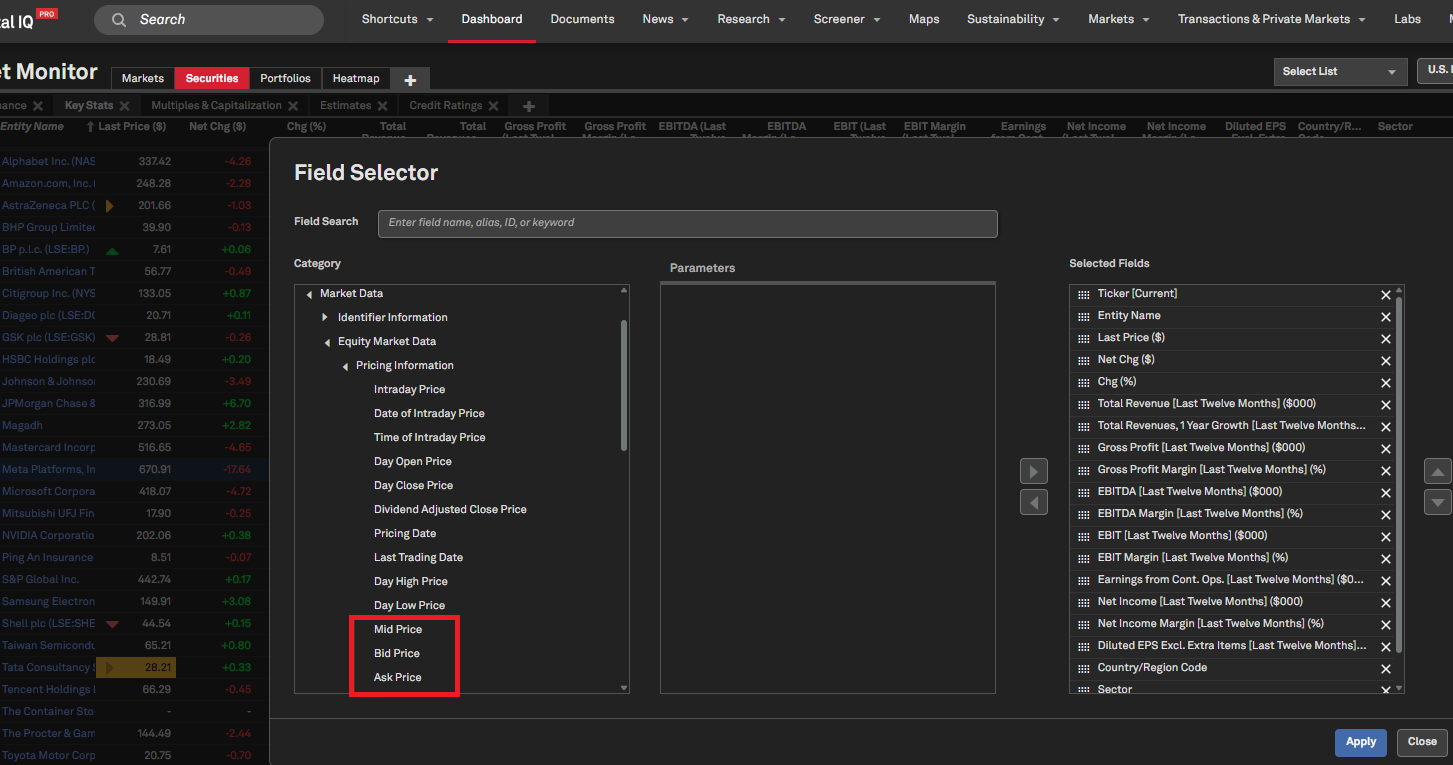
In this release, we added additional pricing data items for Mid, Bid and Ask prices on the S&P Capital IQ Pro Dashboard.
New Pricing Metrics
Users can now access additional pricing data items - Mid Price, Bid Price, and Ask Price on the S&P Capital IQ Pro Dashboard.
Find it in the platform:
Navigate to Dashboard and open the Add Widget menu on the top right
Select List widget and open Field Selector using the settings gear icon at the top-right corner of the widget
Navigate to Market Data > Equity Market Data > Pricing Information to add the new data items Mid Price, Bid Price and Ask Price
Peer Comps
In this release, we enabled users to seamlessly access their saved Peer Screens and Projects via the Manage My Screens page. Additionally, users can now add companies from their saved lists directly to the results grid on the Peer Comps page, making peer analysis more efficient.
Peer Comps on the Manage My Screens Page
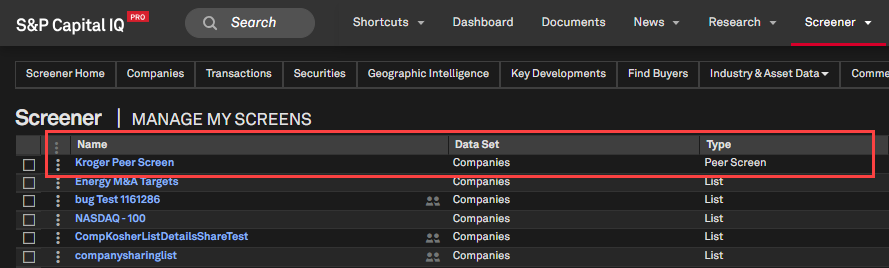
Users can now access their saved Peer Screens and Peer Projects from the Manage My Screens page. Clicking the title of a saved item will open the Peer Screen or Project in Screener, with the Peer Comps toggle enabled.
Find it in the platform:
Navigate to Screener from the top navigation or the Apps & Links menu
Select Manage My Screens
Saved Peer Screens and Peer Projects will appear in the results grid
Click on the required list to open it in Screener
List Support in Peer Comps
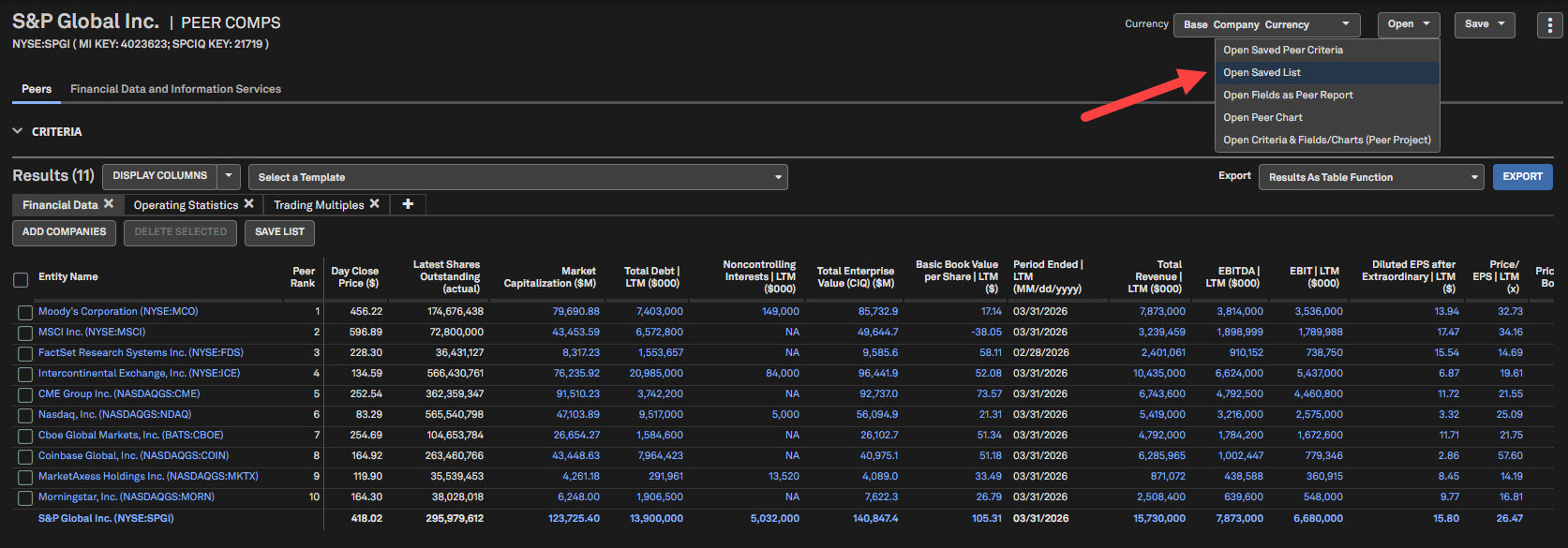
Users can now add companies from a saved list to their Peer Comps results. Selecting a saved list will temporarily replace the Peer Comps companies with the list constituents.
Find it in the platform:
Navigate to the Peer Comps page of a company
Or in Screener, enable the Peer Comps toggle, and select a Base Company when prompted
Click the Open menu at the top right of the page, and choose Open Saved List
A new criteria will replace the existing filter criteria
Add other criteria as needed
Click Run Screen to view the updated results
S&P Capital IQ Pro Labs
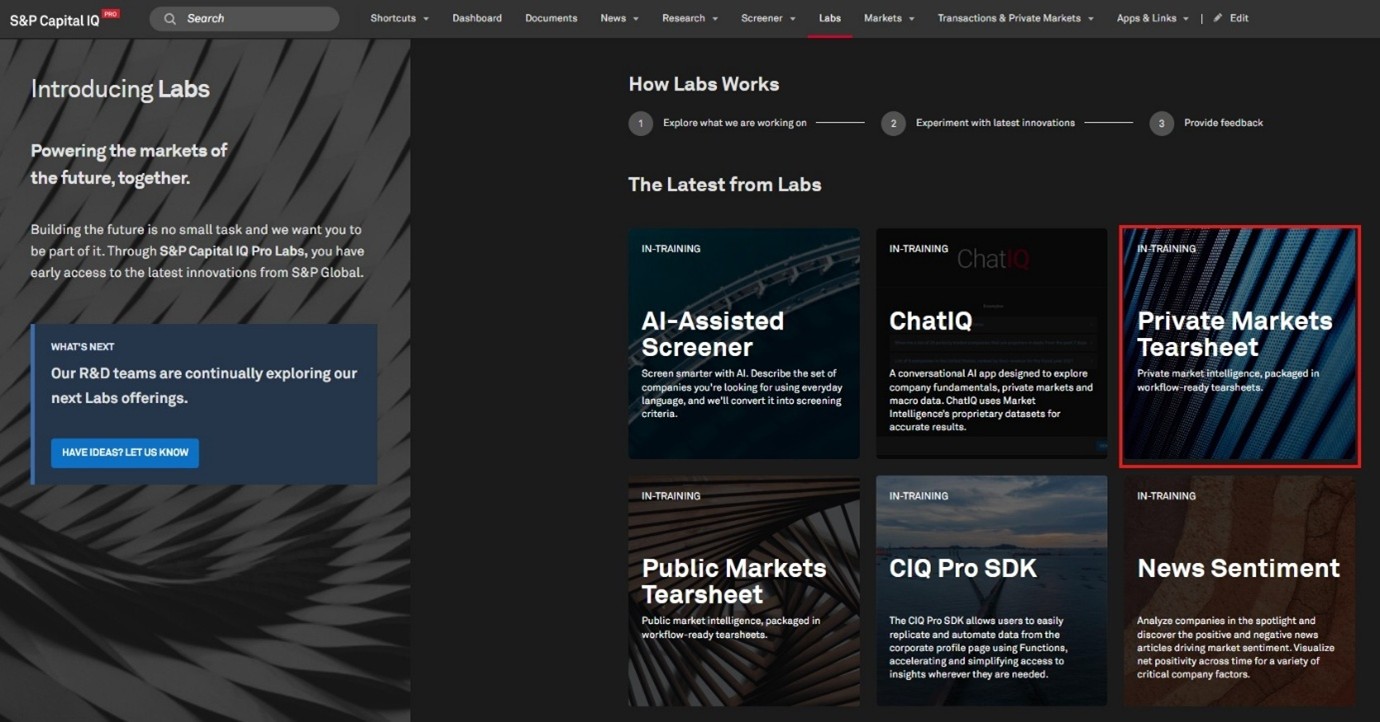
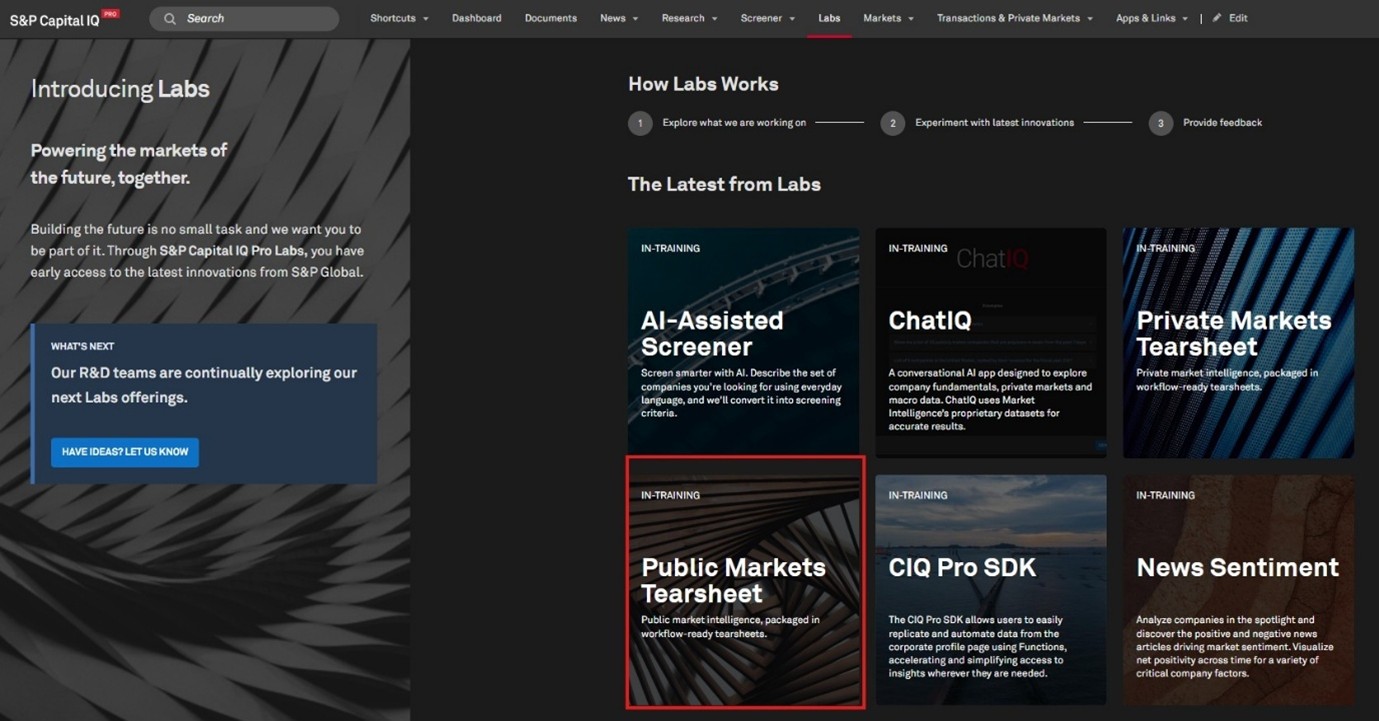
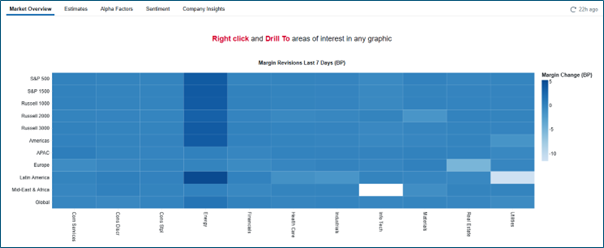
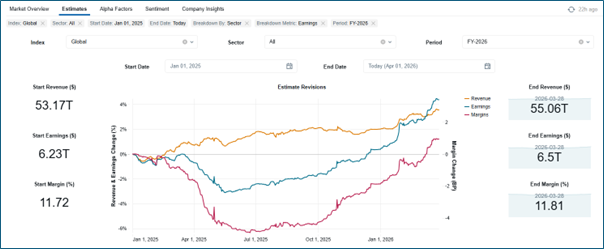
In this release, we introduced a new tile for Private Markets Tearsheet, offering a structured framework for understanding private company growth, valuation, and capital formation, leveraging proprietary S&P Global datasets. Additionally, we launched Public Markets Tearsheet, a workflow-ready tear sheet experience for monitoring the global public equity landscape through S&P Global’s quantitative lens. It consolidates multiple pillars of market intelligence, including sell-side estimates, factor signals, earnings call analytics, and thematic indicators, into a single, regularly refreshed view.
Private Markets Tearsheet
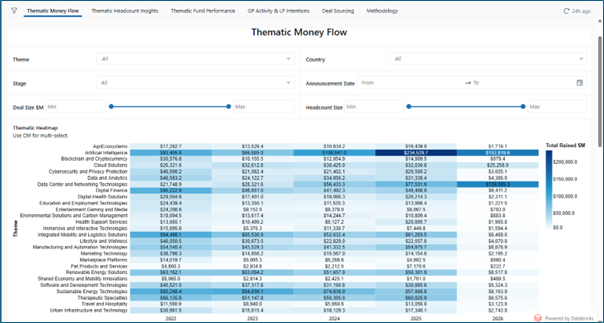
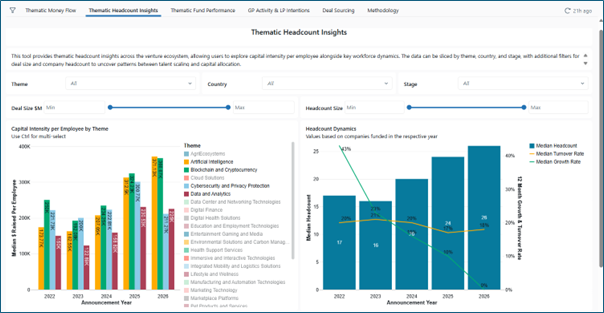
The Private Markets Tearsheet integrates key signals from across the private markets ecosystem, including thematic capital flows, workforce and headcount trends, funding rounds, general partner (GP) activity, limited partner (LP) intentions, signal-driven deal sourcing, and fund performance, providing actionable insights and a holistic view of market dynamics.
Updated on an ongoing cadence, this experience enables users to identify where private market momentum is building, recognize themes attracting sustained investment, and understand how early-stage signals translate into later-stage outcomes. These tear sheets are built to support sourcing, benchmarking, and forward-looking insight into the companies shaping the next cycle of market leadership.
Find it in the platform:
Navigate to Labs from the top navigation
If it is not visible, click Edit on the right side of the top navigation and add Labs from the Additional Menu Items and click Save
When in Labs, select the tile Private Markets Tearsheet
Public Markets Tearsheet
Within the Public Markets Tearsheet, users can track how expectations are evolving across sectors and regions, where earnings revisions and margin dynamics are concentrating, and how narrative and fundamentals intersect in real time. From systematic alpha factors to transcript-derived signals and consensus forecasting, these tearsheets are designed to support idea generation, portfolio monitoring, and timely investment decision-making.
Find it in the platform:
Navigate to Labs from the top navigation
If it is not visible, click Edit on the right side of the navigation and add Labs from the Additional Menu Items and click Save
When in Labs, select the tile Public Markets Tearsheet
Marketplace Data & Solutions Communiqué
The Marketplace Data & Solutions Communiqué reflects developments in the S&P Global Marketplace, your discovery tool for differentiated data and robust solutions with an integrated support site.
Marketplace Data & Solutions Communiqué
Data: Leverage premium fundamental and alternative datasets available seamlessly, along with expert analysis, to accelerate your journey from data to insight.
Solutions: Gain maximum value from your big data with technology solutions designed to enhance your workflow, increase your insights, and complement your datasets. Our solutions, including Snowflake, Kensho NERD, Xpressfeed, Xpressfeed Loader, and API Solutions, help you make the most of all your data.
If you wish to subscribe, sign up on the Communiqué Marketplace site.