- DATE:
- AUTHOR:
- S&P Global
March 2026 S&P Capital IQ Pro Release Notes
S&P Capital IQ Pro Release Highlights
In this release, we added new datasets and tools on Capital IQ Pro, designed to enhance our clients' daily workflows:
Document Intelligence: Features S&P Global’s LLM-powered Sentiment Scores for earnings call transcripts and provides access to over 20,000 documents from With Intelligence, offering deeper insights into LP allocation strategies for more informed fundraising.
Visible Alpha Estimates: Launched Visible Alpha BioPharma sector with granular consensus estimates and specialized analytics, and introduced new estimate visualizations featuring Analyst Histogram and Heatmap charts.
Private Company: Introduced LinkedIn profile integration on People and Professional Summary pages, consolidated contact details layout, and enhanced biography visibility.
Fixed Income: Integrated over 4 million structured securities from Markit, including 3.2 million new additions, featuring enhanced pricing, analytics, liquidity data, and granular reference information.
Charting: Enhanced metric flexibility in Chart Builder, delivering deeper insights, improved calendar controls, and expanded market data.
Document Intelligence
In this release, we introduced S&P Global’s large language model (LLM) powered Sentiment Scores for earnings call transcripts in Document Intelligence, enabling users to quickly identify meaningful shifts in management tone and messaging to streamline valuation and risk decisions. We also added a diverse range of Economic documents, including publications from the Federal Reserve Board, the European Central Bank, and PMI Economic Press Releases. Additionally, we provided access to proprietary, direct-from-investor allocation data by integrating over 20,000 source documents, each mapped to the relevant investor and asset class, empowering users to efficiently analyze investor intentions and preferences.
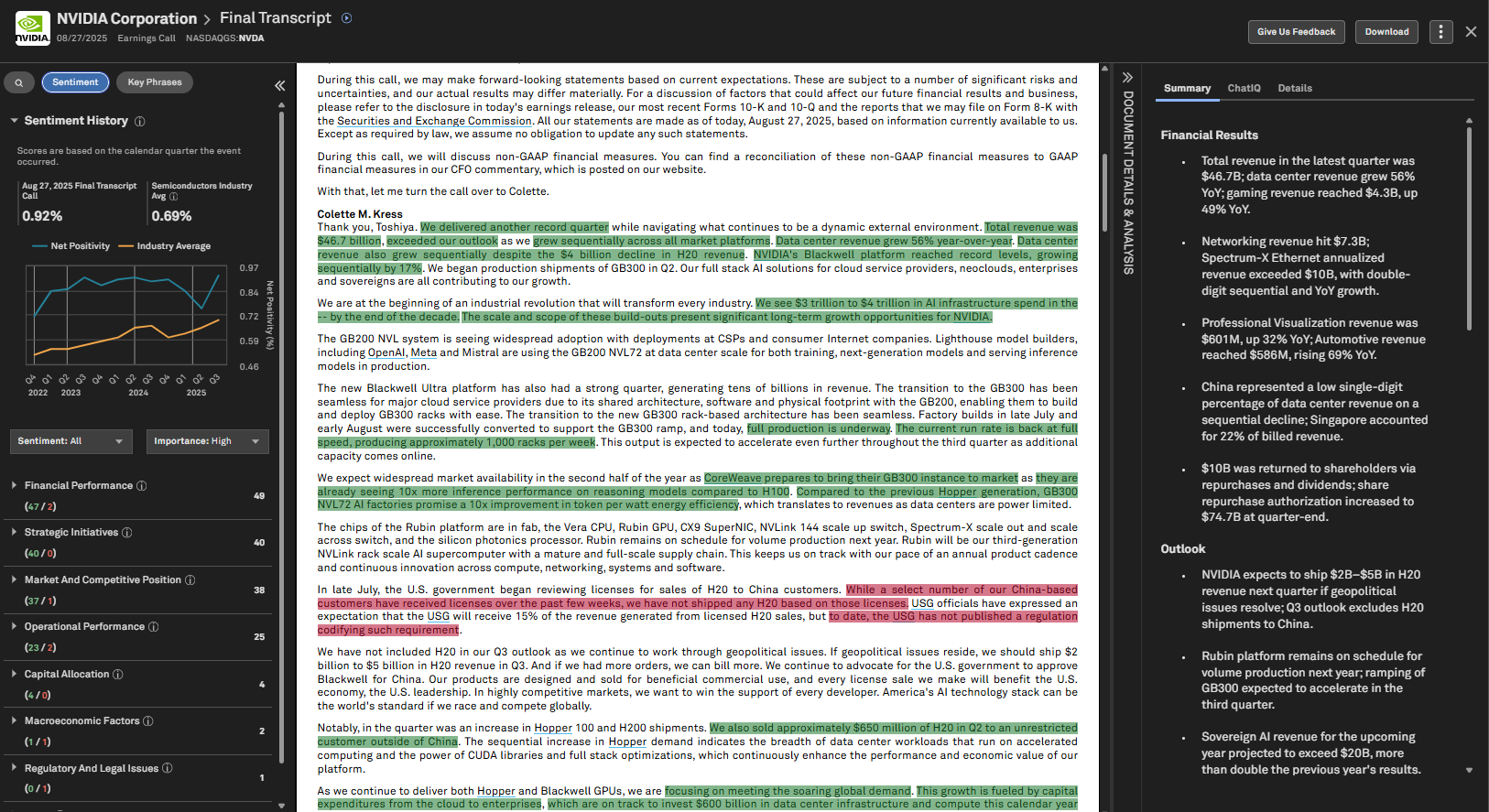
LLM Powered Sentiment Scores
Users can leverage LLM-powered Sentiment Scores to analyze earnings call transcripts. Built with advanced natural language processing and sentiment analysis, Sentiment Scores accurately identify important positive and negative phrases and highlight sentences for context. Advanced filtering by tone and signal importance, along with a dedicated Sentiment view, transforms each call into a clear tone map—revealing shifts in management sentiment and benchmarking against industry standards.
This enhancement enables equity and credit analysts, corporate development teams, and anyone in roles that involve transcript-heavy reviews to quickly identify meaningful changes in tone and messaging, minimize time spent reading full transcripts, and focus on issues most relevant to valuation and risk decisions.
Find it in the platform:
Navigate to the Documents tab in the top navigation to access the Document Intelligence page
Scroll down to the Transcripts & Investor Presentations tile
Click to open any Earnings Call transcript
Select the Sentiment tab on the left side of the document
Choose the required options from the Sentiment and Importance filters
View phrases grouped by Themes for deeper insights
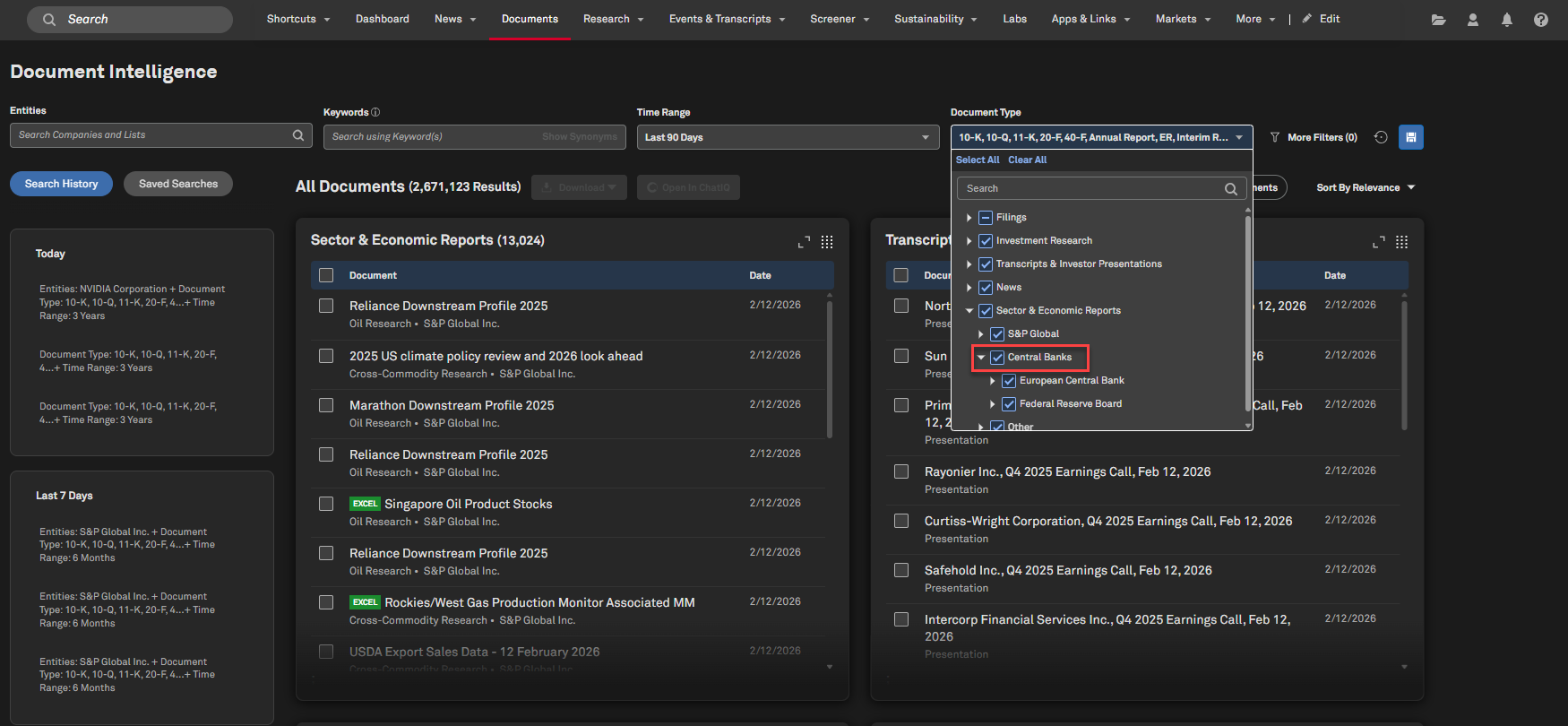
Central Bank Documents in Document Intelligence
Users can access Federal Reserve Board and European Central Bank documents within the Sector & Economic Reports tile in Document Intelligence, providing valuable insights into monetary policy and economic trends.
Find it in the platform:
Navigate to the Documents tab in the top navigation to access the Document Intelligence page
In the Document Type filter, scroll down to Sector & Economic Reports > Central Banks
Scroll down to the Sector & Economic Reports tile and select any document
When viewing the document, In-Doc search is available on the left side, ChatIQ is available on the right side
When tables are available in the document, hover over the table to enable the table extraction feature to download the data table from the document
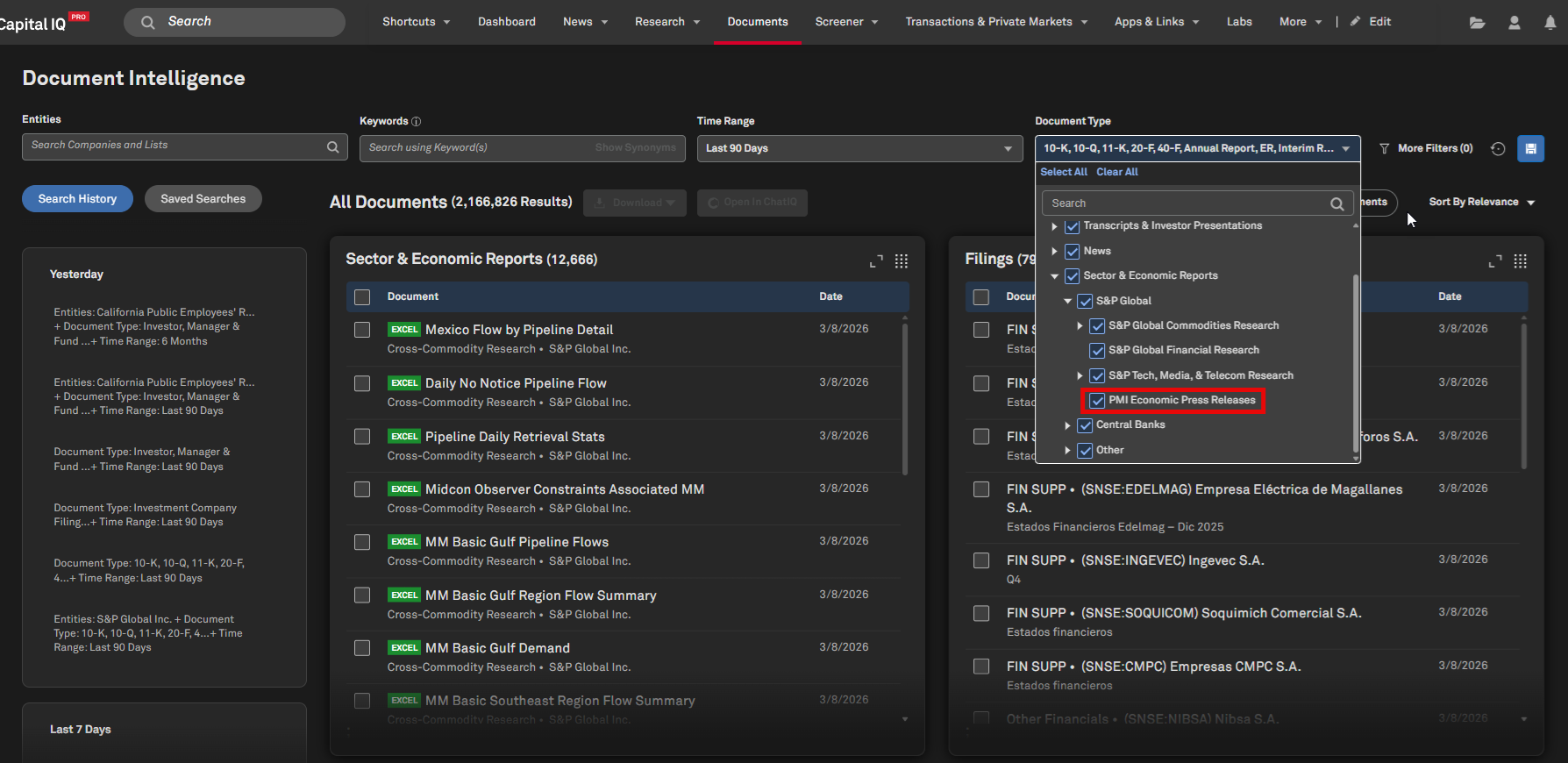
PMI Economic Press Releases in Document Intelligence
Users can now access Purchasing Managers’ Index (PMI) Economic Press Releases within the Sector & Economic Reports tile in Document Intelligence, enabling comprehensive economic analysis.
Find it in the platform:
Navigate to the Documents tab in the top navigation to access the Document Intelligence page
In the Document Type filter, scroll down to Sector & Economic Reports > S&P Global > PMI Economic Press Releases
Scroll down to the Sector & Economic Reports tile and select any document
When viewing the document, In-Doc search is available on the left side, ChatIQ is available on the right side
When tables are available in the document, hover over the table to enable the table extraction feature to download the data table from the document
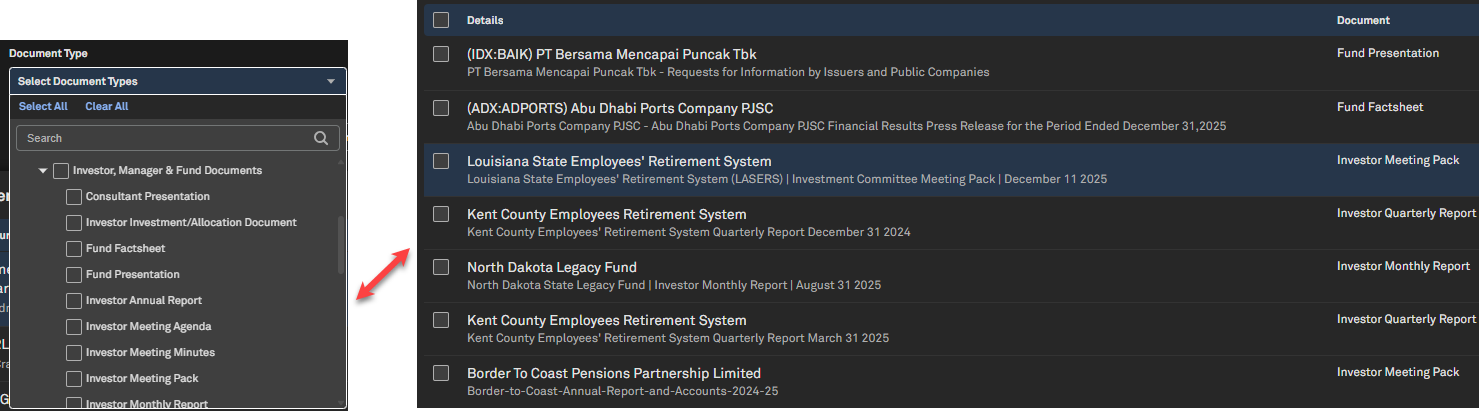
With Intelligence Document Library Integrated into Document Intelligence
In November 2025, S&P Global Market Intelligence acquired With Intelligence, a leading source of private markets data, insights and analytics. Users of S&P Global Capital IQ Pro can now access over 20,000 documents from With Intelligence via Document Intelligence, enabling them to interact with and extract insights from a wide range of documents, including investment committee meeting packs, tender documents, and quarterly or annual reports filed by LPs.
This new content empowers users to quickly find relevant information, gain deep insights into an LP’s allocation strategies for both public and private markets, track how those strategies have evolved over time, identify key investment themes, and ultimately help GPs make more informed decisions to optimize their fundraising processes.
Find it in the platform:
Navigate to the Documents tab in the top navigation to access the Document Intelligence page
In the Document Type filter, expand Filings > Investor, Manager & Fund Documents and select any document
When viewing the document, In-Doc search is available on the left side, ChatIQ is available on the right side
Visible Alpha Estimates
In this release, we enhanced Visible Alpha coverage in S&P Capital IQ Pro by introducing granular consensus estimates and specialized analytics for the BioPharma sector. Additionally, we added new analyst estimate Histogram and Heatmap visualizations to the Visible Alpha pages.
Visible Alpha BioPharma Product
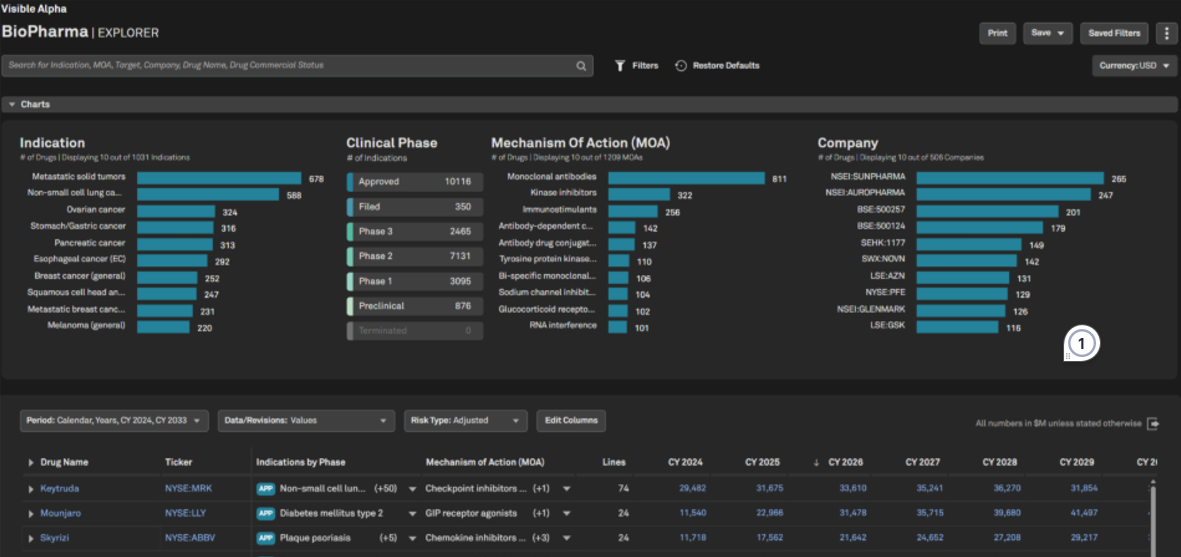
Users can now access Visible Alpha BioPharma on S&P Capital IQ Pro, providing granular, forward-looking consensus estimates for life sciences, biotech, and pharmaceutical industries. This new offering empowers users to analyze drugs and their competitive landscape across drug indications, geographies, therapeutic areas, and mechanisms of action(MOA), supported by the accuracy of Visible Alpha’s consensus data. With enhanced visibility into market expectations and underlying assumptions, Visible Alpha BioPharma enables improved forecasting and modeling for commercial viability of the BioPharma products.
Find it in the platform:
Navigate to the Markets tab in the top navigation
Select BioPharma under Industries (for MI Industry users) or Sectors (for GICS users)
View the BioPharma Explorer page, displaying all drugs covered under BioPharma, with their historical sales and forward-looking consensus estimates
Use the search bar to refine the data and enter criteria such as drug name, indication, MOA, Active Pharmaceutical Ingredient (API), company name, etc.
The grid updates to display drugs within that grouping, including financial and descriptive data
Click the Filters option to apply additional filters, or use Edit Columns to add additional descriptive data columns
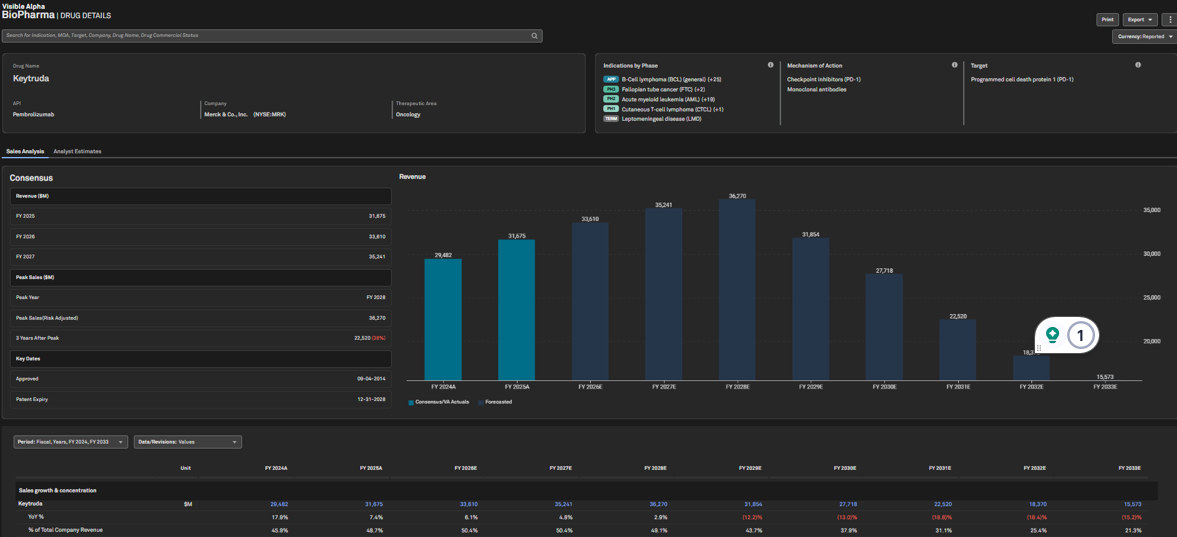
Click the name of any drug in the grid to to open its dedicated Drug page The drug page displays two tabs
Sales Analysis tab displays all consensus and historical data available for the drug
Analyst Estimates tab displays the distribution of analyst estimates and additional statistical details
Note: Access to Visible Alpha BioPharma requires an additional subscription, please contact your account team for details.
Quick Charting from Visible Alpha Pages
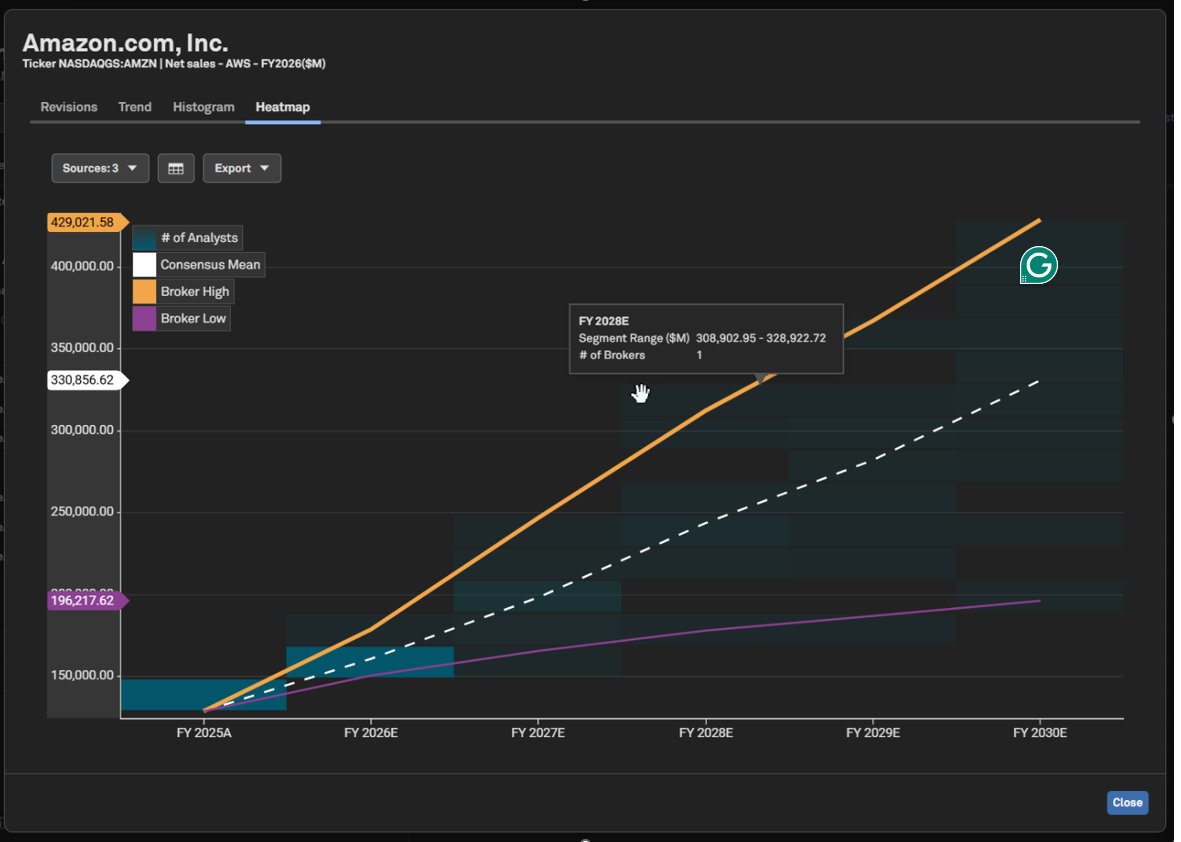
Users can now visualize the distribution of analyst estimates over time with our new Analyst Histogram and Heatmap charts, available via Quick Charting on Visible Alpha pages. Launch a quick chart from any supported datapoint to explore where analysts’ estimates cluster or diverge from consensus across a periodic time series. Users with broker entitlements can also optionally overlay individual broker estimates on these charts.
Find it in the platform:
Search for a public company covered by Visible Alpha in the top search, e.g., S&P Global
In the left-hand navigation menu, expand Visible Alpha
Open the Key Values page or any of the standardized or company data pages
Hover over a datapoint, e.g. FY2025 Revenue
Click the chart icon next to the datapoint to launch the Chart
Choose Histogram or Heatmap to view the respective chart
Use the dropdown menu within the chart to add additional sources (e.g., broker estimates, broker high/low), switch to Table View, export data, or change chart types
Note: Access to Visible Alpha estimates data requires an additional subscription, please contact your account team for details.
Private Markets & Private Company
In this release, we integrated LinkedIn profiles into the People and Professional Summary pages, introduced a consolidated layout for contact details, and enhanced the visibility of biographies. This enables users to quickly research and validate professional profiles for a more efficient outreach. Additionally, we expanded VAT ID coverage for UK-based private companies.
LinkedIn Profiles Integration
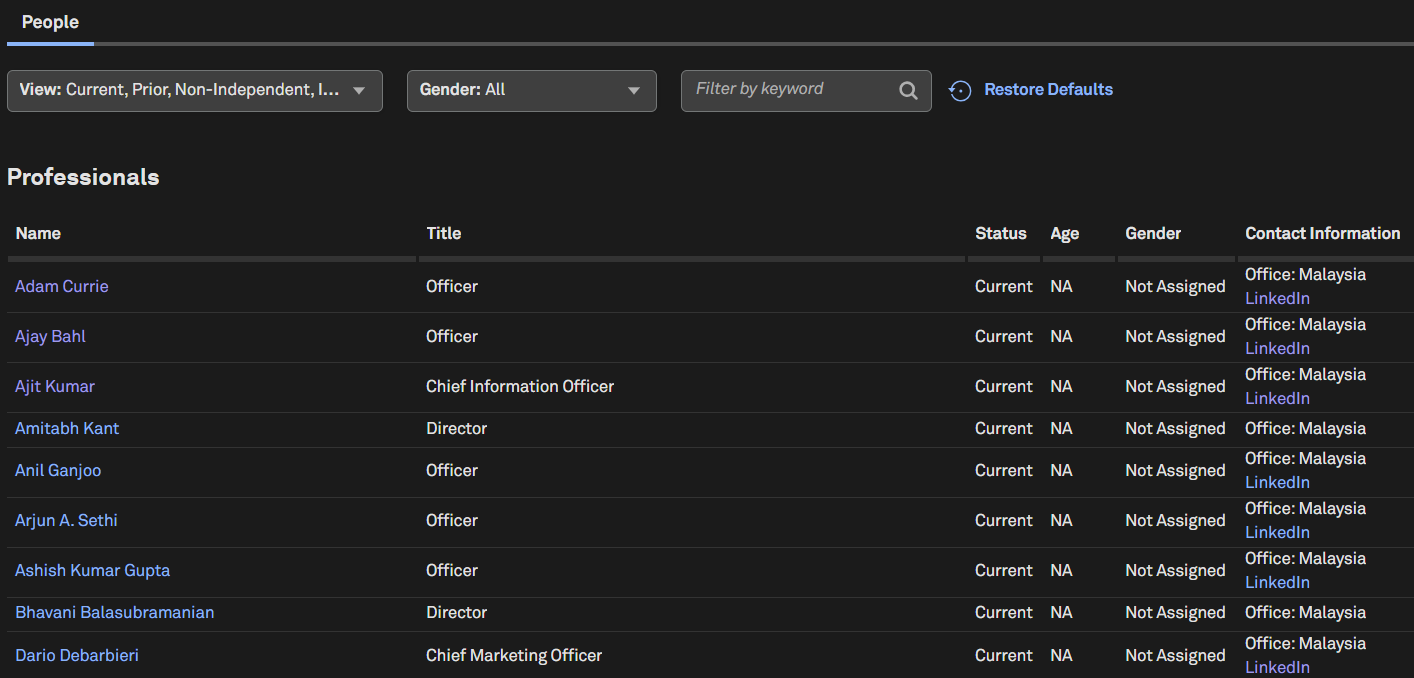
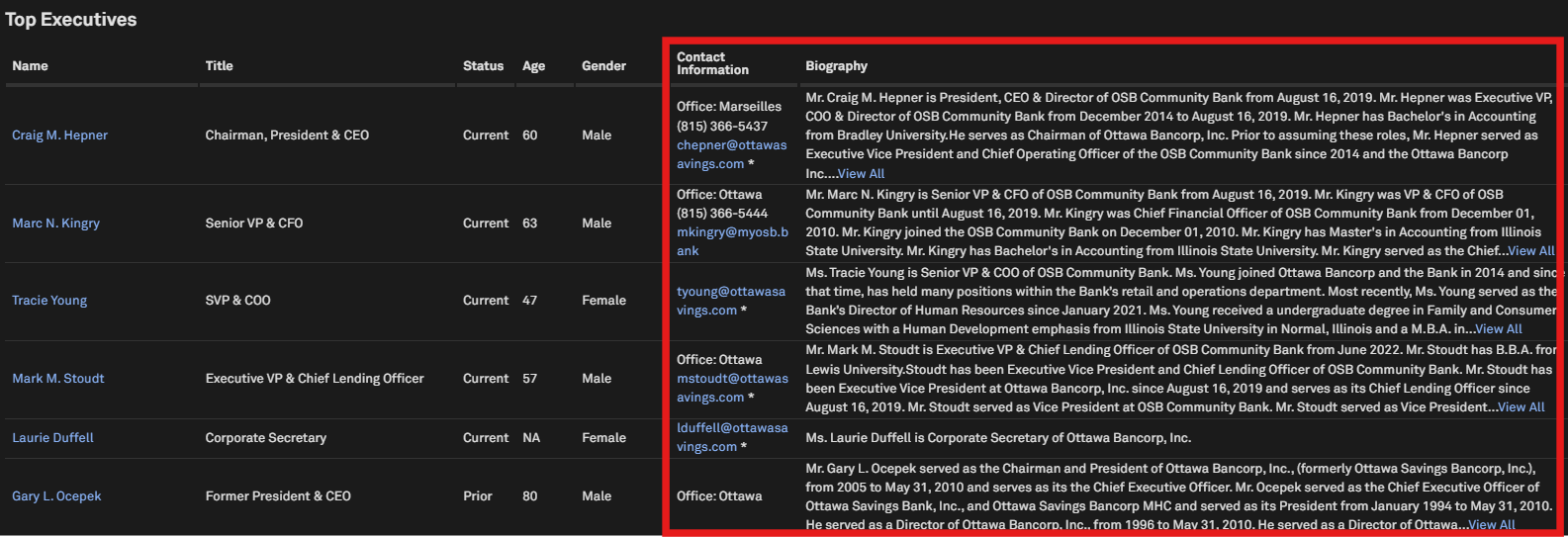
Users can now access LinkedIn profiles directly from the People and Professional Summary pages, making professional research faster and more convenient. Contact details are consolidated into a single, easy-to-scan view, biographies are more readable, and LinkedIn links open seamlessly in a new tab. LinkedIn details are also included in vCard exports, ensuring consistent data across research and outreach workflows.
Find it in the platform:
Search for and select a private company in the top search
From the left-hand menu, navigate to People Summary > People tab
View professionals with LinkedIn profiles displayed under the Contact Information column
Click on any professional to open their Professional Summary page, where the LinkedIn URL appears under Contact Details
Click Export vCard to see LinkedIn profiles alongside contact information
Coverage Stats:
LinkedIn profiles are available for 700k professionals employed by 146K private companies, with further expansion planned for future releases
Additionally, we've expanded our people coverage by adding over 13 million professionals sourced from websites of 1.4 million private companies
Expanded VAT ID Coverage for UK SME Companies
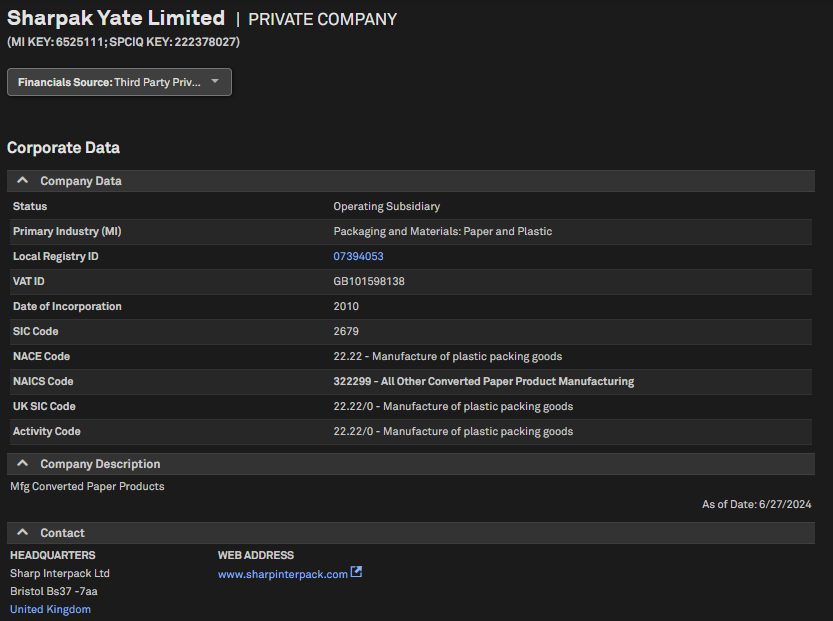
Users can access additional VAT ID coverage for small and medium enterprises in the United Kingdom, thereby significantly expanding coverage for this geography.
Find it in the platform:
Search for and select a UK private company in the top search
Navigate to its Corporate Profile and view VAT ID in the Company Data section
Coverage Stats:
Over 1.6M new VAT IDs
Fixed Income
In this release, we integrated over 4 million structured securities from Markit, including 3.2 million net new additions. These securities feature enhanced pricing, analytics, and liquidity data, along with more granular reference information such as collateral type and advisor roles. This expanded coverage is integrated across multiple workflows, including Search, Dashboard, Screener, the S&P Capital IQ Pro Plug-in, and the Capital Issuance page filters.
Structured Securities
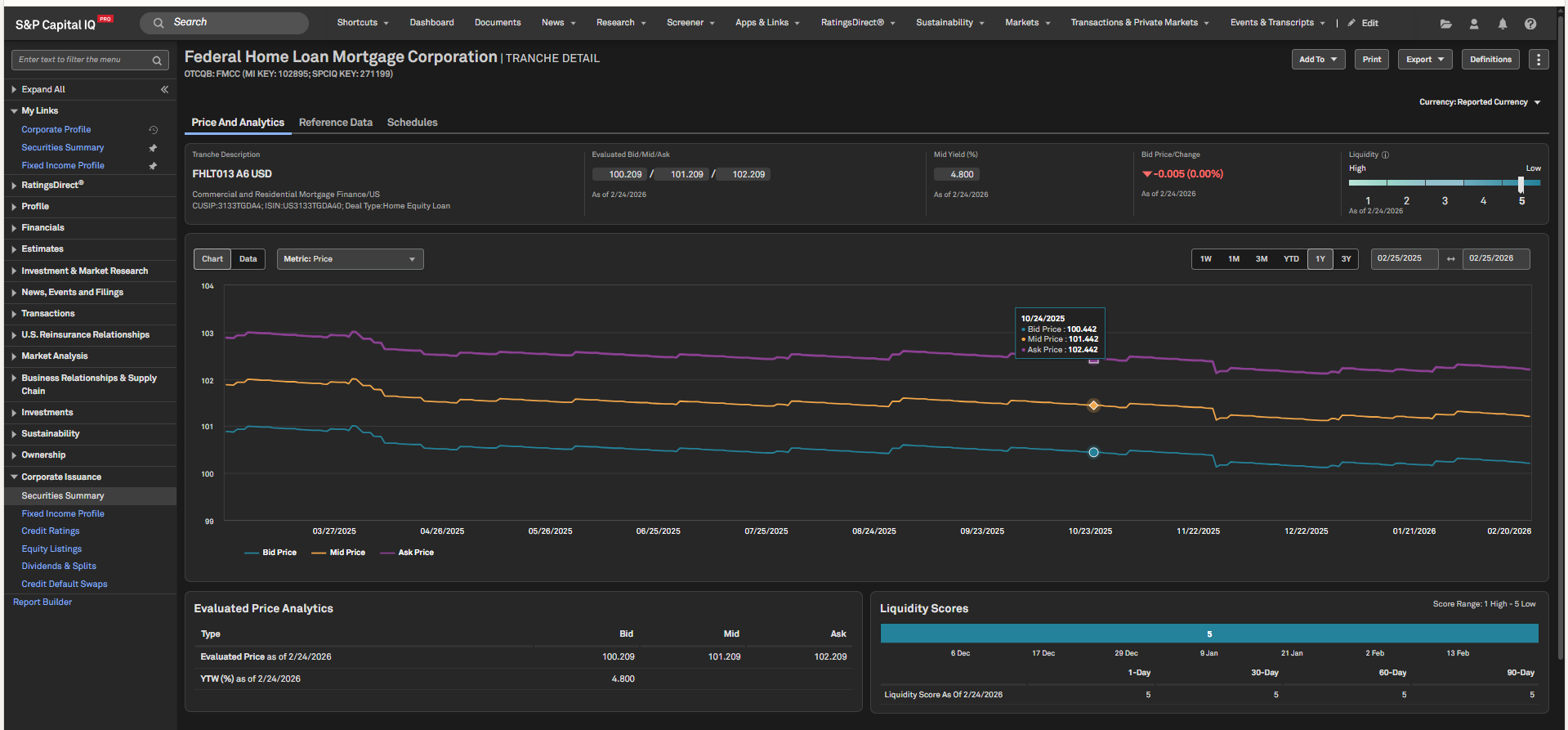
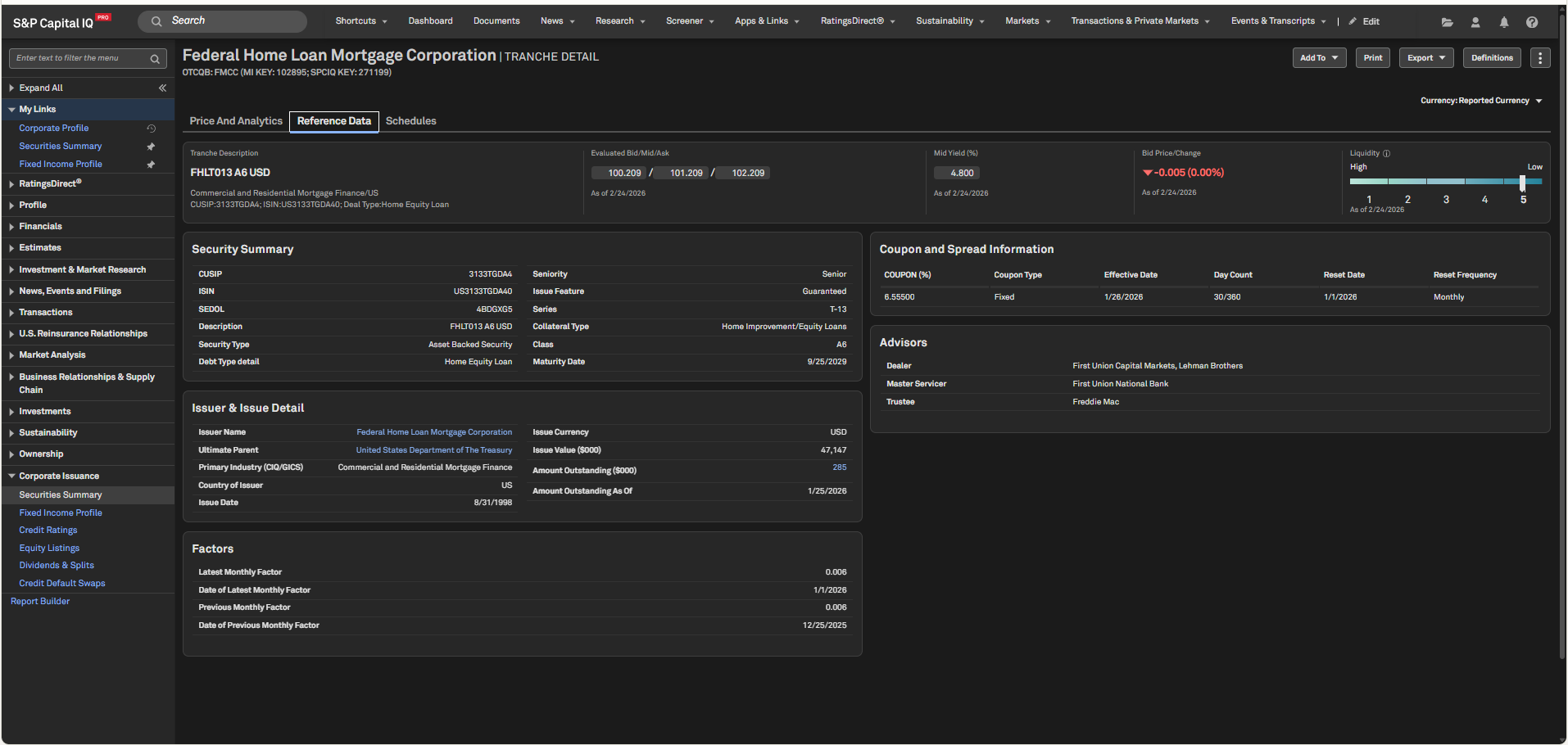
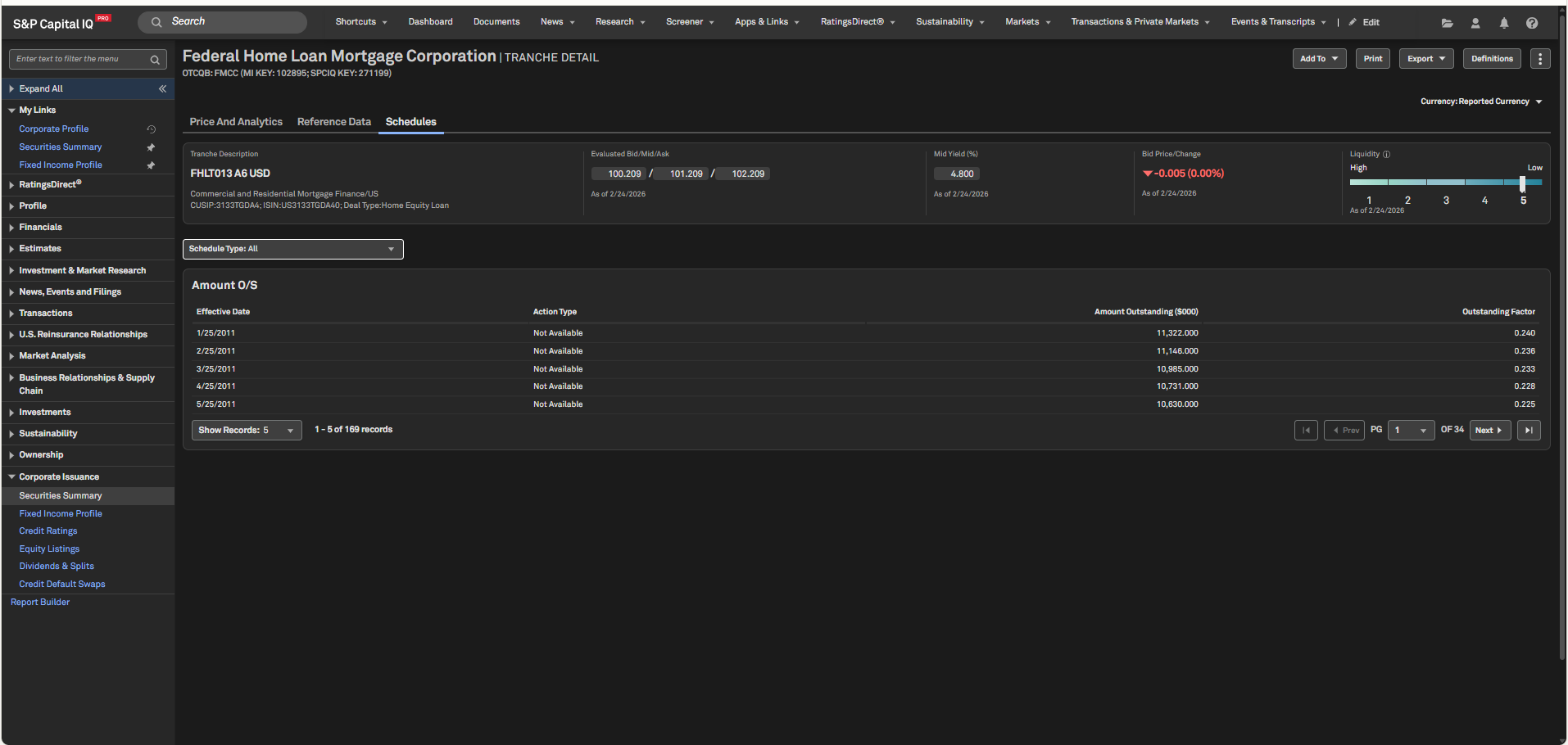
Users can quickly access the expanded structured security coverage within the Corporate Issuance pages, or on the new Tranche Detail page.
Find it in the platform:
Corporate Issuance pages:
Search for and select a structured issuer from the top search and navigate to Corporate Profile
From the left-hand navigation, expand the Corporate Issuance tab
Click on the Securities Summary page to view the structured securities displayed in the Debt Capital Structure grid
Similarly, view these securities on the Securities Pipeline tabs within the Fixed Income Profile page
Tranche Detail page:
Search for a tranche or security with market identifiers such as CUSIP, ISIN, SEDOL, etc. from the top search
Select the security to navigate to the new Tranche Detail page, which displays enhanced pricing, analytics, liquidity and reference data
From a structured issuer’s Capital Issuance page, click the hyperlink on a structured securities description to launch its Tranche Detail page
Screener:
Navigate to Screener from the top navigation or the Apps & Links menu
Select Securities dataset
In Recommended Criteria, choose Fixed Income Type > Debt Capital Markets > Structured Finance
Choose the specific Structured Security Type as needed
Structured Security data is incorporated into existing Close Prices, Price Analytics, Liquidity and Reference Data Fields within the Fixed Income folder
Credit Default Swaps
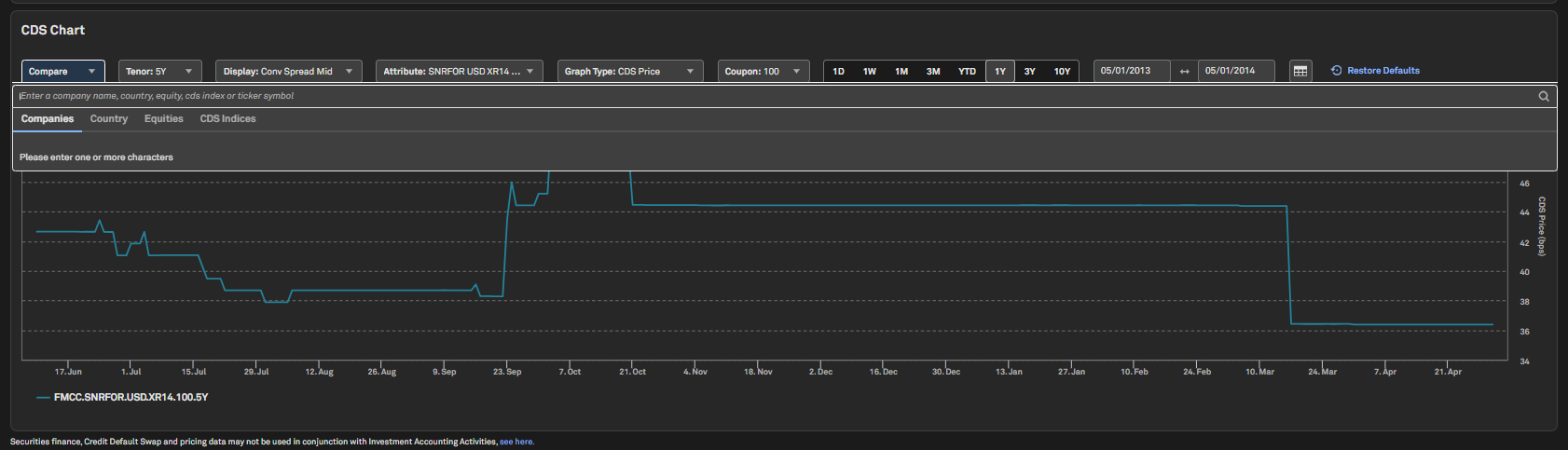
In this release, we enhanced the CDS chart on our Credit Default Swaps (CDS) page to support comparisons of issuer-level CDS with equities, indices and country-level CDS. We also updated Report Builder functionality to include the new CDS fields.
Find it in the platform:
Search for and select a company in the top search
In the left-hand navigation, select Corporate Issuance > Credit Default Swaps page and scroll to the CDS Chart
Click on the Compare box and enter the desired equity or Index to add it to the Chart
Charting
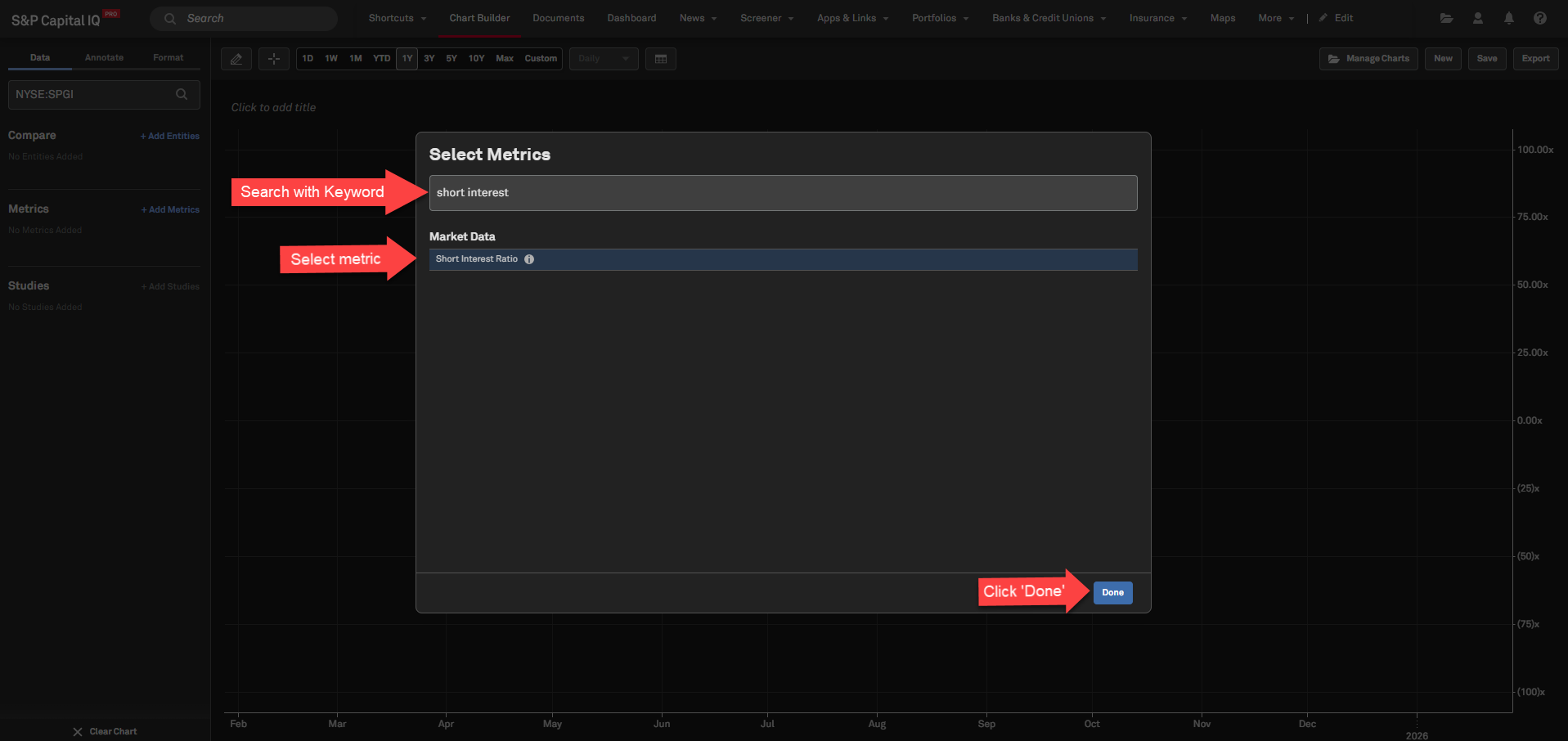
In this release, we added over 60 market data points and trailing multiples in Chart Builder, enabling more effective benchmarking, performance visualization, and strategic analysis. Enhanced calendar controls allow users to effortlessly redefine the analytical window.
Expanded Market Data & Trailing Multiples coverage in Chart Builder
Users can now access Chart Builder’s deep analytical capabilities with over 60 new market data items and trailing multiples, providing a comprehensive toolkit to analyze performance, valuation, and long term trends. These added metrics deepen diagnostics, enabling users to benchmark companies with greater precision, uncover strategic patterns, and generate stronger, data-driven insights.
Find it in the platform:
Navigate to Chart Builder from the top navigation or the Apps & Links menu
Input a company name or select an equity index to add to the Chart
Search required data item in the Metric Search to add to the Chart
New Data Items:
Market Data Metrics: Day Open Price, Day High Price, Day Low Price, VWAP, Total Enterprise Value (SNL), Average Daily Volume, Average Weekly Volume/Shares Out, Avg Daily Volume/One Year Avg Daily Volume, Price Change, High Price, Low Price, Short Interest Ratio, Beta One Year, Beta Three Year
Trailing Multiples Metrics: TEV Excl Operating Leases/Total Revenue, TEV Excl Oper Leases/ EBITDA Excl Oper Leases, TEV Excl Operating Leases/EBIT, TEV/ Free Cash Flow Unlevered, Total Enterprise Value/ Employees, Diluted TEV Outstanding/EBITDA, Diluted TEV Out Excl Op Leases/ EBITDA Excl Op Leases, Diluted TEV Outstanding/EBIT, Diluted TEV Out Excl Op Leases/ EBIT, Diluted TEV Outstanding/ FCF Unlevered, Diluted TEV Exercisable/Total Revenue, Diluted TEV Exer Excl Op Leases/ Total Revenue, Diluted TEV Exercisable/EBITDA, Diluted TEV Exer Excl Op Leases/ EBITDA Excl Op Leases, Diluted TEV Exerciaable/EBIT, Diluted TEV Exer Excl Op Leases/ EBIT, Diluted TEV Exercisable/ FCF Unlevered, Price/ Basic NAV, Price/ Diluted NAV, Price/ FFO, Price/ AFFO, Price/ EPS, Price/ Sales, Market Cap/ EBT Excl Unusual Items, Market Cap/ Free Cash Flow, Market Cap/EBT Incl Unusual Items, Market Cap/ Book Value, Diluted Market Cap Exercisable/ Total Revenue, Diluted Market Cap Exer/ EBT Excl Unusual Items, Diluted Market Cap Exercisable/ FCF Levered, Diluted Market Cap Outstanding/Total Revenue, Diluted Market Cap Out/EBT Excl. Unusual Items, Diluted Market Cap Outstanding/ FCF Levered, Price/ Last Quarter EPS (SNL), Price/EPS (SNL), Price/Book(SNL), Price/Tangible Book (SNL), Price/ Last Quarter FCF (SNL), Price/FCF (SNL), Price/ Last Quarter Net FCF (SNL), Price/Net FCF (SNL), Price/FFO (SNL), Price/Sales (SNL)
Equity Indices Market Data: High Index Value, Low Index Value, Day High, Day Low, 52 Week High, 52 Week Low, YTD Total Return, LTM Total Return
Market Data
In this release, we introduced enhanced visualizations on the Credit Default Swap (CDS) Index Profile page for comparative entity analysis, along with expanded equity index coverage, including the new MSCI Real Estate and S&P ESG families.
Enhanced Visualization Capabilities for CDS Indices
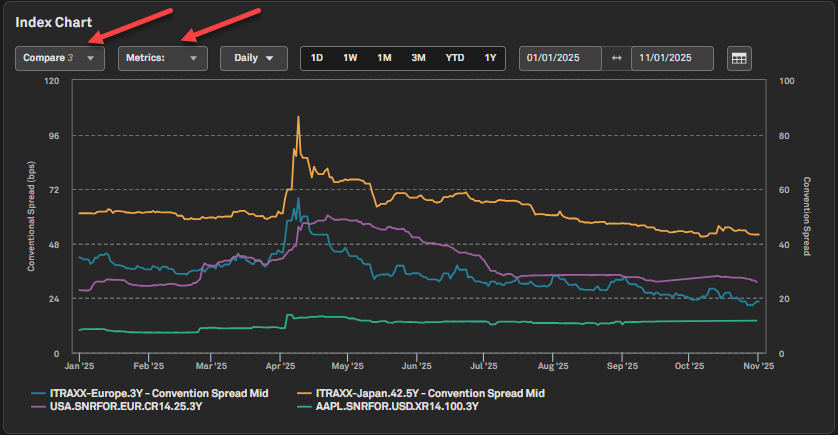
Users can access an enhanced visualization suite on the CDS Index Profile page, allowing comparison of CDS issuer, country, and index-level spreads to enable meaningful benchmarking analysis. Additionally, users can plot bid and ask values alongside the default mid value for the focus index.
Find it in the platform:
Search for and select a CDS index (alongside required series and tenor) within the top search
Navigate to the Index Chart within the CDS Index Profile page
Use the Compare option to select required comparison entities
In the Metrics dropdown, select Bid and/or Ask as secondary metrics
MSCI Real Estate Indices Coverage Expansion
Users can now access index values and constituents for two MSCI indices, namely MSCI ACWI IMI Core Real Estate and MSCI ACWI ex USA IMI Core Real Estate.
Find it in the platform:
Search for and select the required index from the top search
Navigate to the Index Profile page to view the new profiles
Click on Index Constituents in the left-hand navigation to view constituents
Note: Access to MSCI constituent data requires an additional subscription, please contact your account team for details.
S&P ESG Indices Coverage Expansion
Users can now access index values and constituents for the following S&P ESG index families:
S&P Global LargeMidCap Net Zero 2050 CT ESG
S&P Emerging Plus LargeMidCap Net Zero 2050 CT ESG
S&P Global LargeMidCap Net Zero 2050 PAB ESG
S&P Climate Resilience Tilted Indices
Find it in the platform:
Search for and select the required index from the top search
Navigate to the Index Profile page to view the new profiles
Click on Index Constituents in the left-hand navigation to view constituents
Note: Access to S&P ESG index constituent data requires an additional subscription, please contact your account team for details.
News & Insight
In this release, we introduced two new enhancements to help S&P Capital IQ Pro users discover and curate our high-value news and research content. S&P Global’s editorial teams offer forward-looking coverage and data-driven analysis of developing stories and underlying trends in the banking, real estate, insurance, tech, media & telecom, metals & mining, energy, and utilities sectors, complemented by cross-sector news on private and public markets, corporate debt, and macroeconomic trends. In addition, S&P Global’s news partners offer real-time coverage of global business and markets.
Redesigned Feature Page
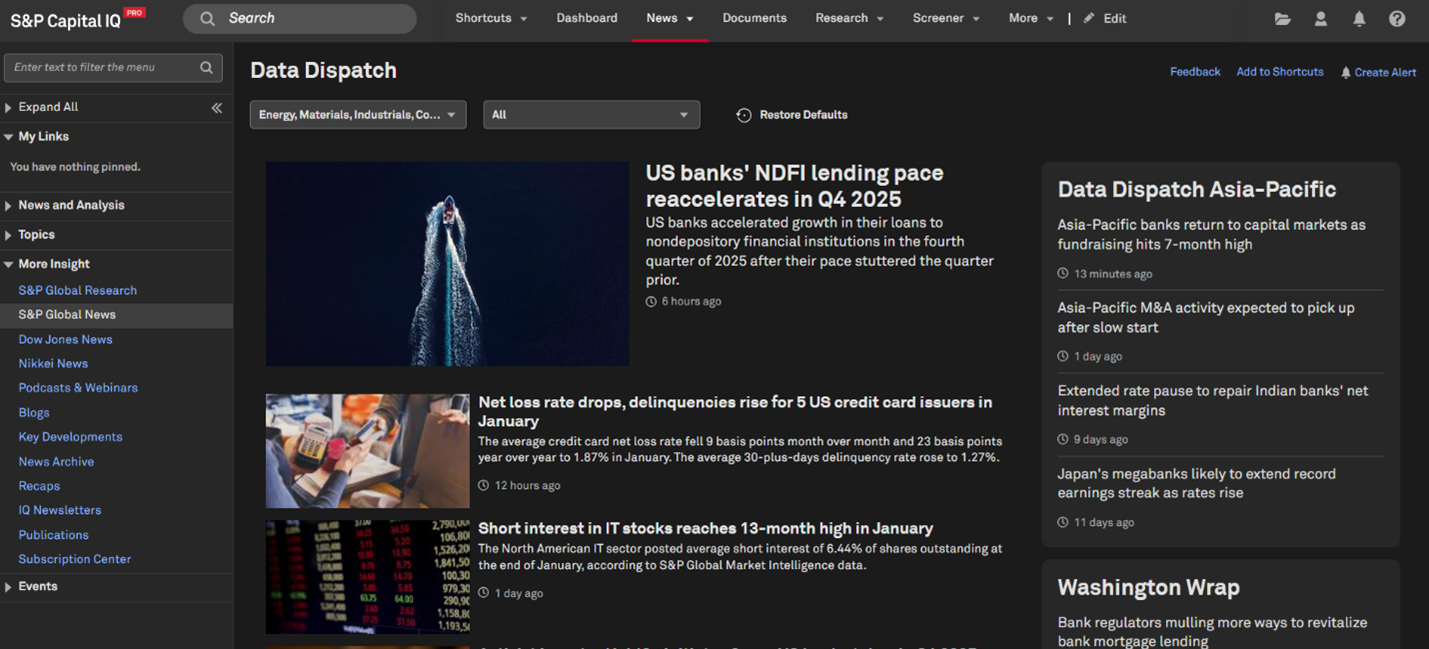
Users can access exclusive insights from S&P Global’s journalists and analysts through redesigned news and research feature pages. A more dynamic visual layout and streamlined content organization help users quickly surface differentiated insights, including Data Dispatches, Deal Profiles, and other premium editorial series.
Find it on the platform:
Navigate to News in the top navigation menu
In the More Insight section of the News menu, click S&P Global Research or S&P Global News
Browse the sections on the right side of the page to dive deeper into the featured series
List Curation Directly from News Articles
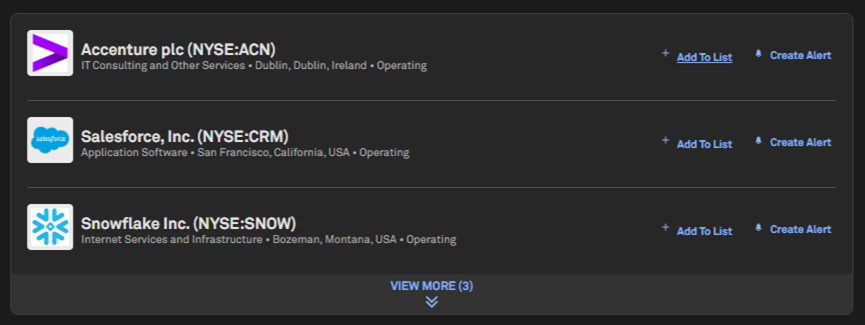
Users can add companies to their lists directly from the article page while reading company news. This update enables users to curate and manage their lists without interrupting their workflow, driving more efficient news monitoring and company research. Users can leverage lists to set up targeted News alerts, monitor company developments in real time via Dashboard Newswire, and organize company news across the S&P Capital IQ Pro platform.
Find it on the platform:
Navigate to News in the top navigation menu
Click on any company news headline
Navigate to Related Companies at the bottom of the article
Select the Add to List button next to the company name
Add the company to an existing list or create a new one
Alerts
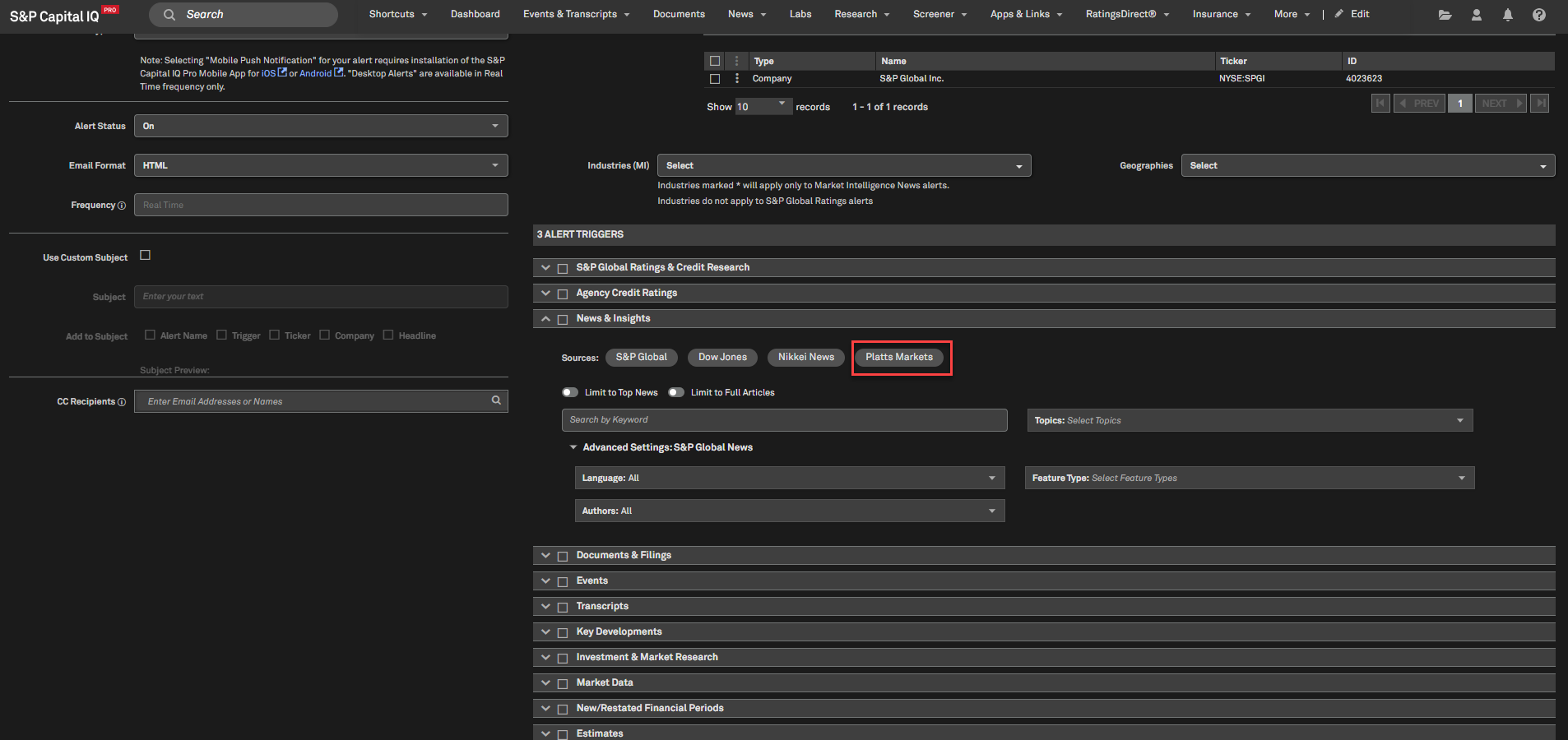
In this release, we simplified the creation of News alerts by introducing clearer source labeling, improved default settings, and updated terminology, making it easier for users to set up relevant alerts. In addition, we introduced Platts Markets as a new source for News alerts, enabling users to receive timely alerts on Platts news to better track commodity and energy related developments within their workflows.
Simplified News & Insights Alert Trigger
Users can now easily set up News alerts by selecting a source and adding keywords, with additional filters available in advanced settings.
Find it in the platform:
Click the Bell icon on the right-hand side of the top navigation to open the Desktop Alert panel
Navigate to Create New Alert from the panel
Select the necessary options from Alert settings, and under Alert filters
In Alert Triggers, select News and Insights
Select a news source and add keywords
Use Advanced Settings to apply additional filters if needed
Click Save in the top right corner

Creating Alerts for Platts Markets News
Users can create alerts to receive Platts Markets news directly within the platform, with improved naming, clearer defaults, and a more streamlined alert creation experience.
Find it in the platform:
Click the Bell icon on the right-hand side of the top navigation to open the Desktop Alert panel
Navigate to Create New Alert from the panel
Select the necessary options from Alert settings, and under Alert filters
In Alert Triggers, select News and Insights, click on Platts Markets capsule and add keywords.
Click Save in the top right corner
Note: Access to Platts Markets alerts requires an additional subscription, please contact your account team for details.
Portfolio Analytics
In this release, we expanded Portfolio Analytics with ‘group-level what-if analysis’, enhanced folder management, and new MSCI classifications. These updates help users quickly test allocation changes, stay organized as usage scales, and gain deeper geographic and market-level insights.
Group-Level What-If Analysis
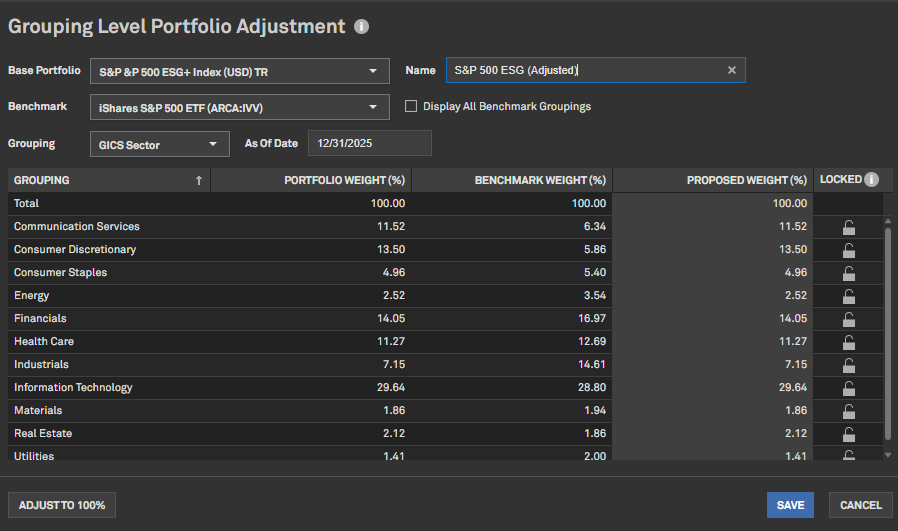
Users can now perform ‘what-if analysis’ at the group level – such as sector, industry, or region – in addition to adjusting individual holdings. This enables faster evaluation of allocation changes, while preserving total portfolio market value.
Key Capabilities:
Run what-if analysis by adjusting group-level portfolio weights
Rebalance allocations across groups while keeping total portfolio value unchanged
Automatically reflect group-level changes in the underlying holdings
Compare adjusted portfolios to the original to evaluate the impact on performance and portfolio characteristics
Find it in the platform:
Navigate to the Portfolios tab from the top navigation
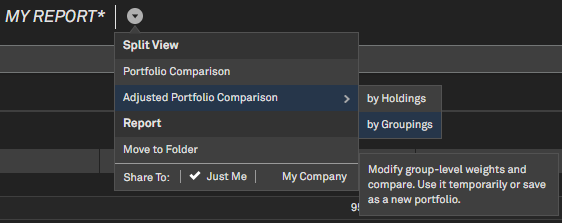
Go to Reports tab, open a report and click the dropdown arrow next to the report name
Select Adjusted Portfolio Comparison
Choose By Groupings and select a grouping (e.g., GICS Sector, Industry, Region)
Adjust group-level portfolio weights; benchmark weights are displayed for reference
Click Update to view results
Optionally, Save the adjusted portfolio for continued analysis
Enhanced Folder Management
Users can access enhanced folder functionality to efficiently organize reports, layouts, and schedules – useful when managing many saved items.
Find it in the platform:
Navigate to the Portfolios tab from the top navigation
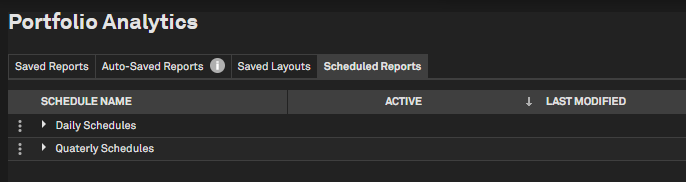
Go to Reports, Layouts, or Scheduled Reports
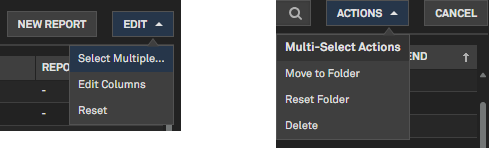
Click Edit on the top right, enable Select Multiple and select items using checkboxes
Choose Actions > Move to Folder
Move multiple reports, layouts, or schedules at once using multi-select
Organize Schedules into subfolders (e.g., Daily, Monthly, Quarterly, or by portfolio)
Simplify cleanup and reorganization without deleting saved artifacts
To return an item to its default location, select Reset Folder
When deleting a folder, choose the option to reset contained items instead of deleting them
MSCI Classifications
New MSCI classifications are now available for users as metrics or groupings in Portfolio Analytics reports, enabling richer geographic and market-level analysis.
New classifications available:
MSCI Geo Region Code: Analyze portfolios by major geographic regions such as Americas, EMEA, and APAC
MSCI Market: Classify holdings by market development level, including Developed, Emerging, and Frontier Markets
Find it in the platform:
Navigate to the Portfolios tab from the top navigation
Go to Reports tab and open or create a report
Use the Grouping or Metrics menus
Select the desired MSCI classification
Note: Access to MSCI data requires an additional subscription, please contact your account team for details.
Banks & Credit Unions
In this release, we added new Deposit and Loan Beta fields for Credit Unions, enabling users to measure deposit and loan‑pricing sensitivity and anticipate margin impacts as interest rates shift. We also introduced Basel Minimum Capital Requirement fields for Banks, helping users quickly evaluate capital adequacy and compare risk profiles across institutions.
New Deposit and Loan Beta fields for Credit Unions
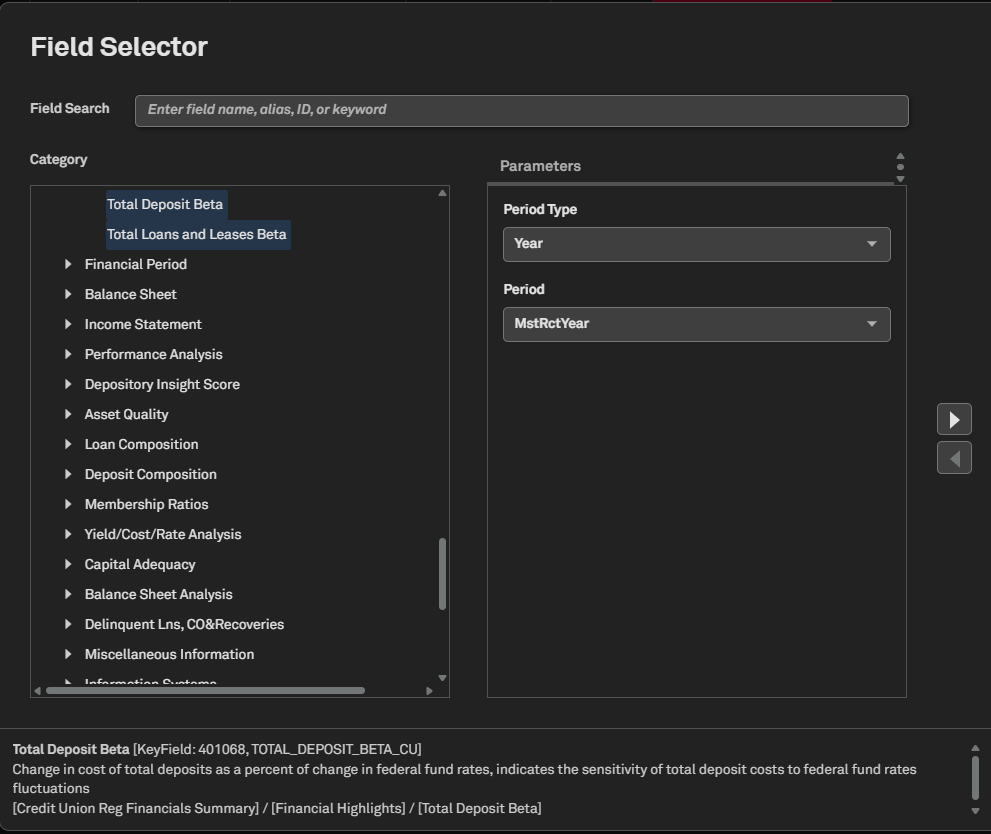
Users can access the new Total Deposit and Loan & Leases Beta fields for Credit Unions in Screener. These fields reflect the sensitivity of deposit and loan costs to fluctuations in the federal funds rate and are available for annual, quarterly, and the last twelve months period types in the Screener.
Find it in the platform:
Navigate to Screener from the top navigation or the Apps & Links menu
Select Industry & Asset Data > Financials > Regulated Depositories (U.S.)
Within Criteria, select Company Type as Credit Unions and set the Entity Type dropdown to Companies
Select Display Columns, go to Credit Union Reg Financials Summary to find the new fields within Financial Highlights
Similarly, within the Companies dataset, expand Financials > U.S. Bank Regulatory Financials > Credit Union Reg Financials Summary > Financial Highlights to find the new fields
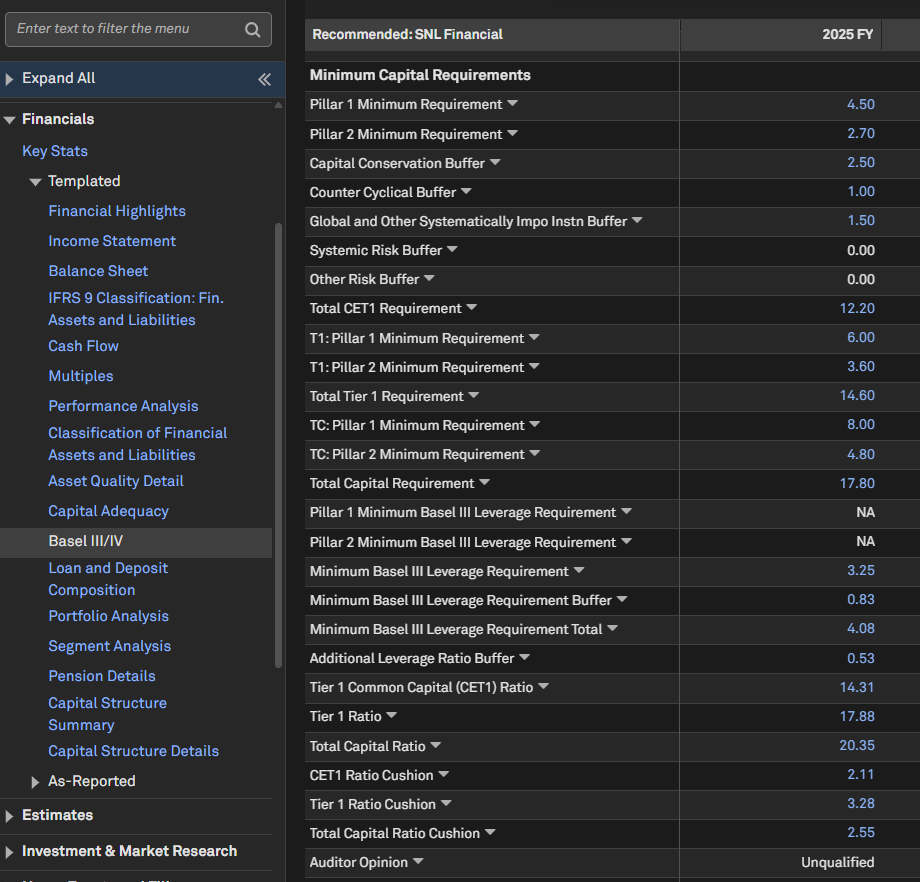
New Minimum Capital Requirement fields on the Basel III/ IV page
Users can now access the below Minimum Capital Requirements fields on the Basel III/IV page.
T1: Pillar 1 Minimum Requirement
T1: Pillar 2 Minimum Requirement
TC: Pillar 1 Minimum Requirement
TC: Pillar 2 Minimum Requirement
Pillar 1 Minimum Basel III Leverage Requirement
Pillar 2 Minimum Basel III Leverage Requirement
Minimum Basel III Leverage Requirement Buffer
Minimum Basel III Leverage Requirement Total
Additional Leverage Ratio Buffer
Find it in the platform:
Search for a global bank in the top search to go to its Corporate Profile
In the left-hand navigation, expand Financials > Templated > Basel III/ IV to find the new metrics
Insurance
In this release, we added 2025 statutory filings updates related to the Principal-Based Bond Definition (PBBD), delivering clearer bond categorization, improved reporting across investment schedules, and new disclosures for life insurers. These enhancements align with NAIC statutory filing updates that introduce new exhibits and disclosures for U.S. Insurance companies.
New Exhibits - Schedule D Part 1A | Schedule D Part 1 Section 1 & 2
Schedule D Part 1 is now divided into Issuer Credit Obligations and Asset-Backed Securities; these categories are consistently applied across related schedules. A new section, Schedule D Part 1A, enables bond reporting by NAIC rating, maturity, and affiliation, while the Summary Investment Schedule and the Schedule D – Summary by Country also display assets by location and affiliation. For life insurers, the State Page Footnotes show direct premiums earned and losses for Accident & Health lines, and a new Schedule S Part 8 reports assets tied to MODCO or funds withheld reinsurance agreements by account type and asset class. All these updates are accessible in the Screener.
Historical Tagging of Schedule D subcategories
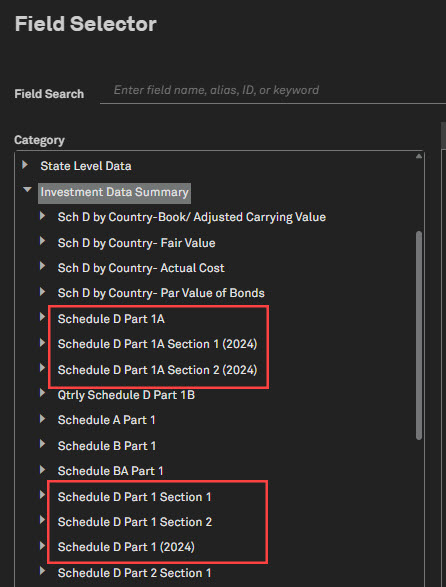
Schedule D Part 1A Section 1, Schedule D Part 1A Section 2, and Schedule D Part 1 have been reclassified as historical data. The subcategory names now include the suffix “2024” – for example: Schedule D Part 1A Section 1 (2024).
Impact: All queries that reference these categories will return data only up to the 2024 annual reporting period
Addition of New Exhibits (PBBDDriven): In line with the latest Principal-Based Rond Definition (PBBD), the following exhibits have been introduced
Schedule D Part 1A
Schedule D Part 1 Section 1
Schedule D Part 1 Section 2
These new exhibits are now located under the Investment Data Summary category of the Insurance Statutory Financials dataset.
Find it in the platform:
Navigate to Screener from the top navigation or the Apps & Links menu
In Display Columns, expand Investment Data Summary
Schedule D Part 1A
Schedule D Part 1 Section 1
Schedule D Part 1 Section 2
New Metrics in Insurance Investment Holdings and Transactions Datasets
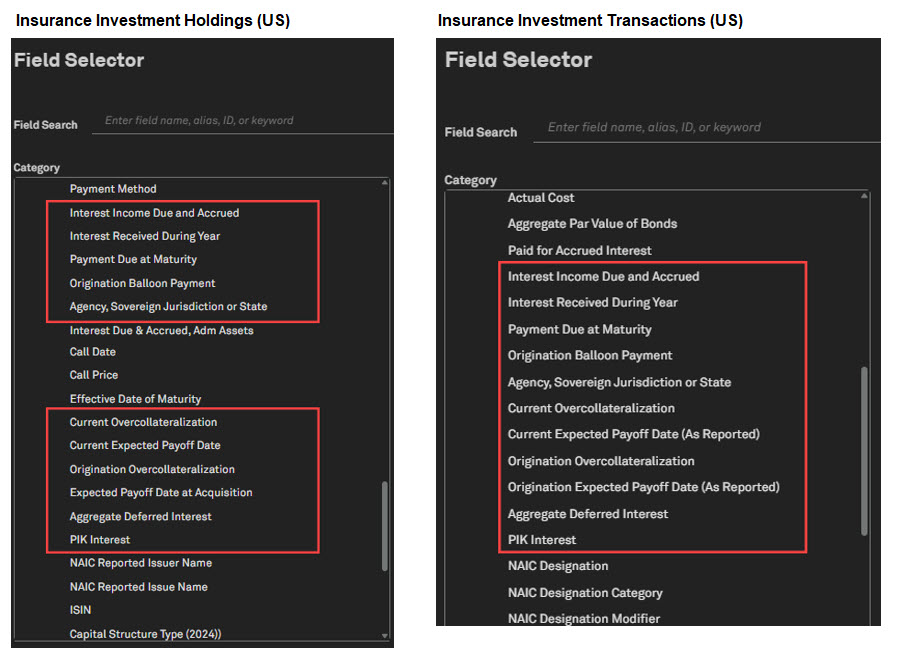
Users now have access to newly added columns in Schedule D Parts 3, 4, and 5. These metrics are available within Insurance Investment Holdings (US) and Insurance Investment Transactions (US) perspectives.
New metrics in Investment Holdings and Transactions datasets:
Interest Income Due and Accrued
Interest Received During Year
Payment Due at Maturity
Origination Balloon Payment
Agency, Sovereign Jurisdiction or State
Current Overcollateralization
Current Expected Payoff Date
Origination Overcollateralization
Expected Payoff Date at Acquisition
Aggregate Deferred Interest
PIK Interest
Find it in the platform:
Navigate to Screener from the top navigation or the Apps & Links menu
In Display Columns, expand Investment Asset Information > Bonds
For Transactions metrics, select Insurance Investment Transactions (US)
In Display Columns, expand Investment Transactions Asset Information
Bonds & Stock: Acquisition
Bonds & Stock: Disposal
New Metrics for the Summary Investment Schedule and Schedule D Summary by Country
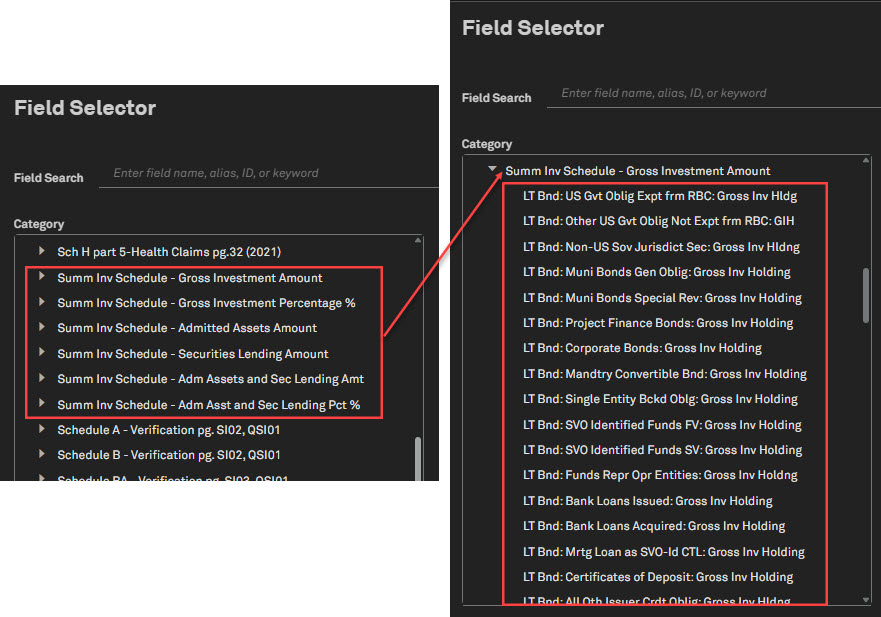
Users can access new metrics added to Insurance Statutory Financials (U.S) to provide updates on Issuer Credit Obligations (ICO) and Asset‑Backed Securities (ABS). This helps to review an insurer’s exposure to ICO versus ABS, which is critical under the new principles.
Find it in the platform:
Navigate to Screener from the top navigation or the Apps & Links menu
Select Insurance Statutory Financials (U.S) > Core Financial Pages to find the following metrics
Summ Inv Schedule - Gross Investment Amount
Summ Inv Schedule - Gross Investment Percentage %
Summ Inv Schedule - Admitted Assets Amount
Summ Inv Schedule - Securities Lending Amount
Summ Inv Schedule - Adm Assets and Sec Lending Amt
Summ Inv Schedule - Adm Asst and Sec Lending Pct %
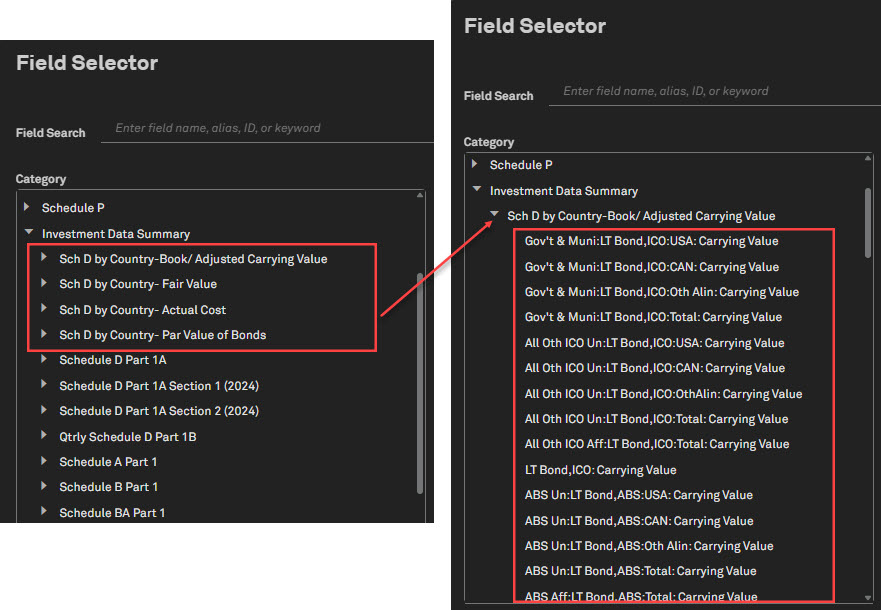
Select Insurance Statutory Financials (U.S) > Investment Data Summary to find the following metrics
Sch D - by Country-Book/ Adjusted Carrying Value
Sch D - by Country- Fair Value
Sch D - by Country- Actual Cost
Sch D - by Country- Par Value of Bonds
Life - Schedule S Part 8
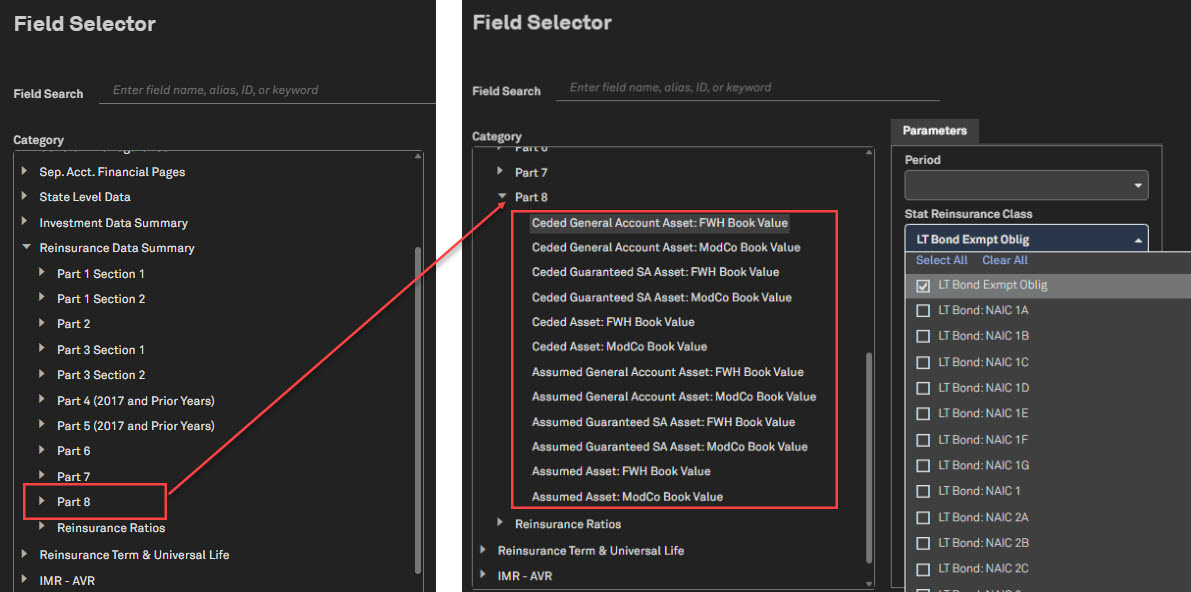
Users can now access a new subcategory, Part 8, in Reinsurance Data Summary within Insurance Statutory Financials (U.S.) for life filers. Schedule S, Part 8 provides detailed information on ceded reinsurance, including each reinsurer’s recoverable amounts. This enhancement improves transparency, enables regulators to better assess reinsurer risk, and helps ensure insurers do not become overly reliant on a limited number of reinsurers.
Find it in the platform:
Navigate to Screener from the top navigation or the Apps & Links menu
Select Insurance Statutory Financials (U.S) > Reinsurance Data Summary > Part 8
Updates – Notes to Financials, MCAS & Schedule E Part 2
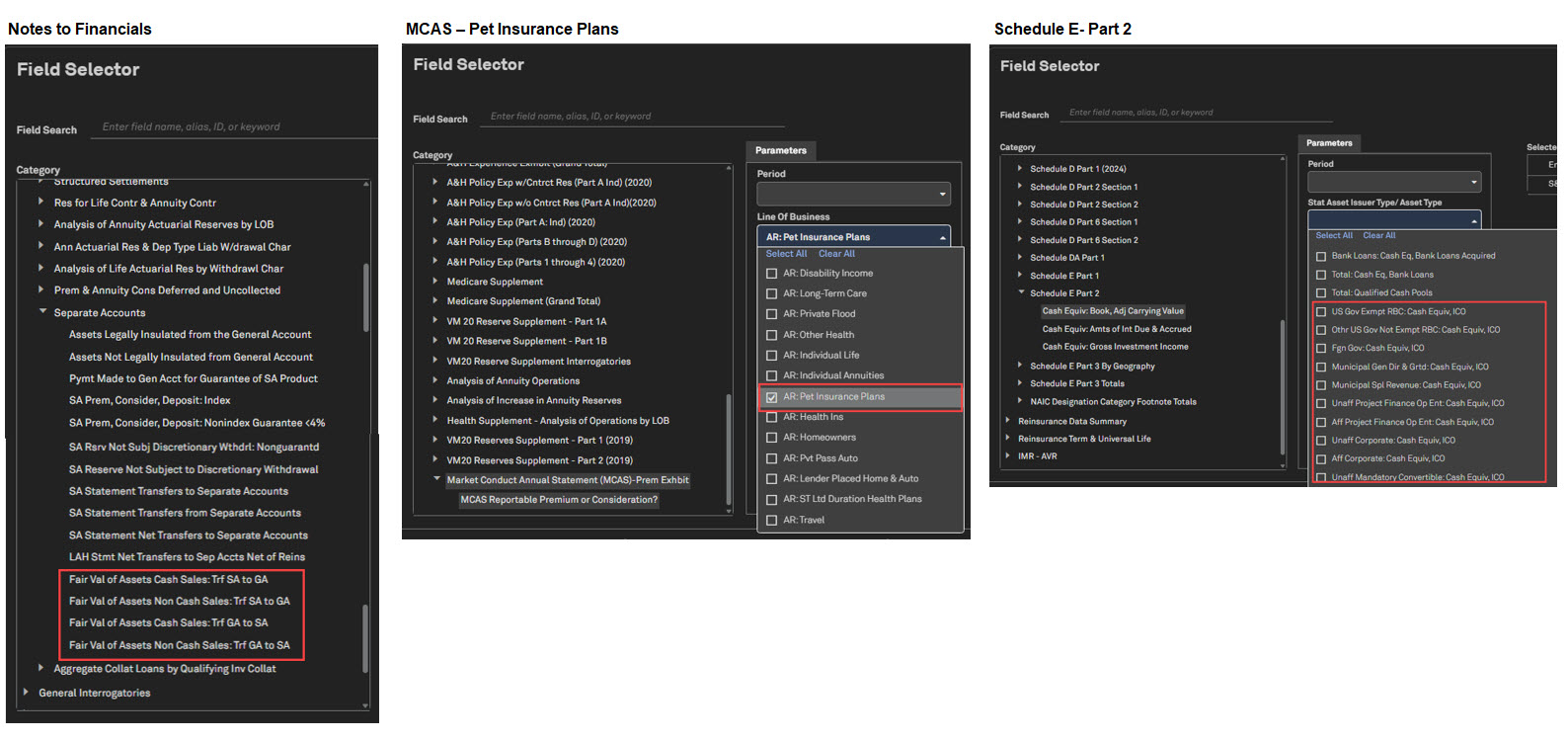
New metrics are added to Notes to Financials, MCAS, and Schedule E Part 2. Four Note 35 metrics are added under Separate Accounts to help analyze the activities of life and fraternal insurers backed by general account guarantees. MCAS now includes Pet Insurance Plans to track the growing pet insurance market. Issuer Credit Obligations (ICOs) are now listed in Schedule E Part 2 (Cash Equivalents) by NAIC guidelines, with new categories added accordingly.
Find it in the platform:
Navigate to Screener from the top navigation or the Apps & Links menu
Select Insurance Statutory Financials (U.S) >
Notes to Financials > Separate Accounts
Supplements > Market Conduct Annual Statement (MCAS)-Prem Exhibit
Investment Data Summary > Schedule E Part 2
Energy
In this release, we added the California Independent System Operator (CAISO) Interconnection Queue region to the ISO Interconnection Queue page, providing access to comprehensive queue data and relevant metrics. Additionally, we introduced new Renewable Operating & Maintenance fields sourced from Electric FERC Forms and enhanced the Market Intelligence Research Library, enabling users to search for reports by specific authors or Federal Energy Regulatory Commission (FERC) jurisdiction.
CAISO Interconnection Queue
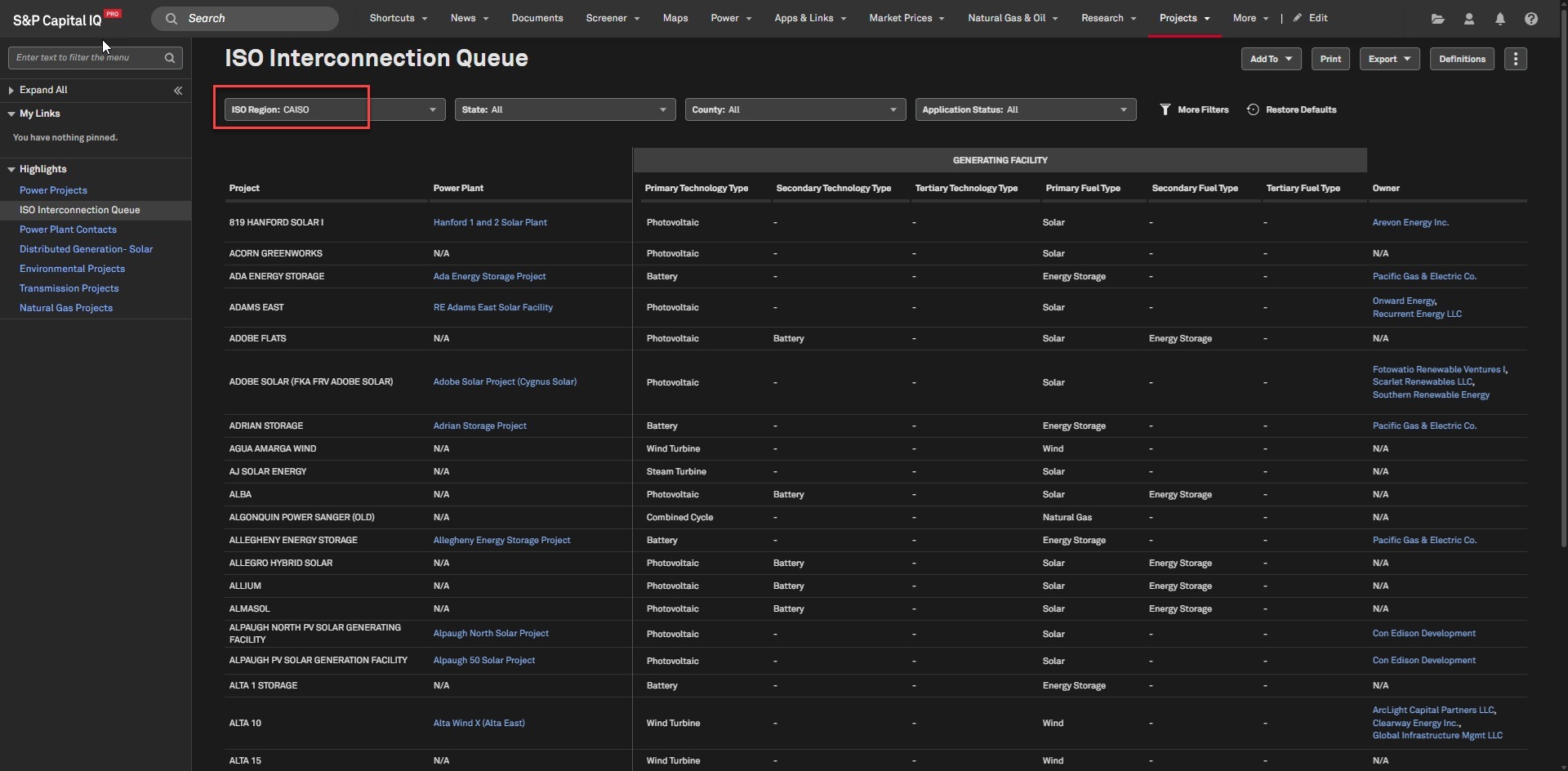
Users can access CAISO Interconnection Queue data on the ISO Interconnection Queue page, available under the Projects tab. This data empowers users to monitor shifts in electricity demand, track load defection, and further safeguard against energy transition and technology risks.
Find it in the platform:
On the Energy profile specialization, navigate to Projects from the top navigation menu
Select ISO Interconnection Queues
Set the region as CAISO to access relevant data
Coverage stats:
All projects available in the CAISO Interconnection queue starting from July 2025
Renewable Operating & Maintenance Expenses
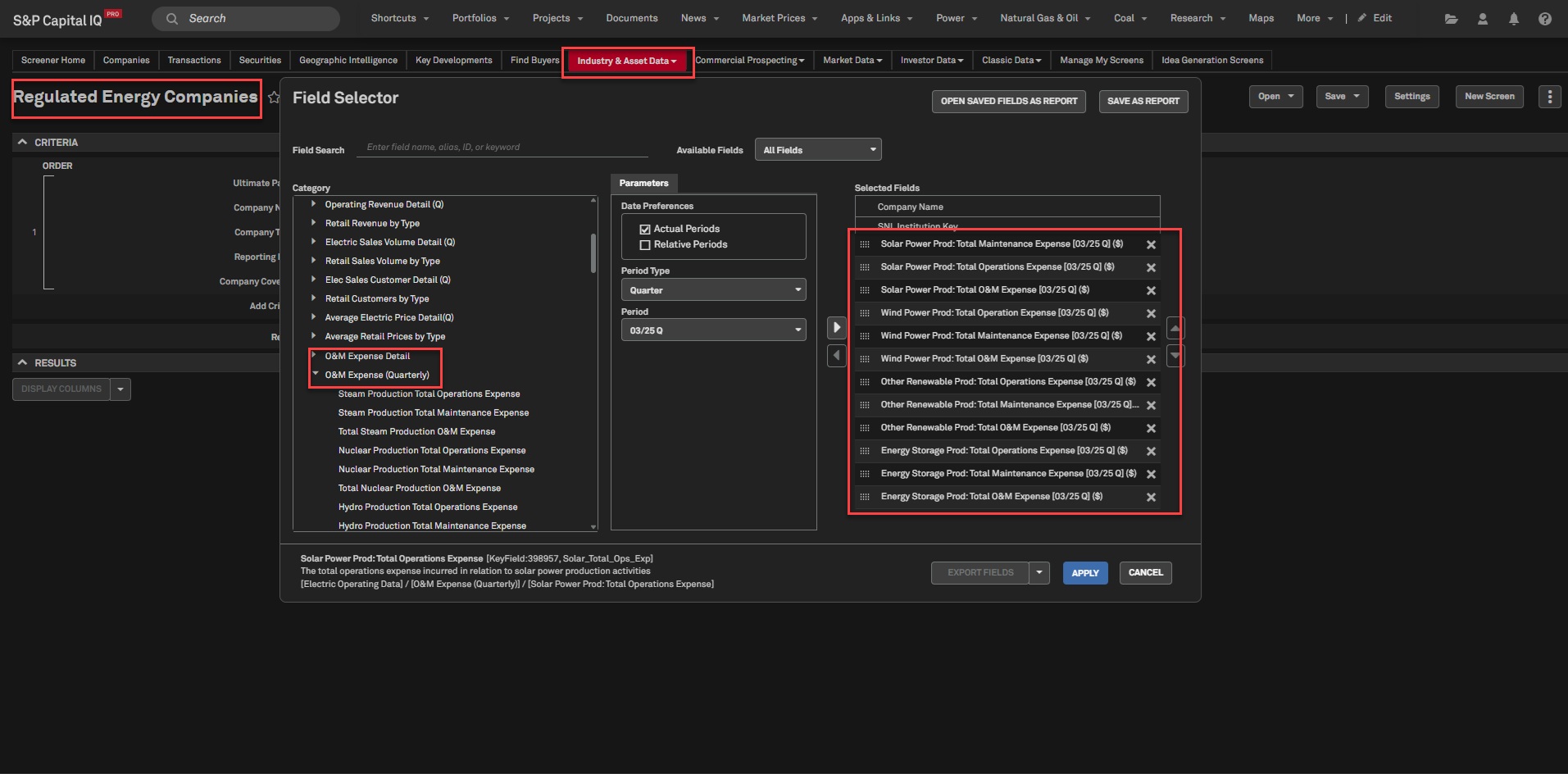
Users can access solar, wind, storage, and other renewable operating and maintenance expenses from the Regulated Energy Financials or from the Regulated Energy Companies dataset in Screener. This information, sourced from the FERC Form 3, enables users to benchmark electric utility expenses and compare the efficiency of renewable power production.
Find it in the platform:
On the Energy profile specialization, search for a power or diversified utility company in the top search
On the company profile, in the left-hand menu, navigate to Financials > Regulated Energy and select Electric O&M Expenses
Navigate to Screener from the top navigation or the Apps & Links menu
Select Energy & Utilities > Regulated Energy Companies
Go to Display Columns and navigate to O&M Expense Detail or O&M Expense (Quarterly) categories within Electric Operating Data
Set the desired parameters and move the new O&M fields to the Selected Fields section
Click Apply and Run Screen
Coverage stats:
All reporting entities starting Q3’2025
Market Intelligence Research Library
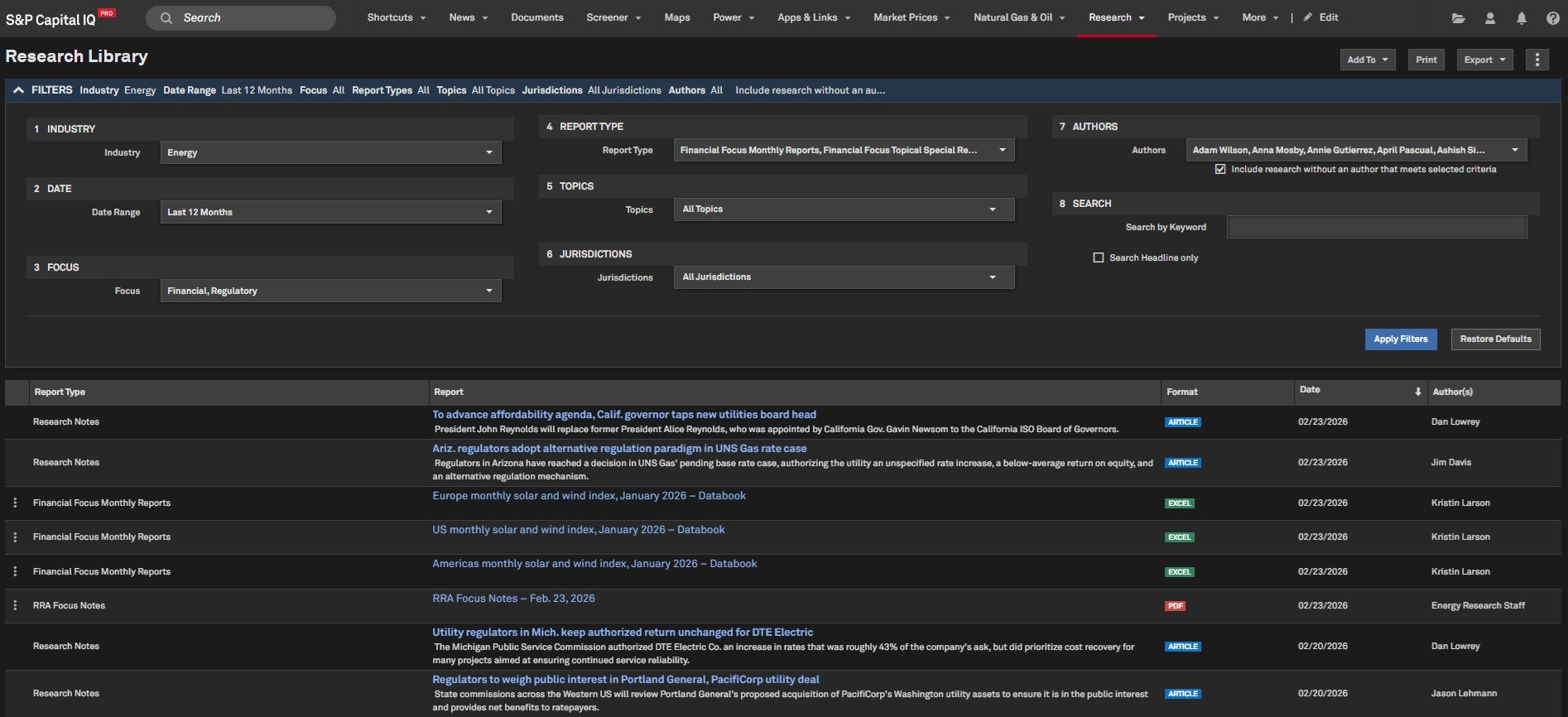
In the Market Intelligence Research Library, users can now access regulatory research on utility rate cases, evaluate regulatory risk across states, explore financial and regulatory intelligence within the energy utility sector and track energy policy trends.
Find it in the platform:
On the Energy profile specialization, navigate to Research from the top navigation
Coverage stats:
All research reports from 2011
Metals & Mining
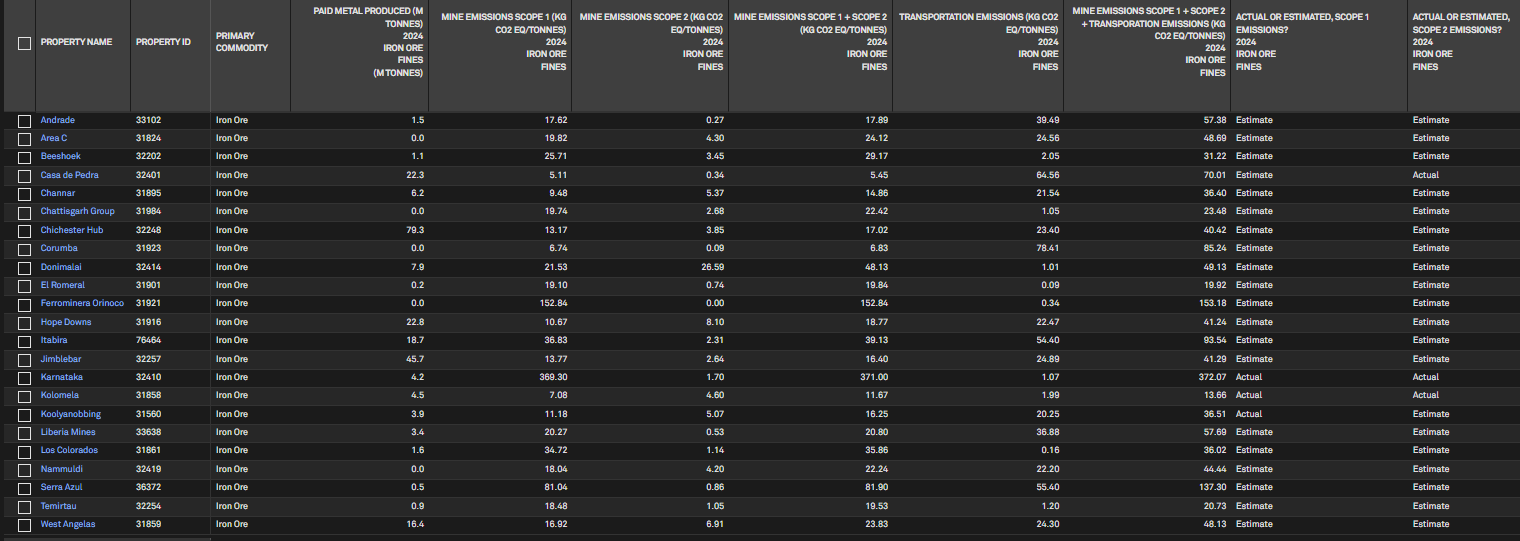
In this release, we added comprehensive emissions data for bulk commodities, including iron ore and manganese, to Screener and the S&P Capital IQ Pro Plug-In. This enhancement includes Scope 1, Scope 2, and Transportation Emissions, as well as emissions reporting.
Emissions data for Bulk Commodities in Screener and S&P Capital IQ Pro Plug-In
Users with the Mine Emissions add-on subscription can access emissions data directly within Screener and the S&P Capital IQ Pro Plug-In, including the newly added coverage of Iron Ore and Manganese.
Find it in the platform:
Screener
Navigate to Screener from the top navigation or the Apps & Links menu
Select the Metals & Mining Properties dataset, expand the Mine Emissions Data category from Display Columns
Access the new Bulk Commodities category
S&P Capital IQ Pro Plug-In
In Excel, launch the S&P Capital IQ Pro Plug-in and open Formula Builder
Under Industry & Asset Data, select Metals & Mining Properties
Expand Mine Emissions Data category from Data Items
Find the new Bulk Commodities category
Coverage stats:
Cobalt, Copper, Gold, Iron Ore, Lead, Lithium, Manganese, Molybdenum, Nickel, Palladium, Platinum, Rhodium, Silver and Zinc.
Note: Access to Mine Emissions data requires an additional subscription, please contact your account team for details.

Real Estate
In this release, we introduced 70+ leasing‑summary and rent‑spread fields in the Property Company Analysis view, providing REIT users direct access to rental‑income data. Consolidation of these metrics enables users to efficiently evaluate tenant stability and forecast future REIT revenue.
As-Reported Leasing Summary and Rent Spread
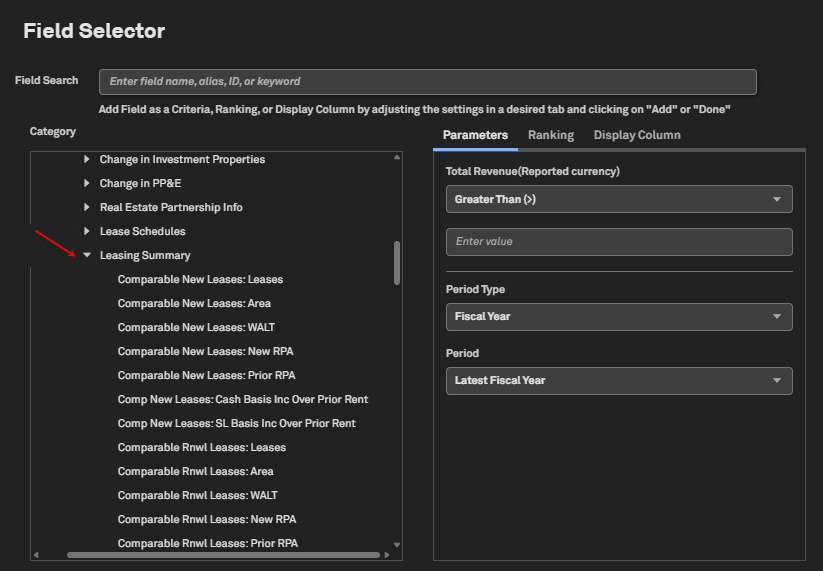
Users can now access the enhanced REIT Property Aggregate experience, featuring over 70 new rental‑income fields in the Leasing Summary section. This update streamlines manual data collection, accelerates analysis, and enhances consistency when benchmarking REITs for improved revenue predictability.
Find it in the platform:
Navigate to Screener from the top navigation or from the Apps & Links menu
Select Companies, expand Financials > SNL Financial Fundamentals > REIT & Property Companies > REIT & Property Company Analysis
Under the Leasing Summary subcategory, select the required metrics and click Run Screen
RatingsDirect
In this release, we introduced significant enhancements to the commentary article tagging process. Leveraging machine learning and Gen AI, the updated commentary tagging system accurately identifies the primary S&P Ratings sector(s) and Market Intelligence geography for each commentary article, significantly improving research relevance and discoverability across the platform. We also enhanced Credit Monitor with expanded export capabilities and an improved list dropdown that provides access to prebuilt lists tracking influential market participants.
Commentary Article Tagging Enhancements
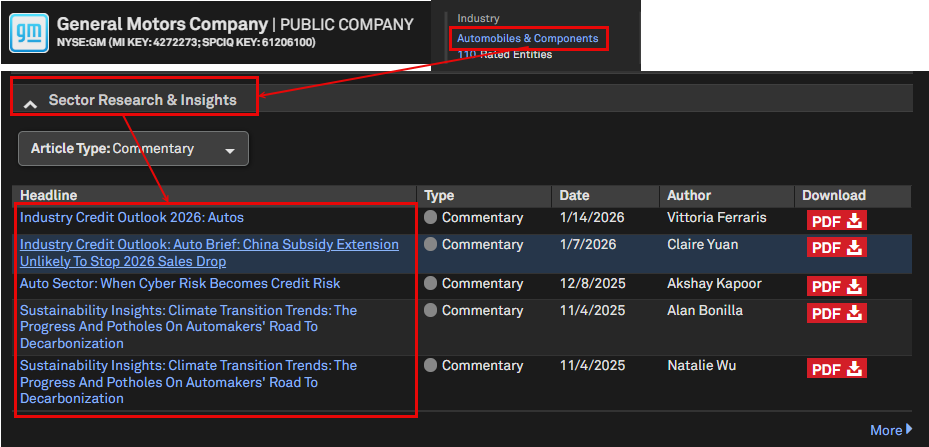
Commentary articles now feature improved sector and geography tags, boosting relevance and discoverability across the platform. Powered by machine learning, the updated tagging accurately identifies the primary sectors and geography of each article, minimizing over-tagging to unrelated sectors, subsectors, and regions.
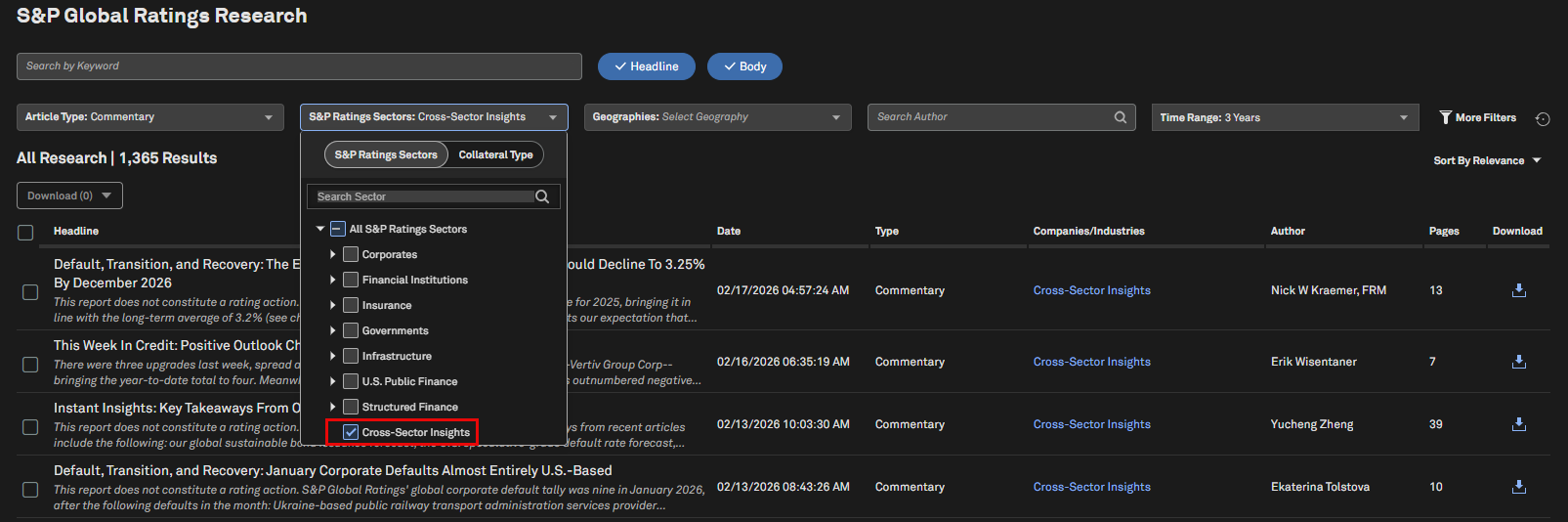
These enhanced tags persist in corporate profiles, industry profiles, entity research pages, and alerts. They are also visible on the Research Search page, which now includes a new Cross-Sector Insights filter option within the S&P Ratings Sectors, enabling users to discover thought leadership and thematic research spanning multiple sectors.
Find it in the platform:
Search for a covered entity in the top search bar and navigate to its Corporate Profile
Review the commentary articles in the Sector Research & Insights tab within the Credit Story widget, which will be more specific to the entity’s primary sector
Navigate to an industry profile and access the refreshed commentary articles in Industry Insights, more specific to the chosen sector
Navigate to the Research Search page, in the Sector filter, choose the Cross-Sector Insights option
Credit Monitor - Expanded Export Capabilities
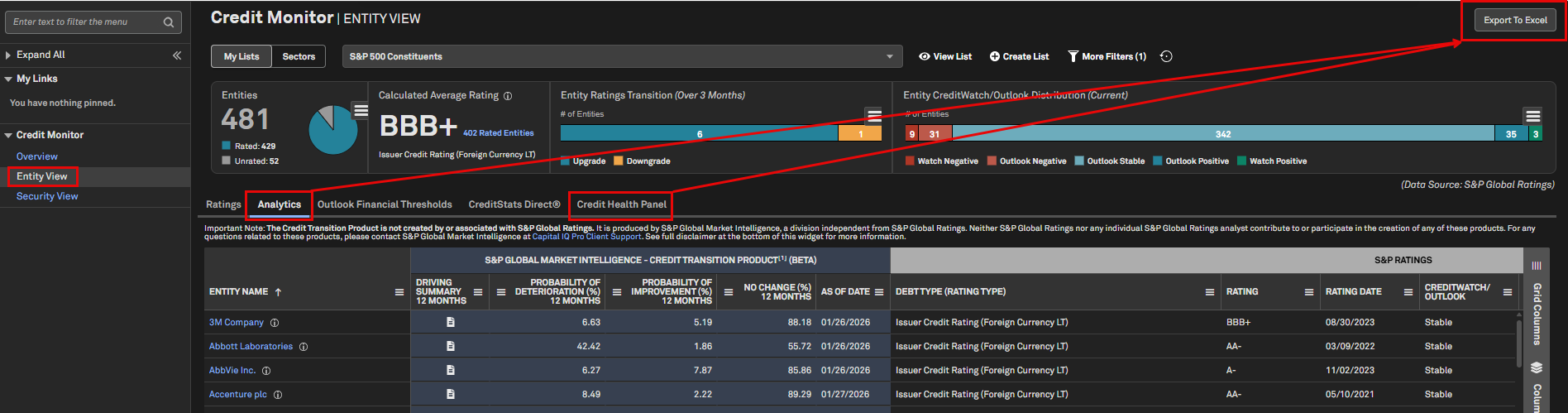
We introduced Export to Excel functionality for both the Analytics and Credit Health Panel tabs within Credit Monitor, enabling users to easily download and analyze key data. This enhancement streamlines reporting workflows and enables users to perform deeper, customized analysis.
Find it in the platform:
Navigate to the RatingsDirect
menu from the top navigation and select Credit MonitorIn the left-hand menu, select Entity View
In the entity grid, select the Analytics tab or Credit Health Panel tabSelect Export to Excel at the top right of the page
Credit Monitor – Dynamic List Enhancements
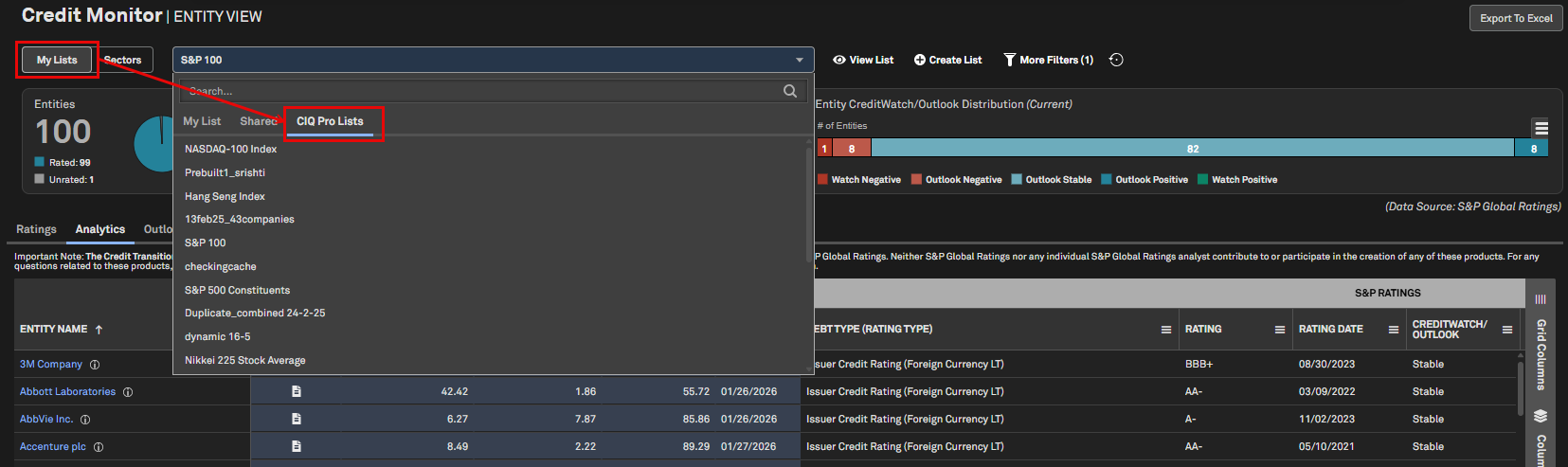
Users can access an enhanced Credit Monitor list dropdown with a new CIQ Pro Lists tab, providing dynamic, prebuilt entity lists curated by S&P Global Market Intelligence. These lists mirror prominent market indices and leading groups such as the S&P 500—enabling quick reference and monitoring of key market segments without manual setup or maintenance.
Find it in the platform:
Navigate to the RatingsDirect
menu from the top navigation and select Credit MonitorSelect My Lists workflow
Open the list dropdown to access a search bar with a tab for CIQ Pro Lists
CreditCompanion by RatingsDirect
In this release, we enhanced CreditCompanion , including deeper integration with the platform via the Article Viewer and improved chat functionality that supports follow‑up questions and translations.
Finding CreditCompanion in S&P Capital IQ Pro
Licensed and trial users can access the tool via the RatingsDirect menu or on the Corporate profile page of rated entities. To provide feedback, select either 'thumbs up' or 'thumbs down' and provide a note. We review and appreciate all feedback.
Find it in the platform:
Navigate to the RatingsDirect
menu from the top navigation and select CreditCompanionNavigate to the Corporate Profile page of a rated entity to access the tool
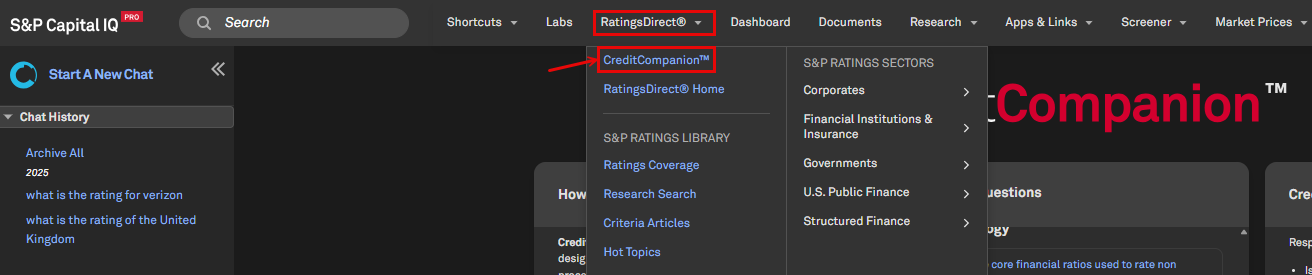

Article Viewer Integration
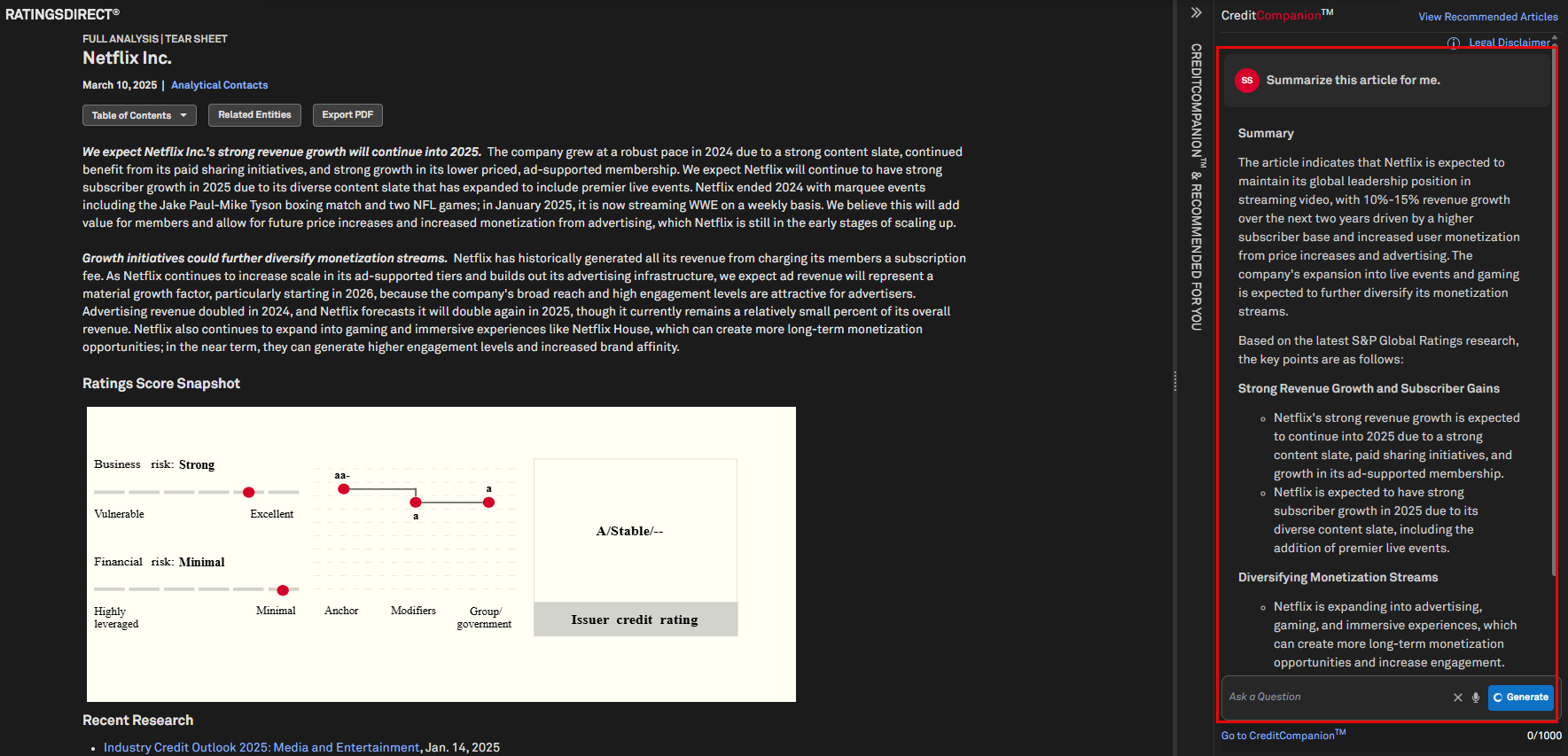
CreditCompanion is now fully integrated into the article viewer, enabling users to easily extract insights from S&P Ratings research. Users can swiftly generate SWOT analysis from Full Analysis, clarify complex explanations in Criteria articles, and efficiently summarize industry-specific information from in-depth Commentary reports.
Find it in the platform:
Navigate to an S&P Global Ratings Research article
Locate the CreditCompanion
right-hand panel
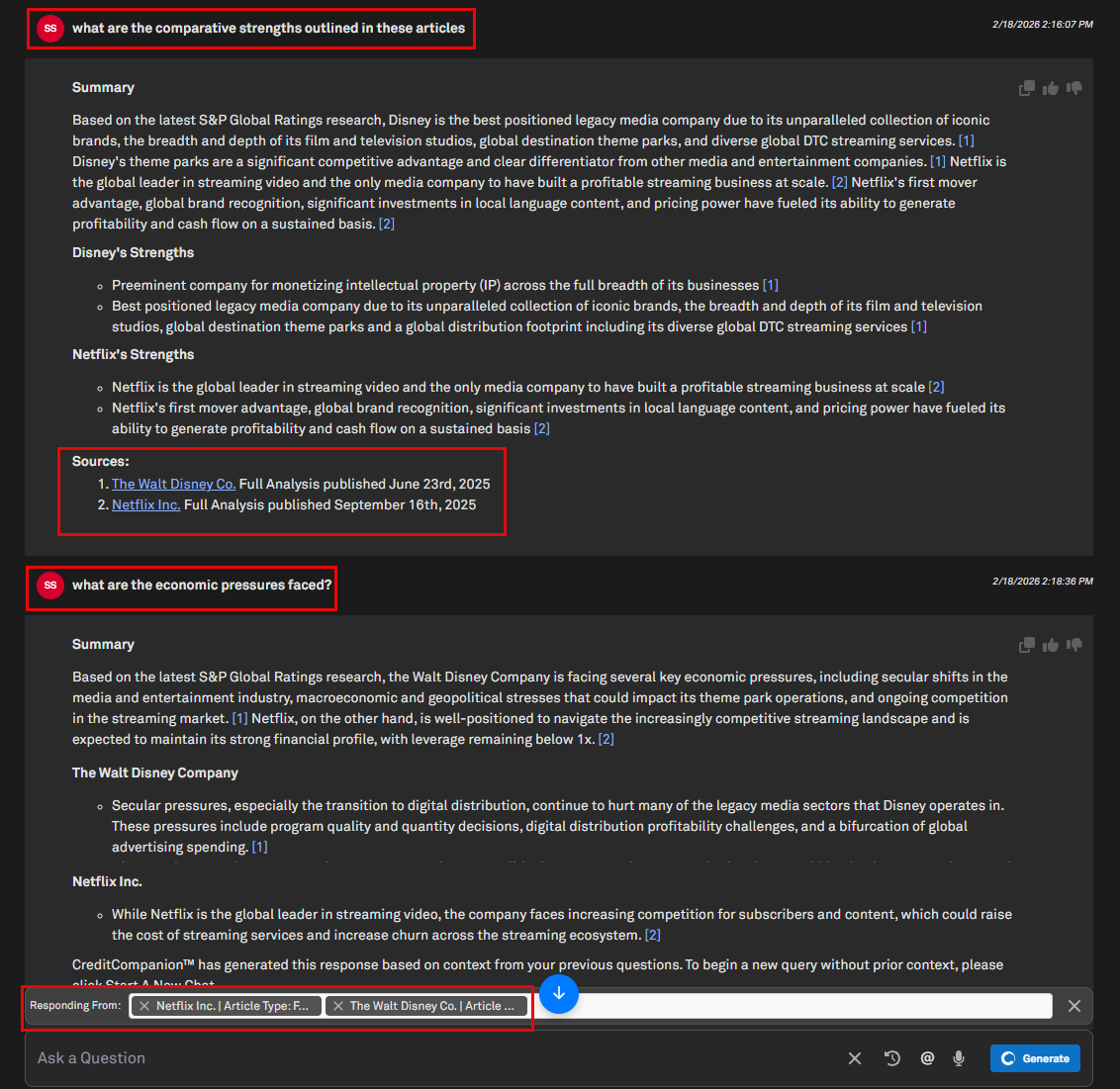
Conversation Follow-ups for Tagged Articles
When users reply to a CreditCompanion answer, the system tracks articles tagged in previous questions and displays them collectively when necessary. As follow-up questions or additional details are requested, CreditCompanion maintains awareness of the conversation’s main topic, ensuring responses stay focused on the original queries. This functionality keeps important articles and discussion threads accessible, providing clear, context-aware answers as inquiries progress. Multiple articles can be selected at once.
Find it in the platform:
Navigate to the RatingsDirect
menu from the top navigation and select CreditCompanionEnter your question in the Ask a Question bar
Ask a follow-up question or request additional details
CreditCompanion Article Translation
Users can effortlessly translate articles with CreditCompanion's new full document translation service, now supporting Japanese and additional languages. Access normalized financial terminology for clarity, consistent translations across articles, and preservation of article formatting. Simply type “@” to search for and tag specific articles for translation. Note that only one article can be translated at a time.
Find it in the platform:
Navigate to the RatingsDirect
menu from the top navigation and select CreditCompanionEnter your question in the Ask a Question bar
Example Prompt: ‘Translate this article to Japanese @IBM Full Analysis’.
Non-English prompts are also recognized

Comparison Operators
CreditCompanion now understands comparison operators expressed in both plain language and symbolic form when translating text prompts into CreditStats Direct queries. Users can enter criteria like ‘greater than’, ‘less than’, ‘between’ or ‘equal to’ as well as symbols such as >, <, and =. This enhancement makes natural‑language querying more intuitive and precise.
Find it in the platform:
Navigate to the RatingsDirect
menu from the top navigation and select CreditCompanionEnter your question in the Ask a Question bar
Example prompt: 'Create a list of US healthcare companies with a 2024 EBITDA margin, adjusted between 10% and 25% and a 2024 Debt/ EBITDA, adjusted greater than 4x'
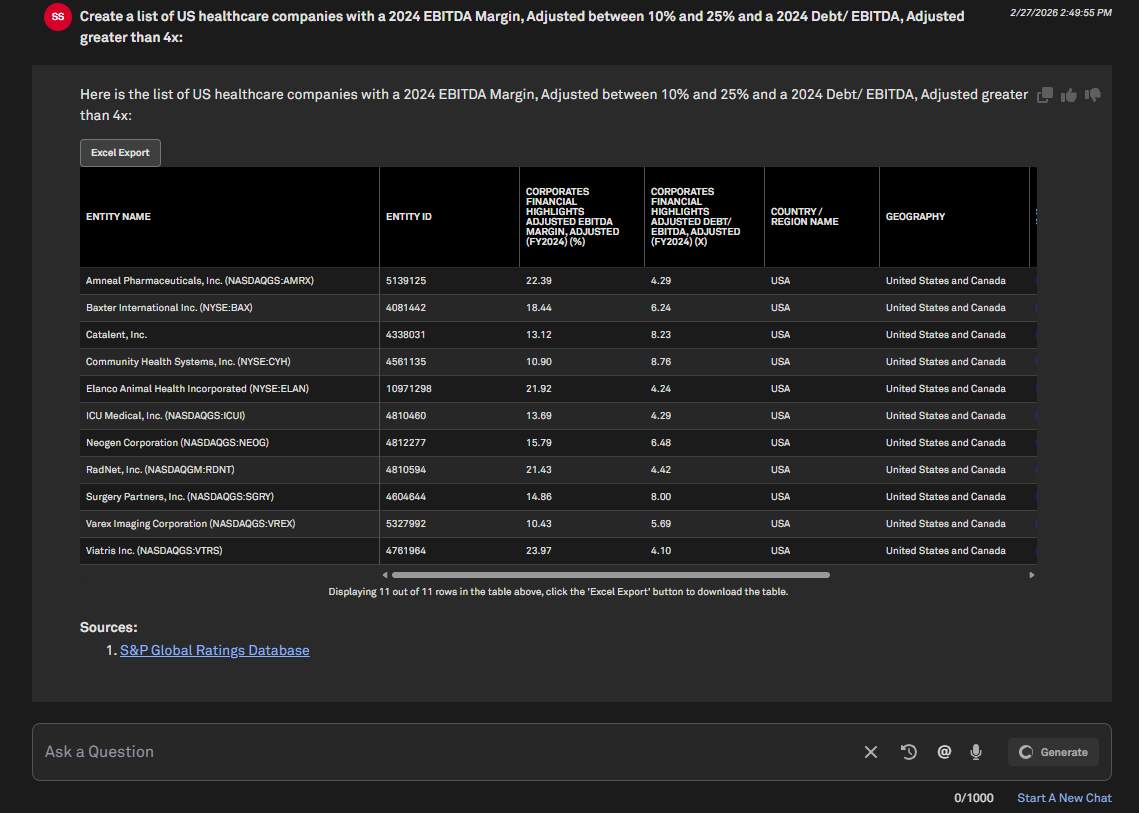
Top Rankings with CreditStats Direct Metrics
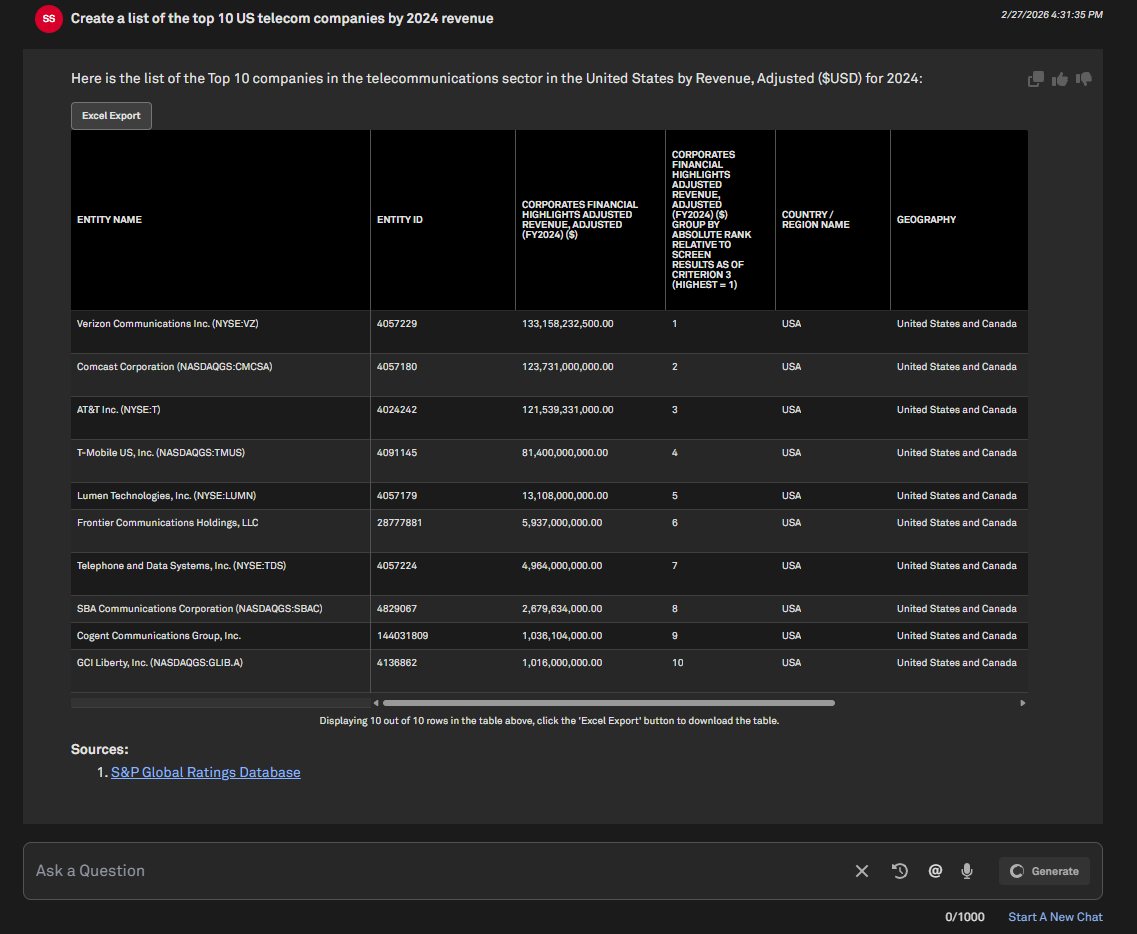
CreditCompanion can generate ranked lists of entities using CreditStats Direct metrics as the basis for comparison. Users can ask for top results—such as the top 10 companies by revenue, leverage, or other financial measures - using natural language prompts. This capability makes it easy to benchmark peers, identify leaders within a sector or geography, and quickly surface comparative insights without manually building queries or tables.
Find it in the platform:
Navigate to the RatingsDirect
menu from the top navigation and select CreditCompanionEnter your question in the Ask a Question bar
Example prompt: 'Create a list of the top 10 US telecom companies by 2024 revenue'
List Creation with Scores & Modifiers
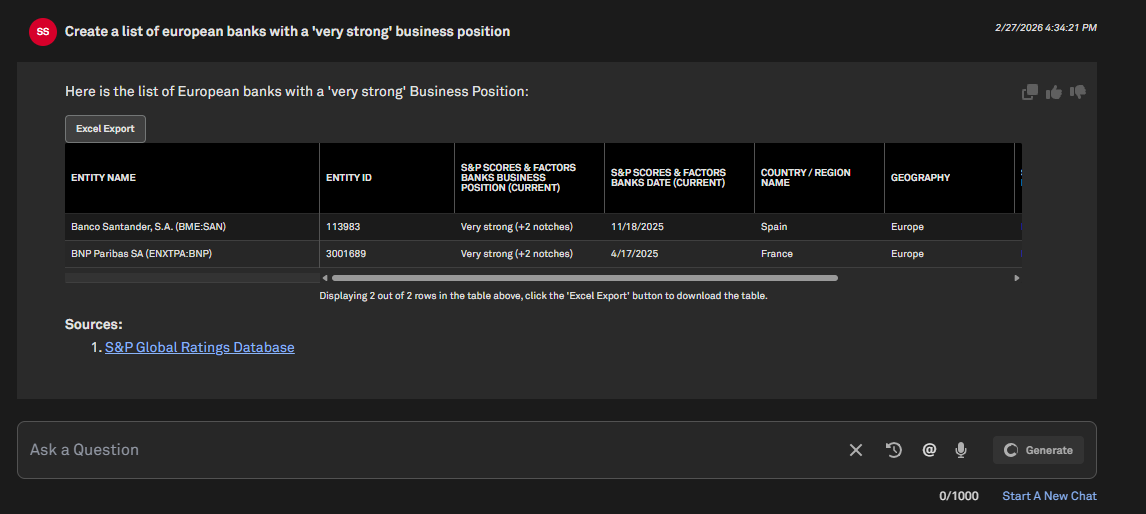
CreditCompanion can generate entity lists using Scores and Modifiers data from RatingsDirect, enabling users to filter entities based on these standardized analytical assessments. This capability streamlines peer identification and comparative analysis.
Find it in the platform:
Navigate to the RatingsDirect
menu from the top navigation and select CreditCompanionEnter your question in the Ask a Question bar
Example prompt: 'Create a list of European banks with a 'very strong' business position'
Financials
In this release, we introduced Total Enterprise Value (TEV) multiples that include pension liabilities and exclude equity method investments in Screener and S&P Capital IQ Pro Plug-In. We also enhanced CIQ Financials with new EPRA NAV metrics for REITs and added additional data items for insurance companies in accordance with IFRS 17 accounting guidelines.
Enhanced TEV Multiples Calculation Options
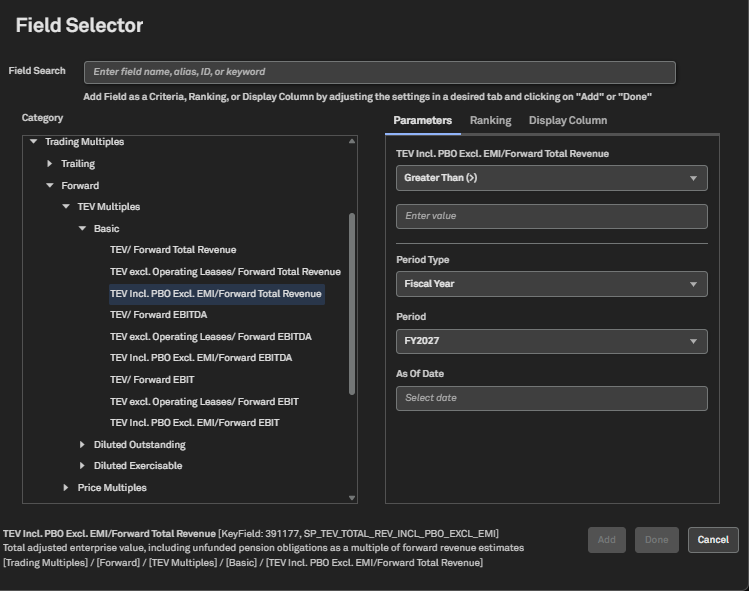
Users can now access Total Enterprise Value (TEV) multiples that include pension liabilities and exclude equity method investments in Screener and S&P Capital IQ Pro Plug-In. This enhancement provides greater flexibility for users to select multiple calculated with the TEV methodology that best fit their company analysis needs.
Find it in the platform:
Screener
Navigate to Screener from the top navigation or the Apps & Links menu
Select Financials >Trading multiples > Trading > CIQ Trading Multiples > TEV Multiples, new TEV options including pension liabilities and excluding equity method investments, are added to the trailing and forward TEV multiples folders
S&P Capital IQ Pro Plug-In
In Excel, launch the S&P Capital IQ Pro Plug-in and open Formula Builder
Under Data Items, select Financials >Trading multiples > Trading > CIQ Trading Multiples > TEV Multiples, new TEV options are added to the trailing and forward TEV multiples folders
IFRS 17 Data Items for Insurance Companies
CIQ Financials users can now access 64 new data items for insurance companies across Templated Financials pages, Screener, the S&P Capital IQ Pro Plug-In, and Dashboard. These additions enable users to accurately view financial statements for insurance companies following the adoption of IFRS 17.
Find it in the platform:
Company Profile
Search for and select an insurance company in the top search
In the left-hand navigation on the company profile, select Financials > Templated > Supplemental Details & CSM Reconciliation- IFRS 17
Screener
Navigate to Screener from the top navigation or the Apps & Links menu
Under Browse Criteria, select Financials > S&P Capital IQ Fundamentals > Insurance Template > Income Statement > Supplemental
Navigate to Financials > S&P Capital IQ Fundamentals > Standard Template > Balance Sheet > IFRS 17 or Cash Flow Statement > IFRS 17, to access IFRS 17 data items
Transactions
In this release, we added convenient future lookup values across applicable date fields in the Transaction Screener. This makes it easier to set time-based filters without manually entering dates.
Future Lookup Options in Transaction Screening Date Filters
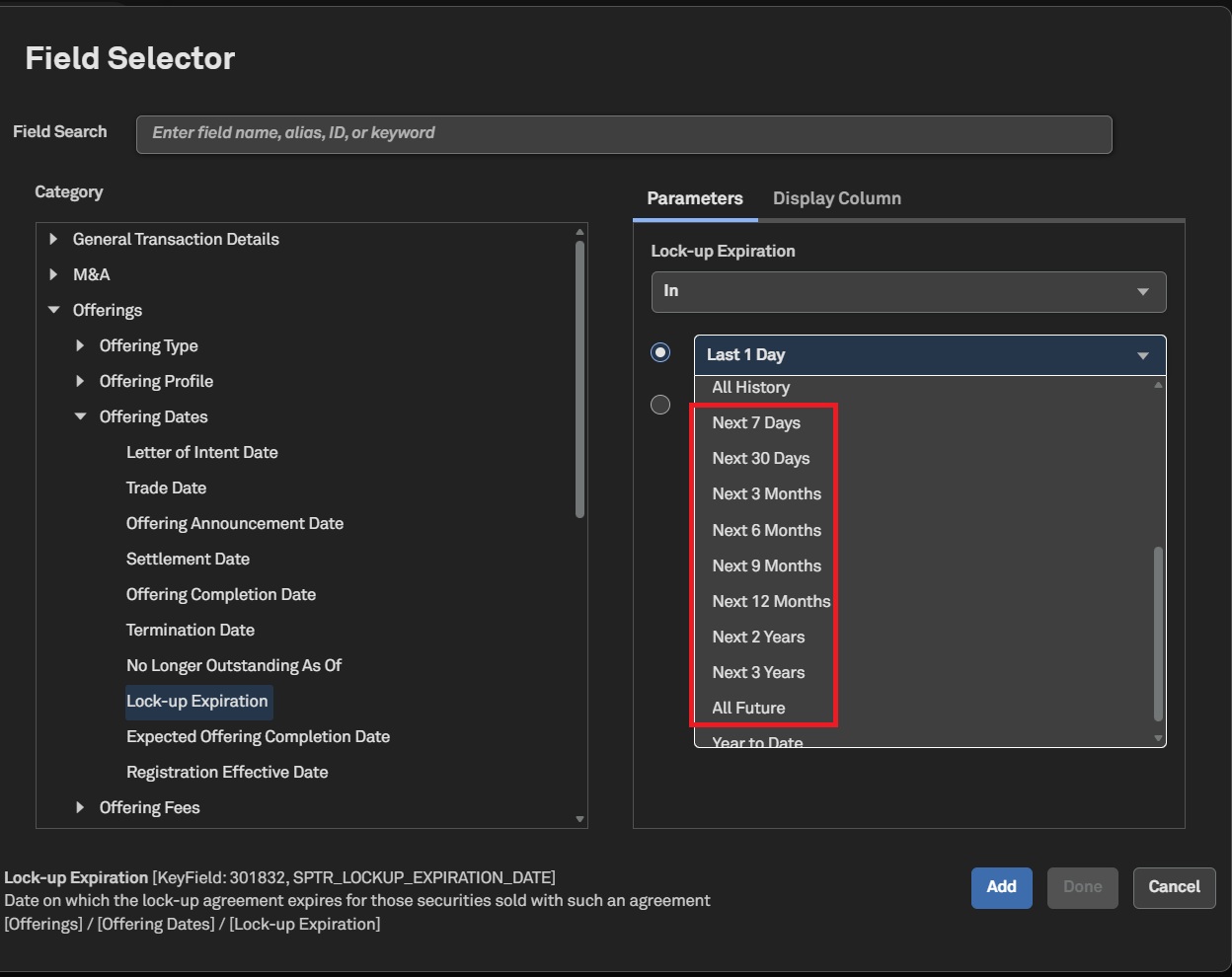
Users can select predefined future time periods from the Transaction Screener's date filters, enabling easier workflow management.
Find it in the platform:
Navigate to Screener from the top navigation or the Apps & Links menu
Select Transactions dataset
Navigate to Offerings Details > Offering Dates > Lock-up Expiration
Future look-up option (e.g., Next 30 Days, Next Quarter) is available for the following Key Fields :
Lock-up Expiration – [KeyField: 301832, SPTR_LOCKUP_EXPIRATION_DATE]
Maturity - [KeyField: 301822, SPTR_MATURITY]
Expected Offering Completion Date -[KeyField: 317670, SPTR_EXPECTED_OFFERING_COMPLETION_DATE]
Expected Offering Completion Date (Begin) - [KeyField: 300173, SPTR_EXPECT_COMPETION_DATE_BEGIN]
Expected Offering Completion Date (End) –[KeyField: 300174, SPTR_EXPECT_COMPETION_DATE_END]
Expected Listing Date [KeyField: 338673, SPTR_EXPECTED_LISTING_DATE]
Dashboard
In this release, we enhanced the S&P Capital IQ Pro Dashboard by introducing metrics for multiple share types. Additionally, we added price-change and 52-week high-low data for Fixed Income Indices, providing a more comprehensive view of market dynamics.
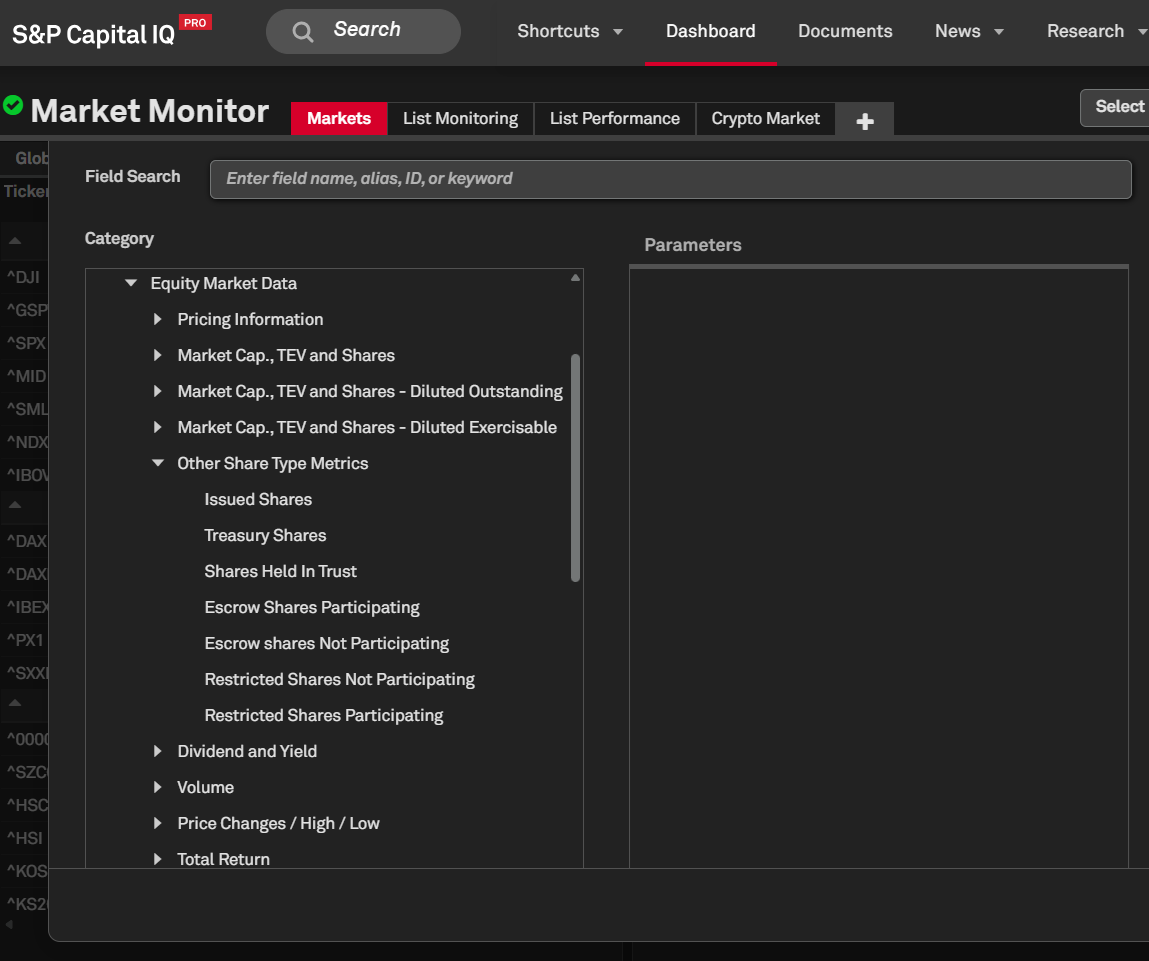
Additional Share Type Metrics
Users can now access metrics for different share types on the Dashboard, including issued shares, treasury shares, shares held in trust, escrow shares (participating and non-participating) and restricted shares (participating and non-participating).
Find it in the platform:
Navigate to Dashboard and open the Add Widget menu on the top right
Select List widget and open Field Selector using the settings gear icon at the top-right corner of the widget
Navigate to Market Data > Equity Market Data > Other Share Type Metrics
Fixed Income Indices: Additional Metrics on Dashboard
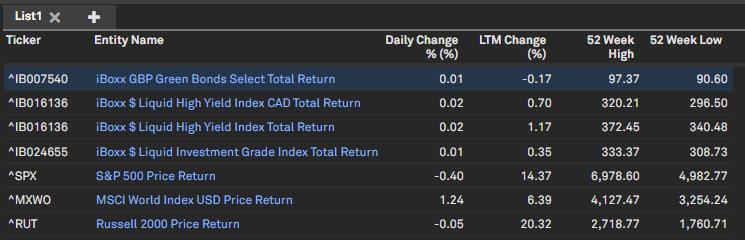
Users can now access price change and 52-week high/low metrics for Fixed Income indices directly within the Dashboard’s List and Quote widgets.
Find it in the platform:
Navigate to Dashboard and open the Add Widget menu on the top right
Select List widget or Quote widget and choose the required Fixed Income indices
Open Field Selector using the settings gear icon at the top-right corner of the selected widget, and add the following metrics
Daily Change: Field # 327032
Daily Change (%): Field # 365107
YTD Change (%): Field # 305491
LTM Change (%): Field # 305493
52 Week High: Field # 305488
52 Week Low: Field # 305489
Screener
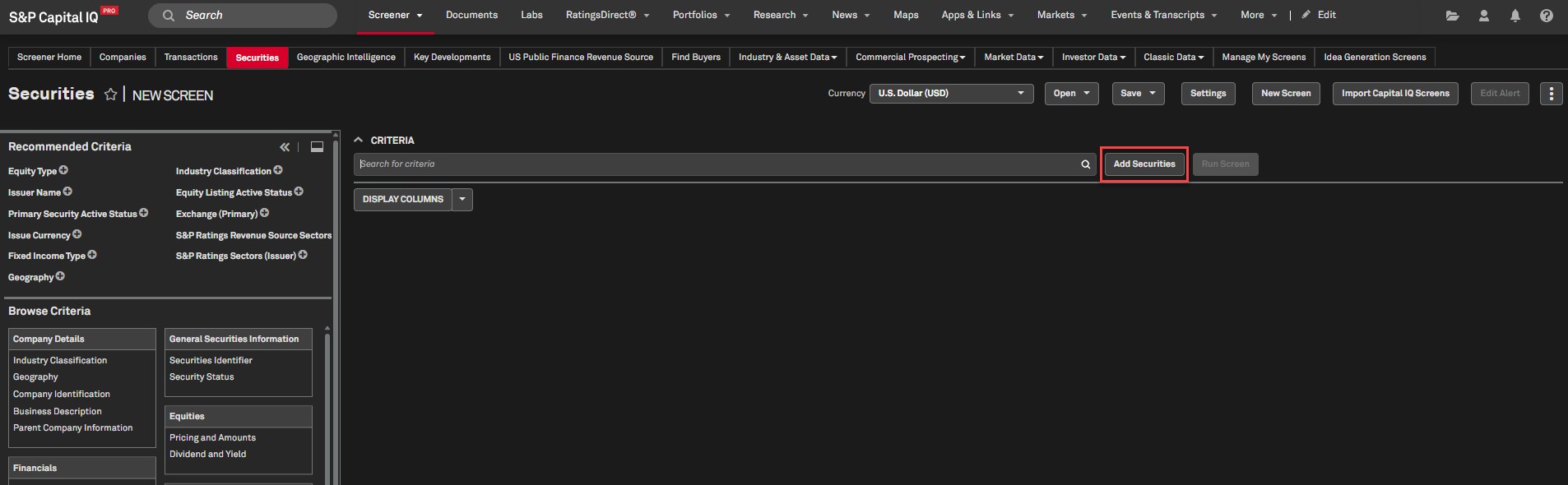
In this release, we added the ‘Add Securities’ option to the Securities dataset in Screener, enabling users to easily add companies, funds, securities, portfolios, and security lists from Screener.
Add Securities Feature
Users can use the ‘Add Securities’ feature in the Securities dataset within Screener to add companies, funds, equity or fixed income securities, company portfolios, and securities lists that were previously created in the Securities dataset in Screener. Note that Company Lists are not yet supported in the Lists tab.
Find it in the platform:
Navigate to Screener from the top navigation or the Apps & Links menu
Select Securities dataset
Click Add Securities and search for the desired company, fund, security, list, or portfolio
Select an option from the Issuer or Ultimate Parent dropdown
This dropdown does not have an impact on securities that have been selected
Click Add Criteria
Select Run Screen to view the results
S&P Capital IQ Pro Plug-in
In this release, we added several new or enhanced Excel templates to meet your data analysis needs.
Excel Template Library
Benchmark a bank’s financial performance, asset quality, and credit risk versus user-selected peers by region and asset range, featuring detailed percentile comparisons and customizable scoring on financial and capital metrics.
View estimate summary information, including details by broker and create custom consensus estimates.
This model replicates the bank financials page on the S&P Capital IQ website. It provides detailed financial statements for all covered Banks, a common-size statement & peer comparisons based on financials, multiples, ratios, and market data.
This template analyzes price performance, valuation, profitability, earnings, revenue, dividend, and capital structure metrics across multiple companies. It includes market data, financials, ratios and growth metrics.
EBA Transparency Exercise 2025
The EBA 2025 EU-wide transparency exercise discloses detailed bank-by-bank data on capital positions, risk exposure amounts, leverage exposures and asset quality data for the reference dates from 30 September 2024 to 30 June 2025.
Historical ISO Prices and Loads
Export historical annual, monthly, daily and hourly ISO price and load data. This model provides managed lists to ensure the correct source, location, and price or load type are selected to return accurate, up-to-date data.
Residual Income Valuation (RIV)
RIV values equity by adjusting book value for gains or losses when returns exceed or fall short of the cost of equity, capturing excess profits after the capital’s opportunity cost. CIQ and Visible Alpha estimates are supported.
Mobile App
In this release, we enhanced S&PCapital IQ Pro Mobile app with advanced earnings calendar tools, enhanced Chat IQ capabilities, real-time transcript access, and detailed sector earnings insights. Users can stay ahead of earnings trends with deeper, wider earnings insights and research smarter with ChatIQ- right from their mobile device.
Release Date: March 13th, 2026
Version Numbers:
iOS: 2.20.X
Android: 2.25.X
Scan the QR Code
Or Download the app for mobile push alerts and anytime access to essential intelligence


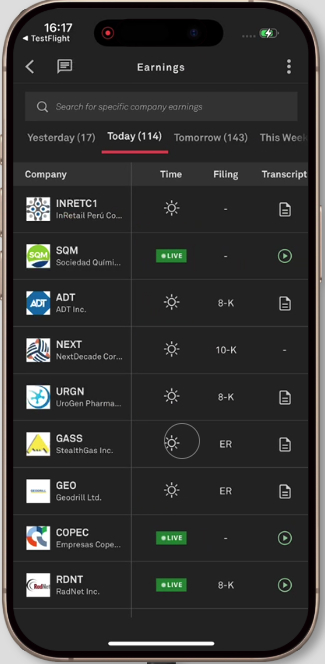
Live Transcript Badge and Notification
Users can access a new badge that indicates when a real-time transcript is being generated for an earnings event. Tap the live play button in the earnings widget, calendar, or company profile to view real-time transcript updates during calls.
Find it in the Mobile App:
Log in to the Capital IQ Pro Mobile App
Locate the live transcript badge in the Earnings Widget, Calendar, or Corporate Profile
Tap the live play button to open a modal that displays the transcript as it updates in near real-time
Earnings Calendar Filtering
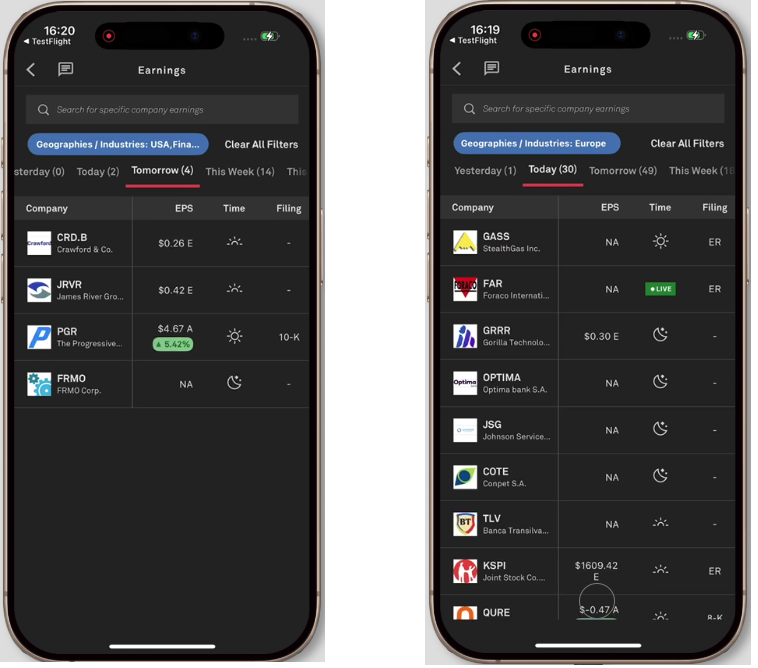
The Earnings Calendar now supports advanced filtering by industry, geography, and company lists, making it even easier to find relevant earnings information for public companies worldwide.
Find it in the Mobile App:
Log in to the Capital IQ Pro Mobile App
Tap More at the bottom‑right of the home screen and select Earnings Calendar
Tap the three-dot menu in the upper right corner to open the filter panel
Select Industry, Geography, or Company List criteria, or use the search bar to find specific earnings events
Chat IQ - New Chat & History
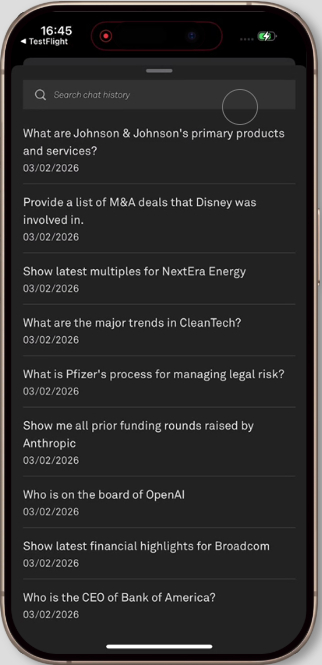
Chat IQ now enables users to start new chat sessions, view and reopen previous sessions, edit and resend questions.
Find it in the Mobile App:
Log in to the Capital IQ Pro Mobile App
Tap the conversation icon in the top navigation or within any document
Tap the + icon in the top navigation to start a new chat session
Tap the three-dot icon in the top navigation, then Chat History to view and open past sessions
Sector Miss and Beats
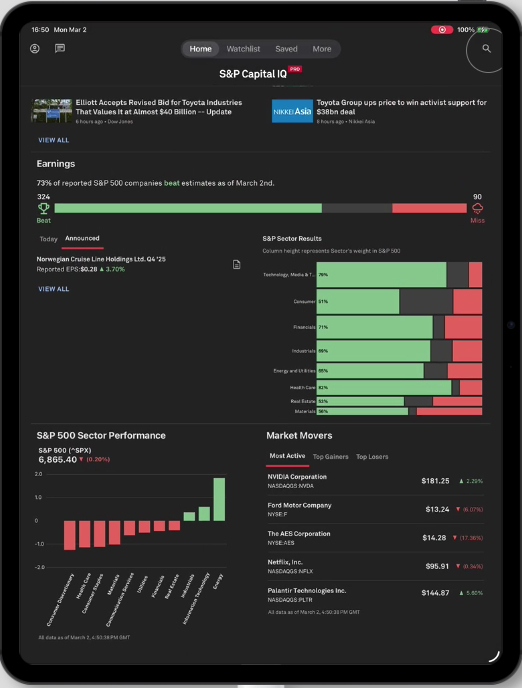
Users can now access a dedicated page in the Capital IQ Pro Mobile App and a widget on their tablet, showcasing sector-level earnings misses and beats. This feature helps to easily track trends across S&P 500 sectors throughout the earnings season.
Find it in the Mobile App:
Log in to the Capital IQ Pro Mobile App
Tap the Miss & Beats section on the homepage to be redirected to the Miss & Beats page
On Tablet/iPad, access the new Miss & Beats widget on the homepage for sector and industry trends
Personalization
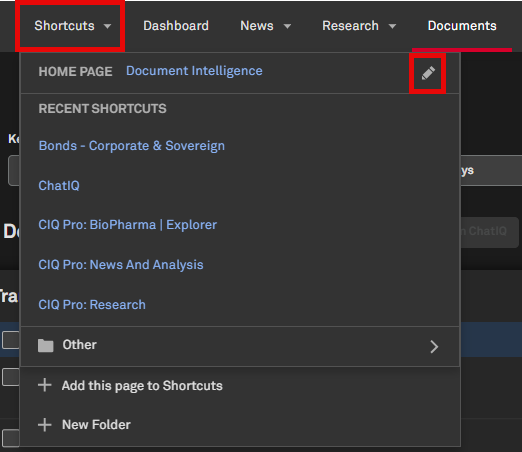
The Shortcuts menu in the top navigation of the S&P Capital IQ Pro platform enables users to set any page as their default home page, making it easier to navigate to the data they need.
Set Default Home Page
Users can access Shortcuts from the top navigation, featuring enhanced capabilities to set any page in the platform as their default home page.
Find it in the platform:
Navigate to any page within the S&P Capital IQ Pro platform
Navigate to the Shortcuts menu item in the top navigation
Expand the menu item and click on the pencil icon next to Home Page
Select Set Current Page as Homepage to set the page you’re on as the default home page
Marketplace Data & Solutions Communiqué
The Marketplace Data & Solutions Communiqué reflects developments in the S&P Global Marketplace, your discovery tool for differentiated data and robust solutions with an integrated support site.
Marketplace Data & Solutions Communiqué
Data: Leverage premium fundamental and alternative datasets available seamlessly, along with expert analysis, to accelerate your journey from data to insight.
Solutions: Gain maximum value from your big data with technology solutions designed to enhance your workflow, increase your insights, and complement your datasets. Our solutions, including Snowflake, Kensho NERD, Xpressfeed, Xpressfeed Loader, and API Solutions, help you make the most of all your data.
If you wish to subscribe, sign up on the Communiqué Marketplace site.